Final exercises — deducing the mojibake
Every kind of garbling leaves a fingerprint. Through 8 cases modeled on real incident investigations, deduce with the whole course's knowledge which encoding wrote the bytes and which encoding read them.
The final 8 questions — a garbled screen is evidence
The last chapter is a set of comprehensive exercises. The preceding chapters showed that garbling leaves fingerprints. Runs of 縺, 繧, 繝 mean UTF-8 misread as Shift_JIS; runs of ã mean a Latin-1 misreading; volleys of � mean Shift_JIS-family bytes misread as UTF-8; replacement with ? means data lost in conversion. A garbled screen is no longer meaningless noise — it is evidence that names the misreading pair.
In all 8 cases, return to the motto — which encoding wrote these bytes, and which encoding was used to read them?
| If you get stuck on… | Go back to |
|---|---|
| Bytes vs. readings; character sets vs. encodings | Chapter 1 |
| Code points and reading U+XXXX | Chapter 2 |
| UTF-8 byte structure, the meaning of E3, the BOM | Chapter 3 |
| Shift_JIS 2-byte structure, dame-moji, CP932 | Chapter 4 |
| Surrogate pairs and how length counts | Chapter 5 |
| Declaration vs. reality, Excel and BOM, DB connection settings | Chapter 6 |
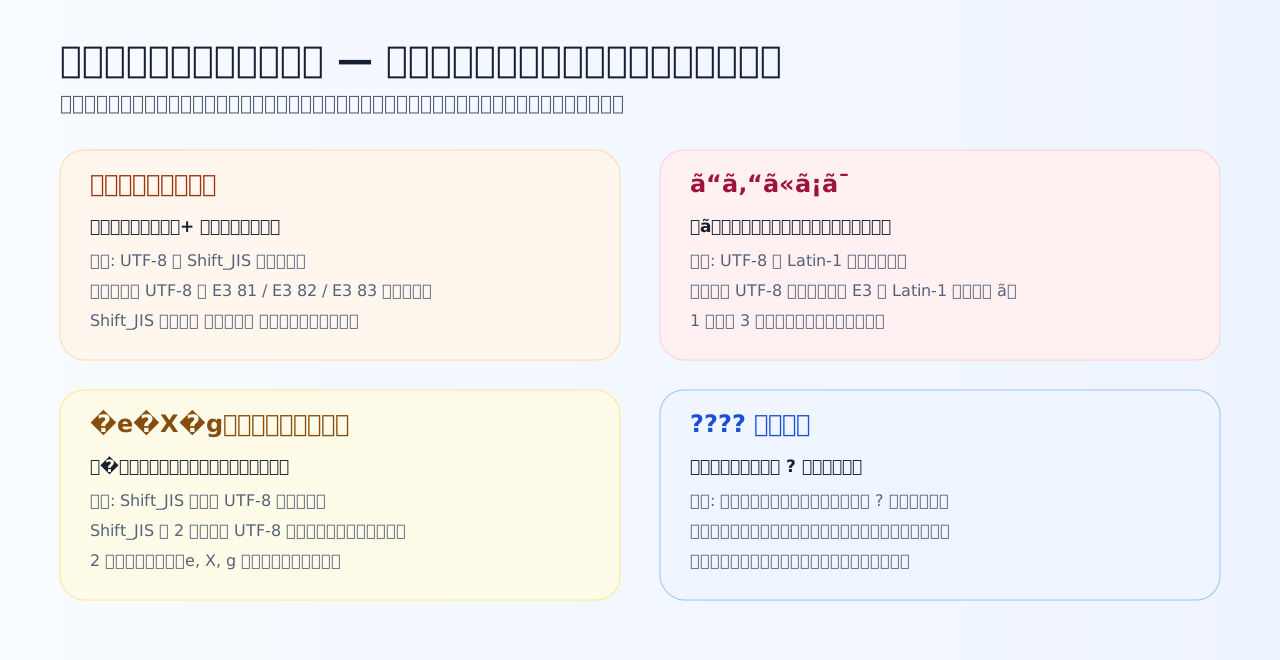
The four classic patterns. Top-left and top-right are misreadings, recoverable by re-reading; bottom-right is a replacement in which the original data is gone. Telling them apart decides whether recovery is possible.
Three facts that carry the deduction (review)
- Hiragana in UTF-8 starts with E3 81 / E3 82 / E3 83 (Chapter 3). Those 2-byte pairs are 縺, 繧, 繝 in the Shift_JIS table — so a UTF-8 → Shift_JIS misreading floods the screen with those 3 kanji. Misread the word 文字化け itself and you get 譁�ュ怜喧縺�
- Shift_JIS second bytes intrude into the ASCII range (Chapter 4). Read as UTF-8, most bytes are invalid and become � (displayed as ? in some environments), with only the ASCII-range second bytes surviving as fragments
- Latin-1-family tables always manage to "read" every byte, 1 byte = 1 character. Three UTF-8 bytes swell into 3 Latin characters, with ã (from E3) as the telltale
Now, let us begin.
Case 7-1 — Reading the fingerprints of garbled text
Scope: Chapters 1, 3, and 4. The garbled characters themselves are the evidence.
Q1. Case: you open a CSV from a business partner and find strings like 縺薙s縺ォ縺。縺ッ — the kanji 縺, 繧, 繝 mixed with half-width kana. What is the strongest deduction?
The UTF-8 bytes of hiragana start with E3 81 / E3 82 / E3 83, and looking those 2-byte pairs up in the Shift_JIS table yields 縺, 繧, and 繝 respectively. So when UTF-8 Japanese is misread as Shift_JIS, those 3 kanji appear with abnormal frequency and the leftover bytes show up as half-width kana (ォ, ッ, and the like). In the opposite direction (Shift_JIS read as UTF-8) you get a flood of replacement characters, as the next question shows — the appearance alone pins down the direction.
Q2. Case: in another file, a spot that should have read テスト has garbled to �e�X�g — replacement characters '�' with stray Latin letters between them. What is the strongest deduction?
テスト in Shift_JIS is 83 65 83 58 83 67. Read as UTF-8, 0x83 is a stranded continuation-shaped byte, invalid, and is replaced with � (U+FFFD). Meanwhile the second bytes 65 (e), 58 (X), 67 (g) are in ASCII range and survive as-is — Chapter 4's 'Shift_JIS second bytes intrude into the ASCII range' becomes the fingerprint here. 'Lots of � plus fragments of Latin letters' is the signature of Shift_JIS-family bytes read as UTF-8.
Q3. Case: Japanese text passed through a foreign-made tool comes out as runs of accented Latin letters like ã“ã‚“ã«ã¡ã¯ — and it has swollen to roughly 3 characters per original character. What is the strongest deduction?
Japanese in UTF-8 is 3 bytes per character, with lead bytes mostly E3-E9. In Latin-1-family tables E3 maps to ã, E5 to å, E6 to æ, so the fingerprint is 'ã and friends every 3 characters, and the text swelling to about 3×' (some of the bytes in between land on invisible control codes). Because a 1-byte-per-character table can always 'read' every byte, replacement characters rarely appear — the distinguishing point versus the q2 pattern. This is the classic garbling of foreign tools and mail software that ignore or drop the charset declaration.
Case 7-2 — Triaging field incidents
Scope: Chapters 4 to 6. CSV, email, replacement — separate the layers of cause by the differences in symptoms.
Q4. Case: about a UTF-8 (no BOM) CSV produced by your system, a user reports 'when I double-click it, Excel shows the Japanese garbled like 縺薙s…'. Which cause-and-fix pairing is correct?
The 縺 fingerprint lets you deduce UTF-8 read as Shift_JIS (CP932), which matches legacy Excel's default behavior on a double-clicked file. CSV has no declaration mechanism, so the BOM (EF BB BF) is one of the few labels you can embed in the body itself — adding it is the standard move (Chapter 6). Note the bytes are intact, so users can also import correctly by explicitly selecting UTF-8 in Excel's import feature.
Q5. Case: after migrating a customer list, some customer names came out as ????. What is the decisive difference from 縺薙s…-style garbling?
A misreading (the 縺薙s pattern) leaves the bytes intact and is reversible; replacement with ? is the result of a conversion rewriting inexpressible characters into the different character ?, and it is irreversible. It happens, for example, when CP932 vendor characters like ① or 髙 go through a strict conversion (Chapter 4). The remedies differ too: re-read for a misreading, re-import from the source data for a replacement. Being able to say 'misreading' versus 'replacement' feeds directly into judging whether recovery is possible.
Q6. Case: a received email's body is fine, but only the subject shows symbol strings like =?UTF-8?B?...?= or meaningless characters. Which is the most plausible explanation?
Mail headers were historically restricted to ASCII, so a Japanese subject is wrapped in MIME encoding — '=?encoding-name?B?Base64-data?=' — for transmission. Subject and body declare their encodings in different places, so one garbling without the other is a natural symptom, not a contradiction. Typical causes: the receiver cannot interpret MIME, the declaration and the data diverge, or an intermediate system mangled the header. It is the 'declaration versus reality' framework (Chapter 6) applied at the granularity of a single header.
Case 7-3 — The deduction finale
All chapters in play. Return to the motto — which encoding wrote these bytes, and which encoding read them?
Q7. Case: feeding a file named ソフト一覧.csv through an old Shift_JIS-based interface program, only the rows containing ソ get imported with their columns shifted. What is the most likely cause?
'Only rows containing a particular character break' is the fingerprint of Chapter 4's dame-moji. The second byte of ソ (83 5C) equals the backslash, so a program doing byte-wise escape processing mistakes the middle of the character for a symbol. Fixes point the same way — process with a library that truly understands Shift_JIS, or move the interface to UTF-8 — that is, handle character boundaries correctly. Katakana as such is not the problem, and nothing overflowed.
Q8. Case: you are migrating data accumulated in EUC-JP on an old system to a new UTF-8 system. What is the correct procedure?
The course's grand summary. A declaration is only a label (Chapter 6); the bytes change only through actual conversion. Conversion means 'read via the EUC-JP table back to code points (numbers), then re-encode those numbers by UTF-8's rules' — a move through the two stages of Chapter 1. Not fixing garbling after the fact, but converting correctly before the boundary is crossed: keeping the writing encoding and the reading encoding in agreement is the whole of character-encoding practice.
Closing the course — carry the two stages and the one question with you
Well done. The lookup tables this course asked you to memorize amount to just a few lines. What you should take away instead is a way of seeing that works anywhere.
- Characters are always handled in two stages: number (code point) → bytes (encoding)
- A file's substance is bytes alone. The declaration (label) is only a reading instruction; it converts nothing
- When it garbles, ask — which encoding wrote these bytes, and which encoding read them? The fingerprint of the garbling tells you the direction
- Misreadings are reversible; replacement (?) is not. Never save while garbled
The next time you meet mojibake, you are no longer someone who reopens the file with random encodings until something works. You are someone who identifies the misreading pair from the evidence and judges whether to fix the declaration or the bytes. The Chapter 3 simulator remains yours to use — when you meet a suspicious byte sequence, reproduce it at your desk.