Practical pitfalls — make the declaration match the bytes
Mojibake in the field is a mismatch between the declaration (the label) and the reality (the bytes). Clear the classic cases: charset declarations, Excel and UTF-8 with a BOM, newline codes, and database connection settings.
"It worked fine until yesterday" — garbling happens at boundaries
Fine in the development environment, garbled the moment it hit production. The CSV a batch job produced garbles when a user opens it in Excel. The app appears to register data correctly, but looking straight into the DB reveals different characters. — Real-world mojibake almost always happens at the boundary between systems: wherever data changes hands.
This chapter needs only one tool. Data crossing a boundary has a reality (the bytes) and a declaration (the label) that says how to read it. And the declaration never converts the bytes. It is just a tag. The moment tag and contents diverge, the receiver looks the bytes up in the wrong table, and Chapter 1's mojibake plays out again.
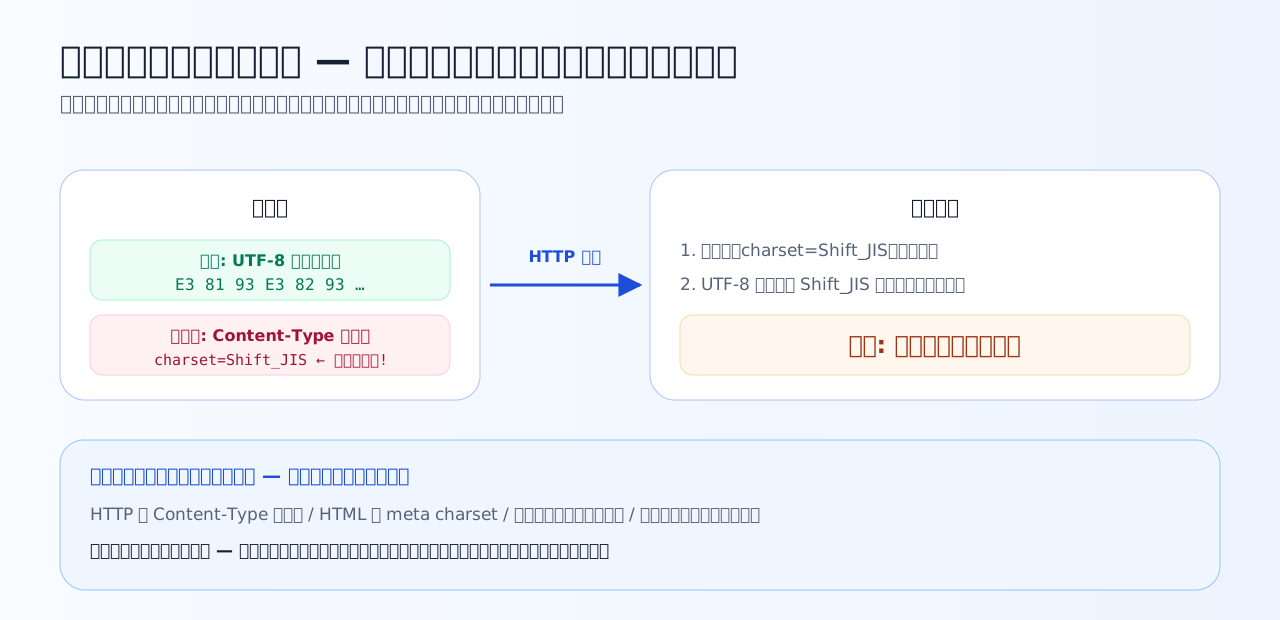
The body is UTF-8, the label says Shift_JIS. The browser trusts the label, so it garbles. Should you fix the label, or the body? Suspecting both possibilities is the investigative pattern.
Declarations on the web — Content-Type and meta charset
A web page's encoding label lives in 2 places: the HTTP response header Content-Type: text/html; charset=UTF-8, and <meta charset="UTF-8"> inside the HTML. When both are present, the HTTP header wins — meaning server configuration can override the meta written in the file.
The mystery of "I converted the file to UTF-8 and fixed the meta, but only production garbles" is usually a server or framework stamping an old charset onto the header. Conversely, with no declaration anywhere, the browser reads by guesswork. Make the body UTF-8 and align both the header and the meta on UTF-8 — the baseline of the modern web.
Excel and CSV — where "UTF-8 with a BOM" earns its keep
CSV has no declaration mechanism like a charset header. Opened by double-click, legacy Excel reads it as the regional default (CP932 in a Japanese environment). That is the classic way a UTF-8 CSV garbles.
Here Chapter 3's BOM comes into play. If the file starts with EF BB BF, Excel takes the cue and reads it as UTF-8. "Export system-generated CSV as UTF-8 with a BOM" is the standard move for files that Excel users will open. It is not a cure-all, though — hand the same file to another system that does not expect a BOM, and the 3 leading bytes become stray data that can cause misbehavior. Decide whether to add the BOM based on who will read the file — that is the practical judgment.
Quiz 6-1 — Declaration versus reality
Confirm the principle that a label never converts the bytes, using the classic web and Excel scenarios.
Q1. What is the role of the charset in the HTTP Content-Type header, or of the HTML meta charset?
A charset declaration is only reading instructions — it never touches the bytes themselves. Declare charset=Shift_JIS on a UTF-8 body and the browser will dutifully look the bytes up in the Shift_JIS table and garble them. The triage follows directly: if changing the declaration did not fix it, the body side is stale; if converting the body did not fix it, the declaration side is.
Q2. An HTML file saved as UTF-8 was served with a declaration of charset=Shift_JIS, and the page garbled. Which is the most accurate account of what the garbling really is?
This is Chapter 1's pattern verbatim — garbling is always a mismatch between the writing encoding and the reading encoding, and here the declaration misled the reading. The bytes are unharmed; aligning the label with the reality solves it. Refusing to settle for words like 'incompatibility' or 'bug', and instead saying which side diverged, is this course's goal.
Q3. A classic problem: users double-click a CSV exported as UTF-8 (no BOM), Excel opens it, and the Japanese garbles. What is the standard file-side countermeasure?
When a double-clicked CSV carries no encoding declaration, legacy Excel reads it in the regional default (CP932 in Japanese environments). Add a BOM at the front and it works as the 'this is UTF-8' marker, and the file is read correctly. Chapter 3 taught that the BOM is an optional marker; Excel interoperability is the marquee case where that marker earns its keep in practice. Conversely, ingestion programs that do not expect a BOM can choke on those 3 leading bytes — decide per recipient whether to include it.
Newline codes — the other invisible bytes
Encoding consultations often end with the culprit turning out to be the newline code. Newlines are bytes too. Windows conventionally uses CRLF (0D 0A), 2 bytes; Unix/Linux and macOS use LF (0A), 1 byte — text that looks the same has different bytes.
Hand a CRLF file to a program that assumes LF and a CR (0x0D) lingers at the end of every line, producing bugs that are even harder to notice than mojibake: "comparisons fail because an invisible character trails each value", "line counts come out different". In CSV interface agreements, the standard practice is to specify the encoding and the newline code as a set (e.g. UTF-8, no BOM, LF).
Databases — the declaration must hold over every leg of the path
Databases also carry multiple encoding settings. The main ones are the encoding of tables and columns (how bytes are stored and interpreted) and the encoding of the connection (the declaration of what the app-to-DB conversation is spoken in). If declaration and reality diverge on even one leg of the path — app → connection → table — a wrong conversion or interpretation occurs at store or fetch time, and garbled data gets persisted.
What makes this nastier than a web page is that the garbled result is persisted. The worst form of Chapter 1's iron rule "never save while garbled" is garbled data quietly accumulating in a DB. For new systems, align every leg on the UTF-8 family from the start; for existing ones, check leg by leg which setting has diverged from reality — the investigative pattern is the same as ever.
The course motto, field edition: when it garbles, ask "at which boundary did declaration and reality diverge?" The writing-versus-reading mismatch can happen once per boundary.
Quiz 6-2 — Invisible bytes and connection settings
Finish with newlines and databases — the mismatches you cannot see.
Q4. Which statement about newline codes is correct?
Newlines too are real bytes: CR (0x0D) and LF (0x0A). Windows-family systems conventionally use the 2 bytes CRLF, Unix-family systems the 1 byte LF, and programs or shell scripts that process files line by line misbehave over 'an extra byte at the end of each line — or its absence'. It is not a character-set issue, but as 'invisible bytes that differ by environment' it is a close cousin of encoding trouble, and in CSV interfaces it should be checked together with the encoding.
Q5. Which is a typical cause of mojibake in a database?
A database has several encoding settings — the tables' and columns' encoding, and the connection's encoding (the declaration of what the client speaks) — and their mismatch is the classic cause of garbling. An app sending UTF-8 bytes over a connection still configured as latin1 reproduces 'the reading at store time and the reading at fetch time diverge' inside the DB. Just as with a web server's charset, declaration and reality must agree over every leg of the path.
Q6. Is there a way to know, with 100% certainty and before reading it, the encoding of a text file you have received?
Automatic encoding detection is a guess — 'which table makes these bytes look natural?' — and it fails on short files and on byte sequences valid in several encodings (famous cases of misdetection depending on content have been known for decades). That is why the heart of practice is not detection technique but agreements: write 'UTF-8 (no BOM), LF newlines' into the interface spec, and declare wherever declaration is possible (HTTP headers, DB connection settings). Mojibake deduction (Chapter 7) is the investigative craft for when the agreement gets broken.
Key takeaways from this chapter
- charset is a label. The bytes are not converted. The HTTP header takes precedence over meta
- CSV destined for Excel: UTF-8 with a BOM is the standard move — but decide by who will read it
- Newline codes (CRLF 0D 0A / LF 0A) are an "invisible bytes" problem on a separate axis from encoding. Agree on both together
- A DB needs table encoding and connection encoding aligned over every leg. Persisted garbling is the worst case
- There is no certain way to detect an encoding. Fix it in the spec, and keep declaration and reality in agreement — that is the heart of it
All the tools are now assembled. The final chapter is a set of comprehensive exercises: treating the garbled screen itself as evidence and deducing the combination of misreadings.