Shift_JIS, Japan's legacy encoding — dame-moji and CP932
Shift_JIS lets second bytes intrude into the ASCII range by design. Understand from that structure the dame-moji problem it spawns, plus half-width kana, CP932, and why the encoding remains in service.
Typing "ソフト" breaks the system — a bug that sounds made up but is real
Save the word "ソフト" (Japanese for "soft/software") in an old business system, and for some reason only that row's data collapses. Create a folder whose path contains "表" and a certain tool starts failing. — The world of Shift_JIS is full of lore about such seemingly occult malfunctions. The goal of this chapter is to be able to explain them from the structure.
Shift_JIS — the legacy encoding that carried Japanese text before Unicode — was created to pack Japanese in alongside ASCII. ASCII stays 1 byte; full-width characters take 2 bytes.
The problem is the second byte's range. 0x40–0x7E is wholesale identical to the values of ASCII letters and symbols. Take the trailing byte of a full-width character on its own and it cannot be told apart from an ASCII symbol. The guarantee we saw in UTF-8 last chapter — every byte of a multi-byte character is 0x80 or above — simply does not exist here.
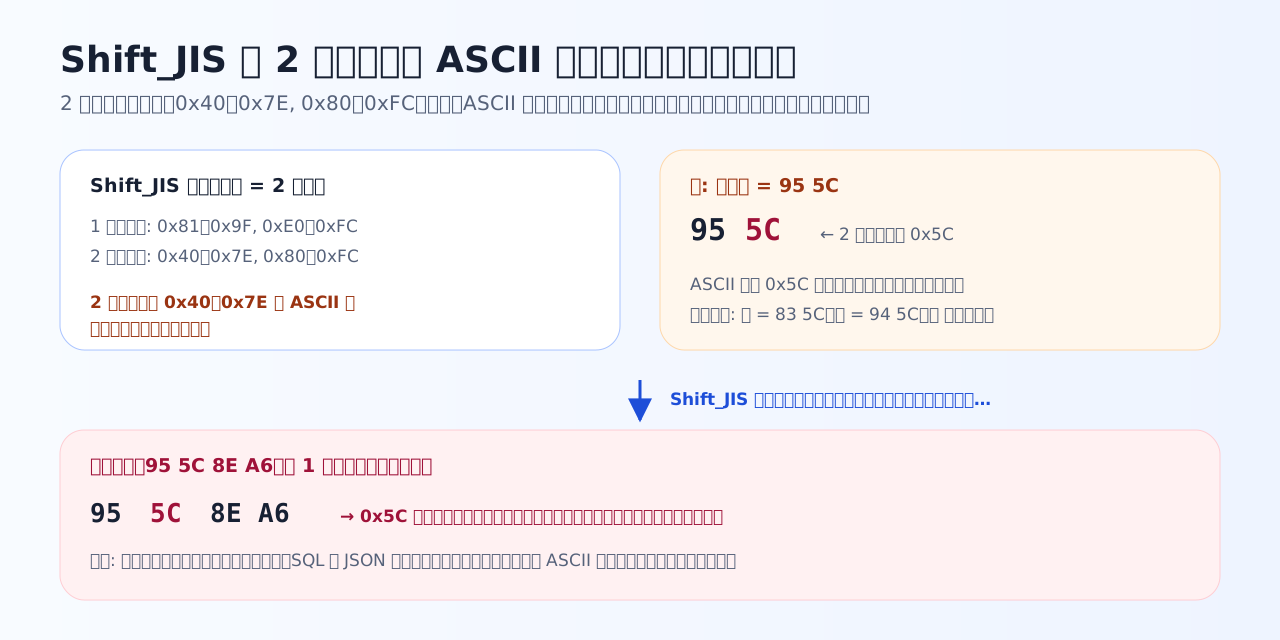
The second byte of "表", 0x5C, is a backslash in ASCII. To a program scanning byte-by-byte, the tail half of "表" looks like a symbol.
Dame-moji — the second-byte 0x5C collision
ASCII 0x5C is the backslash \ (in Japanese environments it is often displayed as a yen sign). In many programming languages and configuration formats it serves as the escape character meaning "treat the next character specially".
Now look at the Shift_JIS kanji "表". Its bytes are 95 5C — the second byte is exactly 0x5C. A processor that scans strings byte-by-byte without awareness of Shift_JIS mistakes the 5C after 95 for a standalone backslash and consumes the following byte as an escape. Result: the tail of "表" is eaten, a character goes missing, and the interpretation of everything downstream shifts in a chain reaction — the true identity of the "occult bugs" above.
Characters whose second byte is 0x5C are numerous — "ソ" (83 5C), "能" (94 5C), "表" (95 5C), "十", "予", "構", and more — and are known colloquially as dame-moji ("no-good characters"). All of them occur naturally in everyday Japanese, producing failures with maddeningly elusive reproduction conditions: "it only breaks with certain words". Beyond 0x5C, combinations where the second byte lands on " (0x22) or | (0x7C) can cause the same class of trouble.
Quiz 4-1 — The 2-byte structure and dame-moji
From Shift_JIS's structure, derive why only certain characters cause trouble.
Q1. Which statement correctly describes the structure of Shift_JIS?
Shift_JIS was designed to pack kanji into 2 bytes while preserving ASCII compatibility, but it used 0x40-0x7E — the same values as ASCII letters and symbols — for the second byte. In other words, the trailing byte of a full-width character, viewed alone, is indistinguishable from an ASCII symbol. The absence of UTF-8's guarantee that all bytes of a multi-byte character are 0x80 or above sets up the problem that follows.
Q2. In Shift_JIS the kanji '表' is the 2 bytes 95 5C. Passing a string containing it through a processor that treats 0x5C as an escape character (backslash) can corrupt it. Why?
To a program that does not know Shift_JIS (or that processes bytes one at a time), 95 5C looks like 'some byte 95' followed by 'a backslash'. On seeing a backslash it consumes the next character as an escape, so the tail of '表' gets eaten and the interpretation of everything after it shifts in a chain reaction. The symptom is closer to data corruption than to mojibake — that is what makes the dame-moji problem frightening.
Q3. Which combination is a correct example of so-called 'dame-moji' (troublemaker characters)?
The classic dame-moji are characters whose second byte is 0x5C (backslash): ソ, 能, 表, 十, 予, and others. These appear routinely in company names and ordinary messages, so you get baffling bug reports like 'saving the word ソフト breaks the system'. It is not that hiragana or Latin letters are bad as a class — only characters whose second byte happens to land on a symbol value cause trouble. Without knowing the structure, this phenomenon is impossible to deduce.
CP932 — a dialect that calls itself "Shift_JIS"
One more piece of field knowledge: vendor-specific characters. Circled digits like ①, ㈱, Roman numerals like Ⅱ, "髙" (the "ladder" variant of 高) — none of these were in the original JIS character set; manufacturers added them independently. Windows adopted them into an extended variant, CP932, and uses it under the name "Shift_JIS".
In other words, most of what the world calls "Shift_JIS files" are, strictly speaking, CP932. Multiple subtly different tables answer to the same name — the root of nasty situations where data containing ① fails strict Shift_JIS conversion, or different environments garble different characters. The practical tip: in any Shift_JIS-related incident, suspect that the real table is CP932.
Why Shift_JIS is nonetheless still in service
The web has essentially unified on UTF-8. Shift_JIS (CP932) survives regardless, because migrating an encoding is not a problem you can solve by changing only your own side. Until every counterpart you exchange files with — Excel's legacy-format CSV, long-running core business systems, fixed-length file interfaces in finance and government — moves in step, the old encoding lingers at the handover points.
So this course treats Shift_JIS not as a relic but as an active suspect that still turns up in deductions. Reading a UTF-8 file as Shift_JIS, reading a Shift_JIS file as UTF-8 — telling these two misreading directions apart is the main event of the final exercises in Chapter 7.
Quiz 4-2 — Half-width kana, CP932, and why it survives
Round out the practical knowledge around Shift_JIS.
Q4. Which statement about half-width kana (アイウエオ…) in Shift_JIS is correct?
Half-width kana are 1-byte kana inherited from the telegraph and early-terminal era (from JIS X 0201), stored in Shift_JIS as single bytes 0xA1-0xDF. The lead bytes of 2-byte characters (0x81-0x9F, 0xE0-0xFC) are laid out to dodge this region — the name 'Shift' comes from this juggling. In Chapter 7 they reappear as the reason half-width kana get mixed in when UTF-8 is misread as Shift_JIS.
Q5. Which statement correctly describes the relationship between CP932 and Shift_JIS?
What Windows calls 'Shift_JIS' is really CP932, an extension that adds NEC- and IBM-derived vendor characters (①, ㈱, 髙, and so on). Even though environments claim the same name 'Shift_JIS', their tables differ subtly, so data containing ① garbles or fails to convert elsewhere. 'When someone says Shift_JIS, it is usually CP932' is a rule of thumb that earns its keep in practice.
Q6. Even now that UTF-8 is the standard, situations requiring Shift_JIS (CP932) remain. Which is the most fitting reason?
Migrating a character encoding is never something you can do alone — it is a question of every system you exchange files with moving in step. CSV files opened by double-click in Excel, fixed-length files in finance and government, aging POS and back-office systems: masses of Shift_JIS-based interfaces are still running. That is exactly why the skill of deducing which encoding a received file uses (Chapter 7) has real professional value.
Key takeaways from this chapter
- Shift_JIS is ASCII in 1 byte + full-width in 2 bytes, but second bytes intrude into the ASCII range (0x40–0x7E)
- Dame-moji = characters whose second byte lands on a symbol such as 0x5C (ソ 83 5C, 能 94 5C, 表 95 5C, …). They collide with escape processing and corrupt data
- Half-width kana are single bytes 0xA1–0xDF. What Windows calls "Shift_JIS" is really CP932, with vendor characters added
- Excel CSV and legacy interfaces keep it in service today. As a suspect in misreading cases, the relationship continues
Next: UTF-16, the other major Unicode encoding. This time the trap is not byte counts but how characters are counted.