Understand Character Encodings with Diagrams and Exercises
You open a CSV in Excel and every Japanese line reads "縺薙s縺ォ縺。縺ッ". An email subject turns into a string of symbols. A name you stored in the database comes back as "????". Garbled text — mojibake, as it is known by its Japanese name — is an old acquaintance for anyone who works with text, yet explaining its cause is surprisingly hard. Instead of memorizing fixes, this course aims to let you look at a garbled screen and deduce for yourself which encoding wrote the bytes and which encoding misread them. You grasp the mechanism with diagrams, assemble UTF-8 byte sequences by hand, and finish by solving realistic mojibake cases.
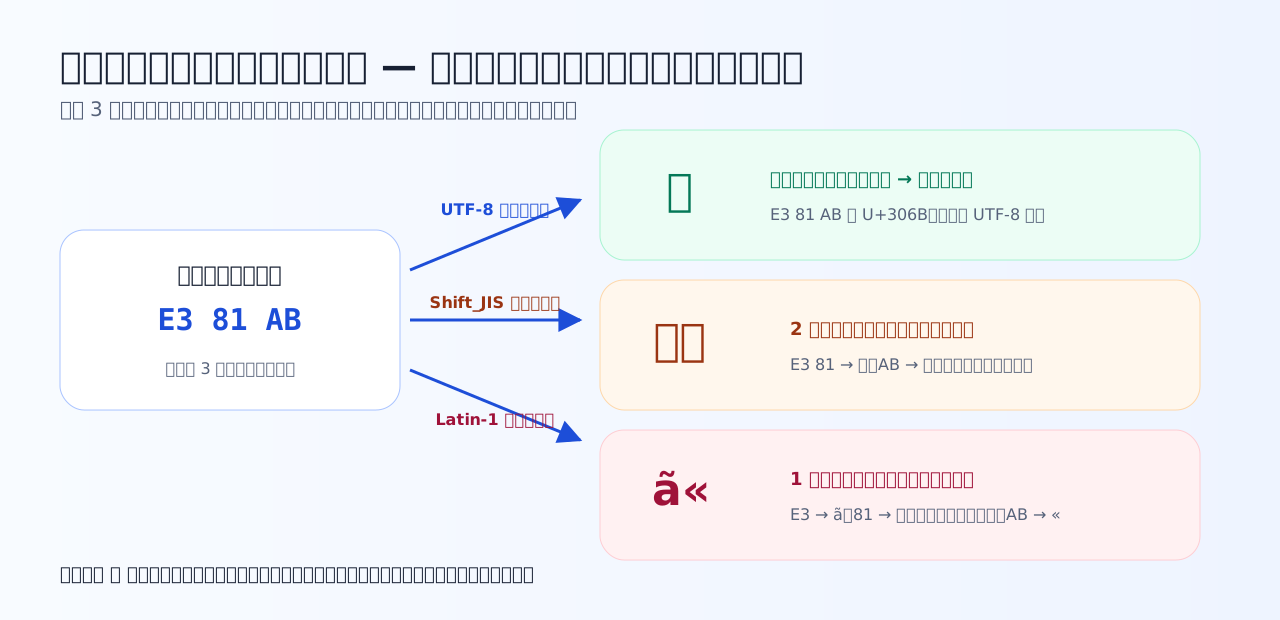
All a file really contains is bytes — there is no tag saying which encoding they are in. The same byte sequence looks like different characters when read differently. This single diagram is the starting point of the whole course.
What makes this course different
The one viewpoint that runs through this course
Inside a computer, characters are always handled in two stages. Learning to keep these two stages apart is everything this course teaches.
The course motto: when you see mojibake, do not stop thinking — ask: which encoding wrote these bytes, and which encoding was used to read them?
Chapter overview
Tips for studying
- Go in the order text → the quiz right below it. Answering just after reading fixes things in memory far better than saving all the questions for later.
- For the bit-packing in Chapter 3, write the binary out on paper and work it with your own hands. Once you have derived E3 81 82 yourself, UTF-8 turns from something to memorize into something you can compute.
- Feed the Chapter 3 simulator your own name or strings you handle at work. The gap between byte count and character count becomes something you have felt, not just read about.
- If a case question in Chapter 7 stumps you, go back to the corresponding chapter for just a pass or two of review. There is no need to redo everything.
Prerequisites before you start
- Having handled text files or CSV files is enough. Programming experience is not required.
- For hexadecimal, we assume only that you know it as "writing numbers with 0–9 and A–F"; you practice reading it inside the chapters.
- Converting between binary and hexadecimal (4 bits = 1 hex digit) is the one skill used in Chapter 3, so the text includes a refresher.