Introduction — Why mojibake happens
A file is nothing but bytes. When the encoding that wrote them and the encoding that read them disagree, the same bytes appear as different characters — this chapter pins down what mojibake really is.
"縺薙s縺ォ縺。縺ッ" — what is happening on this screen?
You open a CSV from a business partner in Excel and all the Japanese has turned into strings of kanji like "縺薙s縺ォ縺。縺ッ". Part of a web page shows runs of symbols like "ã“ã‚“". A name you are sure you registered in the database reads "????". You may have fixed such things by "reopening the file with a different encoding" — but surprisingly few people can explain why that fixes it.
The starting point is a single fact: all a computer can store or transmit is a sequence of bytes, 0x00 through 0xFF. The character "あ" or "A" itself is never stored. The rule that converts characters into bytes is called an encoding, and UTF-8 and Shift_JIS (a legacy encoding for Japanese text) are both instances of such rules.
And here is the crucial point: a file carries no tag saying "these bytes are UTF-8". The reader relies on settings, declarations, or guesses to decide "this is probably encoding X" and looks the bytes up in that table. If the writer's rule and the reader's rule match, the original characters come back; if they diverge — different characters appear. That is mojibake.
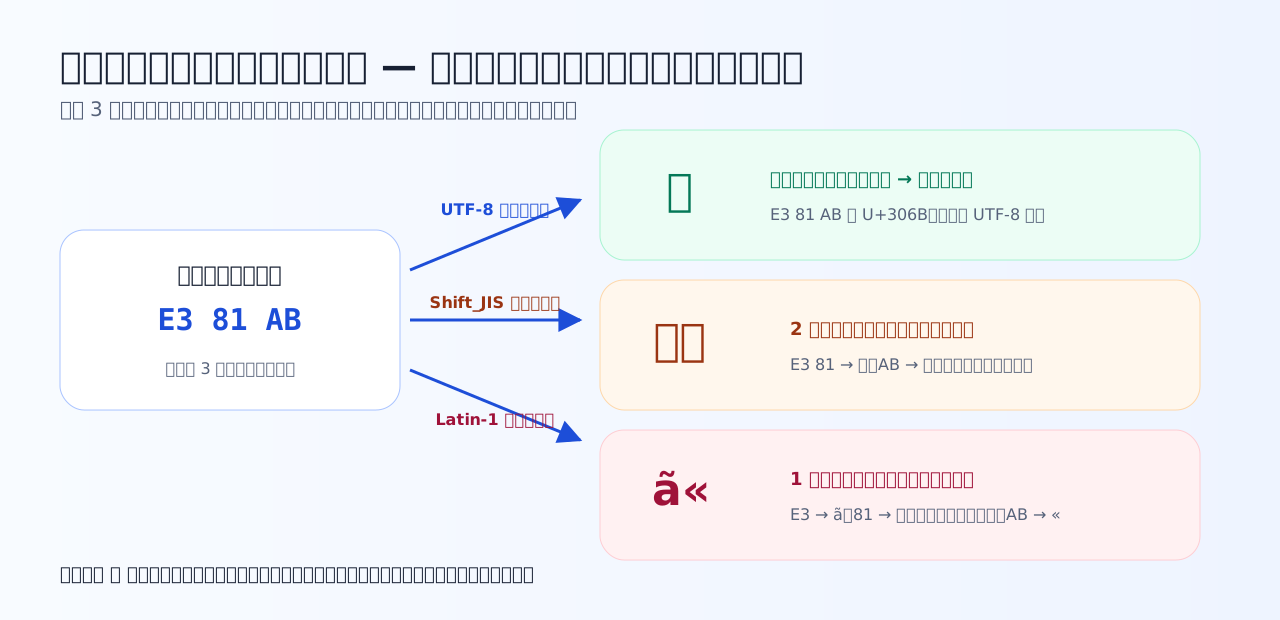
The same 3 bytes garble into "に", "縺ォ", or "ã«" depending on which table you look them up in. The key point: not one bit of the byte sequence has changed.
Garbled, but the data is not broken
Look at the diagram again. The 3 bytes E3 81 AB remain exactly the same 3 bytes under every reading. What broke was not the data but only the choice of how to read it. So if you re-read with the correct encoding specified, the original "に" comes right back.
One caution, though. If you save the file while it still displays garbled, the garbled string "縺ォ" gets written to disk as new bytes, and the original byte sequence is lost. When you meet mojibake, "do not write — question the reading first" is the first move in practice.
The course motto: when you see mojibake, ask — which encoding wrote these bytes, and which encoding was used to read them?
Quiz 1-1 — A file is nothing but bytes
Check whether you can state what mojibake is, in terms of the relationship between bytes and how they are read.
Q1. What is actually stored on disk as a text file?
All that exists on disk is a run of bytes from 0x00 to 0xFF. There is, as a rule, no tag saying 'this is UTF-8'; the reader decides on an encoding from some clue (settings, declarations, guessing) and reads with it. That is precisely where the writer's assumption and the reader's assumption get room to diverge. Code points are numbers; what is stored is the byte sequence that encodes them.
Q2. The same byte sequence E3 81 AB looks like the Japanese character 'に' when read as UTF-8, and like '縺ォ' when read as Shift_JIS. Which statement correctly explains this phenomenon?
An encoding is exactly a rule mapping byte sequences to characters. Looking up E3 81 AB with UTF-8's rules gives U+306B 'に'; with Shift_JIS's rules, E3 81 becomes '縺' and AB becomes the half-width kana 'ォ'. Not a single bit of the data is broken. This is a different phenomenon from a font problem (the tofu squares □), a distinction we revisit in Chapter 7.
Q3. Which statement about a garbled file is correct in most cases?
Most garbling is a mis-reading, so the bytes are unharmed. Re-open the file with the right encoding specified in your editor and it reads fine again. However, if you save it while it still looks garbled, the garbled characters get written out as new bytes, and recovery suddenly becomes hard. The iron rule: when text garbles, do not write — question the reading first.
"Assign a number" and "make it bytes" — think in two stages
Here we introduce the viewpoint that runs through the entire course. Between a character and its bytes there are, in fact, two independent stages.
The perennial question "what is the difference between Unicode and UTF-8?" can now be answered instantly: Unicode is stage 1 (how numbers are assigned), UTF-8 is stage 2 (how numbers become bytes). Think of it as the difference between how street addresses are assigned and how you write an address on an envelope. Chapter 2 covers stage 1 in depth, and Chapters 3 onward cover stage 2.
Quiz 1-2 — Distinguish character sets from encodings
Check the two-stage view that runs through this course — assigning numbers (character set) and turning them into bytes (encoding).
Q4. Which statement correctly describes the division of labor between a 'character set' and an 'encoding'?
The character set (e.g. Unicode) is stage 1, assigning numbers to characters, as in 'あ' = U+3042; the encoding (e.g. UTF-8) is stage 2, converting the number into bytes, as in U+3042 → E3 81 82. Historically some standards fused the two, but in the Unicode world the two stages are cleanly separated, and thinking of them separately untangles every mojibake discussion at once.
Q5. Why is the phrasing 'this file is saved in Unicode' imprecise?
The same Unicode number U+3042 is stored as E3 81 82 in UTF-8 but as 30 42 in UTF-16 — the saved bytes depend on the encoding. 'Saved in Unicode' fails to pin down stage 2 and is not enough information to read the file correctly. The options listed in your editor's save dialog — UTF-8, UTF-16, and so on — are exactly this stage-2 choice.
Key takeaways from this chapter
- The substance of a file is bytes only. No tag says which encoding they are in
- Mojibake is a mismatch between the writing encoding and the reading encoding. The bytes themselves are usually intact, and fixing the reading restores them (but never save while garbled)
- Characters are handled in two stages: number (code point) → bytes (encoding). Unicode is stage 1, UTF-8 is stage 2
The next chapter traces the history of stage 1, "assigning numbers," in one sweep — from ASCII's 128 characters to Unicode, which holds every character in the world.