Build UTF-8 by hand
Pour the code point's bits into a 1-to-4-byte template — hand-compute the UTF-8 conversion U+3042 → E3 81 82, and verify why ASCII compatibility works, all the way to the BOM.
Being able to answer "why 3 bytes?" by calculation
"Japanese takes 3 bytes in UTF-8" — you may have heard it somewhere, but can you explain why 3, and what those 3 bytes contain? This chapter has a single goal: derive with your own hands how U+3042, the Japanese character "あ", becomes E3 81 82. Once you have derived it, UTF-8 changes from something to memorize into something you can compute.
UTF-8 is a variable-length encoding. Depending on the size of the code point, one character takes 1 to 4 bytes.
| Code point range | Bytes | Template (pour the number's bits into the x slots) |
|---|---|---|
| U+0000–U+007F | 1 | 0xxxxxxx |
| U+0080–U+07FF | 2 | 110xxxxx 10xxxxxx |
| U+0800–U+FFFF | 3 | 1110xxxx 10xxxxxx 10xxxxxx |
| U+10000–U+10FFFF | 4 | 11110xxx 10xxxxxx 10xxxxxx 10xxxxxx |
The black parts of the template (1110 and 10) are fixed markers. The count of leading 1s in the lead byte announces the character's byte count, and every continuation byte begins with 10 — this rule alone lets you find character boundaries from anywhere in a byte stream.
Hand calculation — turning U+3042 into 3 bytes
"あ" U+3042 falls in the U+0800–U+FFFF range, so we use the 3-byte template. The procedure has 2 steps.
0011 0000 0100 0010. Cutting 6 bits at a time from the right gives 0011 / 000001 / 000010 (4 + 6 + 6 bits)11100011 10000001 10000010 → in hex, E3 81 82Let us verify. E3 = 1110 0011 — three leading 1s, so "lead byte of a 3-byte character". 81 = 1000 0001 and 82 = 1000 0010 — both start with 10, "continuation bytes". Peel off the markers, concatenate the rest, and 0011 000001 000010 = 0x3042 comes back. Both directions are nothing more than repacking bits.
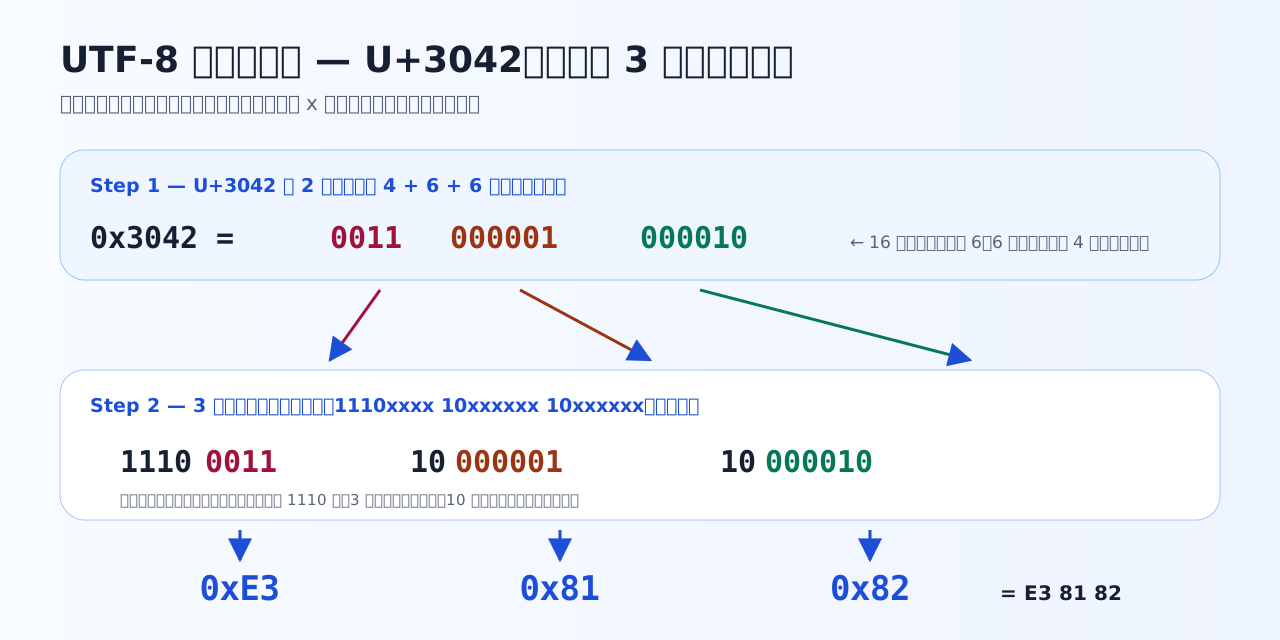
The code point's bits being poured into the template. The colored bits are the content of the number for "あ"; the black parts are UTF-8's fixed markers.
Quiz 3-1 — Pour bits into the template
Follow the steps in the text, writing the binary out on paper as you check.
Q1. When reading a UTF-8 byte sequence from the start, how do you know how many bytes the character beginning at a given byte occupies?
UTF-8 is designed so the lead byte announces its own length: the number of leading 1 bits equals the character's byte count (110→2, 1110→3, 11110→4), and every continuation byte is 10xxxxxx. Thanks to this rule you can find character boundaries immediately even when starting mid-stream. It is not fixed-length but variable, 1 to 4 bytes.
Q2. Which is the correct procedure for pouring U+3042 (binary 0011 0000 0100 0010) into the 3-byte template 1110xxxx 10xxxxxx 10xxxxxx?
The template's x slots hold 4, 6, and 6 bits from the front. Cutting the code point's bits from the right in groups of 6 gives 0011 / 000001 / 000010; filling them in yields 11100011 10000001 10000010 = E3 81 82. Placing the hex 30 42 as-is is the UTF-16 way of thinking — UTF-8 differs in that it rearranges the bits.
Q3. ASCII characters take 1 byte in UTF-8, and most Japanese kanji and hiragana take 3. How many bytes is the string 'Hello世界' in UTF-8?
Hello is 5 ASCII characters × 1 byte = 5 bytes; '世' (U+4E16) and '界' (U+754C) both fall in the U+0800–U+FFFF range, so 3 bytes each, 6 bytes total. The sum is 11 bytes. Internalize with concrete numbers that 'character count = byte count' does not hold — it inevitably matters in things like database column sizing.
Why ASCII compatibility actually works
Look closely at the 1-byte template 0xxxxxxx. U+0000–U+007F — that is, ASCII's 128 characters — come out as exactly the same single bytes as in the ASCII era. A file of pure letters and digits is identical whether read as ASCII or as UTF-8. That the world could migrate with hardly any changes to existing programs and protocols is thanks to this design.
There is one more crux that tends to get overlooked. Every byte making up a character of 2 bytes or more — the lead (starting with 11) and the continuations (starting with 10) — is always 0x80 or above. In other words, in the middle of a Japanese character's bytes, a value equal to an ASCII symbol like / (0x2F) or " (0x22) never appears. A program that scans byte-by-byte for delimiters structurally cannot split a character down the middle by accident. That this peace of mind was not always a given is something the next chapter's Shift_JIS will make painfully clear.
Verify with the simulator
Type any string into the simulator below and you can check everything this chapter computed by hand, at once. Start with the initial value "こんにちは" (Japanese for "hello") and confirm that 5 characters become 15 bytes and every character starts with E3. Your own name, emoji, and mixed English-Japanese strings are also worth trying. Input is processed entirely inside your browser and is never sent to any server.
What the simulator does (text version): as you type a string into the text field, a table updates showing, per character, the code point (U+XXXX), the UTF-8 bytes (hex), and the UTF-16 code units. Alongside it, four numbers are shown — total UTF-8 bytes, UTF-16 code units, code points, and visible characters (graphemes) — and finally "what this UTF-8 byte sequence looks like when misread as Shift_JIS" (if your browser does not support decoding Shift_JIS, that field says it cannot be displayed in your browser).
The BOM — a small marker at the top of the file
In the simulator's last field you saw a UTF-8 byte sequence misread as Shift_JIS. "Could we place a marker at the start of the file so the reader can guess the encoding?" — one answer is the BOM (Byte Order Mark): the 3 bytes EF BB BF, code point U+FEFF encoded in UTF-8, placed at the start of the file.
As the name says, it is originally a mechanism for UTF-16 to indicate byte order (high byte first or low byte first). UTF-8 has no byte-order issue, so there the BOM serves purely as an optional marker meaning "this is UTF-8". When present it is a clue; but for programs that do not expect those first 3 bytes, it is stray data and a seed of malfunctions. "The BOM is not required — but software such as Excel relies on it to detect the encoding" — the practical outcome of this tug-of-war is handled in Chapter 6.
Quiz 3-2 — ASCII compatibility and the BOM
Check why UTF-8 could become the world standard, and the little marker at the top of a file.
Q4. Which correctly explains why UTF-8's ASCII compatibility is safe?
0x00–0x7F are bit-for-bit identical to ASCII, and every byte making up a character of 2 bytes or more — lead and continuation alike — has its top bit set, i.e. is 0x80 or above. So a file of pure ASCII is already valid UTF-8, and conversely an ASCII value like 0x2F (/) never appears inside Japanese text. This design is the main reason UTF-8 could coexist with existing ASCII-assuming programs. Shift_JIS, which we meet in Chapter 4, has exactly this problem.
Q5. How many bytes is 'こんにちは' (5 hiragana, each 3 bytes) in UTF-8?
3 bytes × 5 characters = 15 bytes. Note how every character starts with E3: E3 81 93 (こ), E3 82 93 (ん), E3 81 AB (に), E3 81 A1 (ち), E3 81 AF (は) — hiragana code points cluster around U+3040, so their lead bytes coincide. This 'sea of E3' becomes a mojibake fingerprint in Chapter 7.
Q6. Which statement about the UTF-8 BOM (Byte Order Mark) is correct?
The BOM is the 3 bytes EF BB BF, the encoding of U+FEFF. In UTF-16 it has the practical job of indicating byte order (which byte comes first), but UTF-8 has no byte-order issue, so there it works purely as a 'this is UTF-8' marker. It is optional, and adding it can break programs that do not expect those first 3 bytes. On the other hand it helps Excel recognize CSV files — that practical tug-of-war is covered in Chapter 6.
Key takeaways from this chapter
- UTF-8 is variable-length, 1 to 4 bytes. The lead byte's count of 1s announces the byte count; continuations always start with 10
- U+3042 → 0011 / 000001 / 000010 → E3 81 82. The conversion is nothing but repacking bits
- ASCII stays the same 1 byte in UTF-8, and multi-byte characters consist entirely of bytes 0x80 and above — these two facts are the core of ASCII compatibility
- The BOM is the encoding of U+FEFF, EF BB BF. In UTF-8 it is an optional marker, not a requirement
Next: Shift_JIS, which carried Japanese long before UTF-8. You will see just how precious UTF-8's guarantee — no ASCII values inside a multi-byte character — really was.