Final exercises — Reading HTTP conversations through cases
Apply the three-part reading — what was asked, how it went, what conditions and notes are attached — to eight cases modeled on real incident investigations, using the knowledge of all six chapters together.
The final eight — applying the three-part set to cases
The last chapter is a comprehensive exercise. Eight cases modeled on scenes from real work, answered by crossing the knowledge of all six chapters. When in doubt, return to this course's watchword — What was asked? How did it go? What conditions and notes are attached?
| If you stumble on | Go back to |
|---|---|
| Message skeleton, stateless | Chapter 1 |
| Choosing methods, safe and idempotent, retries | Chapter 2 |
| Classifying and triaging status codes | Chapter 3 |
| Headers such as Host, Content-Type, Cookie | Chapter 4 |
| max-age, ETag, 304, no-store | Chapter 5 |
| Observation procedure with curl and the Network tab | Chapter 6 |
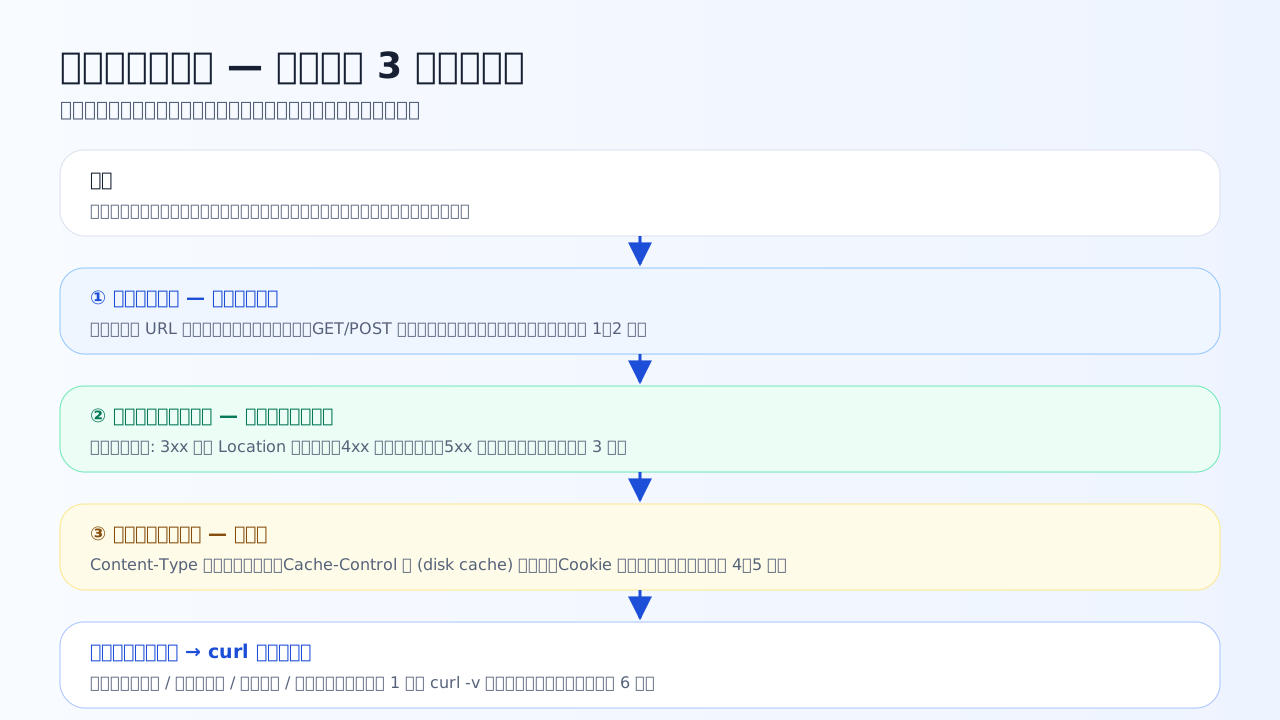
The pattern for case investigation. Starting from the symptom, read in order: request line (what was asked) → status code (how it went) → headers (conditions and notes), and the side holding the cause (client / redirect / server / cache) narrows itself down.
Case 7-1 — Redirect and form troubles
Covers Chapters 2–3 and 6. Reading redirect chains and POST resubmission.
Q1. Case: opening https://example.com/mypage makes the browser show a 'too many redirects' error. Observing with curl -v https://example.com/mypage, it redirected with 302 to Location: /login, and /login also redirected with 302 to Location: /mypage. Which correctly explains what is happening?
Follow the Location destinations and the cycle /mypage → /login → /mypage becomes visible. The typical cause is that the login check's condition (presence of a Cookie, for example) disagrees between the two pages, each forwarding to the other. The browser cuts off after a fixed number of hops and shows this error. A 503 would appear in Status, and broken DNS would prevent connecting at all. curl is the one honestly showing the loop one hop at a time.
Q2. Case: a user reloaded the browser on the order-complete page and reported 'a form-resubmission prompt appeared, and continuing duplicated my order'. What is the standard server-side fix?
If the 200 response to a POST is displayed directly, reloading means re-running the POST (POST is not idempotent, so it can duplicate the order — Chapter 2). POST/Redirect/GET is the pattern of returning a redirect after processing so the completion page is viewed via GET; then even if reloaded, only the safe GET is repeated. no-store does not solve resubmission, and sending orders via GET is the backwards bad move of changing state with a safe method.
Q3. Case: an image file's response headers set Cache-Control: max-age=604800. For how many days can this cache stay fresh?
604800 ÷ 86400 (seconds per day) = 7 days. It is exactly the common-value conversion from Chapter 5. 'May be cached for a week' is a setting you see often on static files, so reading 604800 as 7 days on sight makes configuration reviews faster.
Case 7-2 — Not updating, garbling, not visible
Covers Chapters 3–6. Separating cache, permissions, and character encoding.
Q4. Case: you fixed the CSS and deployed it to the server, but your browser still shows the old design. In the Network tab, that CSS row shows (disk cache) in the Size column. Which cause-and-remedy pairing is most appropriate?
(disk cache) is the decisive sign that 'no request went to the server' (Chapters 5–6). However much you fix the server, the browser will not come looking while the copy is fresh. Disable cache suffices for checking locally, but you cannot clear every user's cache, so the standard permanent fix is changing the URL itself — like style.v2.css — so it is fetched as 'a different resource'. If the upload had failed, the Size column would show a normal transfer size.
Q5. Case: on a membership site, a logged-in user reports 'the document page I could see until yesterday is unavailable today'. In the Network tab, the GET for that page returns 403. Which statement follows most appropriately from this observation?
403 means 'I know who you are, but you lack permission' (Chapter 3). Deletion would give 404, a downed server 5xx or a connection error — the fact that a 403 comes back proves the server is alive and the request is arriving. Combined with 'visible until yesterday', the investigation narrows to likely changes in the document's visibility scope, membership tier, or permission settings. One status code changes where you look this much.
Q6. Case: on the redesigned https://example.com, Japanese renders as symbol strings like 'è±�å�'. Checking with curl -I returns Content-Type: text/html; charset=ISO-8859-1, while the HTML file itself is saved as UTF-8. What is the appropriate fix?
The content is UTF-8, the label says ISO-8859-1 — exactly the 'label-contents mismatch' read in Chapter 4. The browser trusts the declaration and interprets the bytes with the wrong encoding, so the text garbles. What needs fixing is the server's charset declaration; making users change settings every time, or turning the text into English or images, are not even workarounds — they leave the cause untouched. Fix the header and everyone's display is fixed at once.
Case 7-3 — Failure triage and the retry decision
The capstone of Chapters 2–3. Closing the course with 5xx triage and idempotency-based retry decisions.
Q7. Case: the whole site suddenly errors, returning 502 Bad Gateway for every URL. The setup is two stages: 'reverse proxy + application server behind it'. Which is the most appropriate first place to investigate?
502 means 'the relay is alive but could not get a healthy response from behind' (Chapter 3). The very fact that a 502 HTTP response comes back proves the request reaches the proxy. So the first move is the application server's health and logs. If browser settings or the DNS contract were the cause, a reply shaped like a 502 would never arrive. Three digits tell you even which side of a two-stage setup to look at.
Q8. Case: in an inventory system, two requests timed out: (A) PUT /items/42 (replace item 42's data with this content) and (B) POST /orders (create a new purchase order). Which may be resent immediately and mechanically?
The course closes with Chapter 2's practical instinct. A timeout includes the possibility that 'it was processed and only the reply was lost'. PUT replaces with the same content, so even processed twice the final state is the same — resend with confidence. POST processed twice means two purchase orders; resending without confirmation or a duplicate guard is an accident. 'Check idempotency before retrying an update' — take this sentence home.
Closing the course — carry the reading of the correspondence with you
Well done. The items you actually memorized in this course are remarkably few. What you should take home instead is a reading pattern that works in front of any output.
- What was asked — the request line's method and path. Is that favor safe? Is it idempotent?
- How did it go — the status code, starting from the hundreds digit. Whose problem it is comes first
- What conditions and notes are attached — does Content-Type match the contents? What is Cache-Control promising? Is a Cookie attached?
The DevTools Network tab, curl -v output, and every HTTP log you meet from tomorrow on can always be read starting from these three points. Do not be overwhelmed — start from the usual three — that is the ability this course has built.