HTTP caching — Never ship the same thing twice
Hand-compute fresh vs stale with Cache-Control: max-age; once stale, revalidate with a conditional GET using ETag and If-None-Match, and on 304 no body is shipped — learn the cache decision flow with a simulator.
Your update does not show, yet a heavy page opens instantly — both are the cache
You fixed the CSS and uploaded it, but the browser still shows the old design. Meanwhile, a page that was heavy on first visit opens in a blink the second time. For better or worse, the same mechanism is behind both — the cache. It is the heart of the Web's speed, "never ship the same thing twice", yet if you do not know how it works, it becomes the leading cause of "why won't this fix show up".
Fortunately, HTTP caching is nothing to fear once you can read the headers. Only two questions appear in the decision.
Cache-Control: max-ageETagHand-computing max-age — fresh or stale is decided by subtraction
The server can attach this to a response: Cache-Control: max-age=1800. It means "you may treat this as fresh for 1800 seconds after receiving it". The decision is pure subtraction.
Let us run it concretely. Suppose you received a response with max-age=1800 (= 30 minutes) at 10:00:00; at 10:20:00 the elapsed time is 1200 seconds. 1200 < 1800, so still fresh, with 600 seconds remaining. From the moment 10:30:00 passes, it is stale. Get the common conversions into your hands too — max-age=86400 is 1 day (86400 = 24 × 3600), max-age=604800 is 7 days, and max-age=31536000 is 365 days.
One more important line to draw. Stale does not mean forbidden to use. Stale means "cannot be used without confirmation" — confirm, and if unchanged, keep using it. That confirmation mechanism is the next protagonist: the conditional GET.
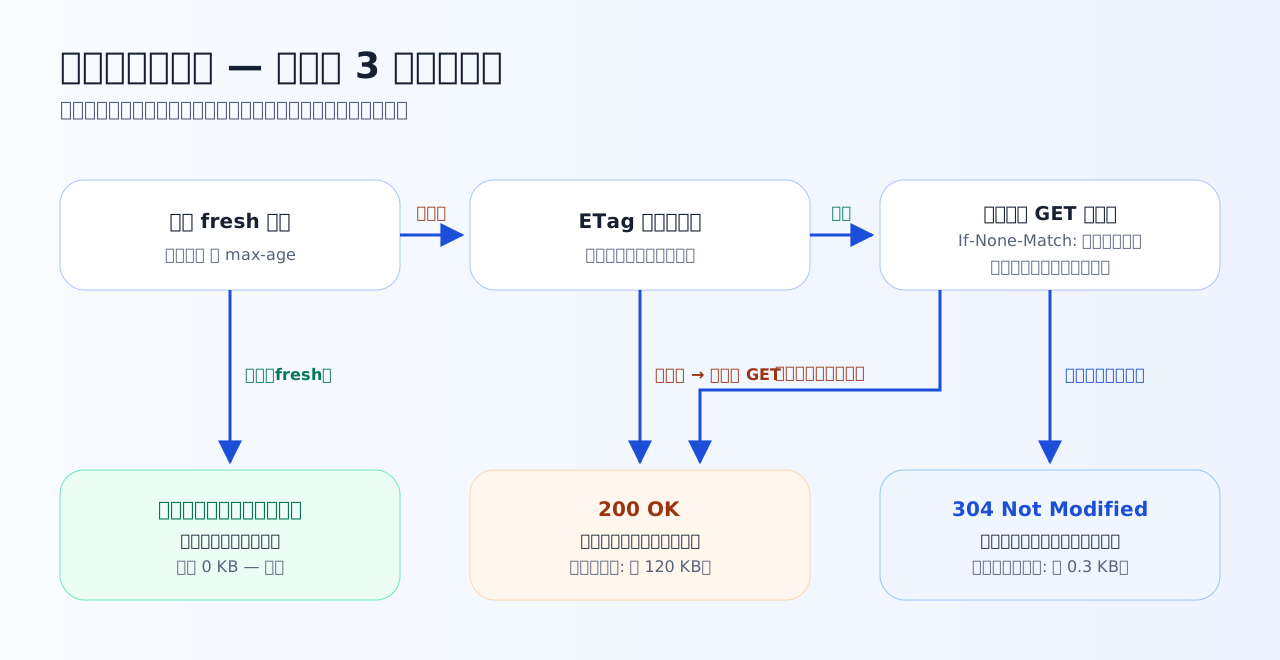
The full cache decision flow. The green exit on the left (fresh: zero traffic), the blue exit in the middle (304: headers only), the orange exit on the right (200: full transfer) — try moving between these three exits with the simulator below.
Practice 5-1 — Hand-computing max-age
Deciding fresh vs stale is nothing but addition and subtraction. Write receive time, elapsed seconds, and max-age on paper and compute.
Q1. A response carried Cache-Control: max-age=86400. For how many hours can this cache stay fresh?
The unit of max-age is seconds. 86400 ÷ 3600 = 24 hours, i.e. one full day. 86400 seconds = 1 day is a very common cache setting; learn it by hand together with 604800 seconds = 7 days and configuration files start reading fluently.
Q2. You received a response with Cache-Control: max-age=1800 at 10:00:00. At 10:20:00, how many seconds of freshness does this cache have left?
The elapsed time from 10:00:00 to 10:20:00 is 20 minutes = 1200 seconds. The difference from max-age=1800 seconds is 1800 − 1200 = 600 seconds. In other words, the instant it turns 10:30:00 the cache goes stale. 'Just compare elapsed seconds with max-age' — that is the entire freshness calculation.
Q3. Which is the correct understanding of a cache turning 'stale' (no longer fresh)?
Stale is not 'past its expiry date and inedible' but a 'needs confirmation' state. The cache itself remains at hand; the client asks the server conditionally, and if told 'unchanged' (304) it keeps using it. It is neither immediate deletion nor free continued use without checking — this 'confirm, then use' mechanism is the conditional GET read next.
ETag and conditional GET — "only if it changed, please"
Confirming a stale cache is done in this two-step arrangement. First, in the initial response, the server attaches a "fingerprint" of the body.
HTTP/1.1 200 OK
Cache-Control: max-age=1800
ETag: "abc123"
Content-Length: 102400
ETag is a short identifier for the body's version at that moment. After the deadline passes, the browser sends not a plain GET but a conditional GET.
GET /style.css HTTP/1.1
Host: example.com
If-None-Match: "abc123"
If-None-Match is a conditional note: "my copy's version is abc123 — send the body only if yours differs". The server's answer splits in two.
Build your intuition for transfer volume here. Fresh: not even a request goes out (0 bytes). 304: a request goes out but only headers return (a few hundred bytes). 200: everything (the whole body). Cache design means designing how traffic is routed to these three exits.
Confirm with the simulator
The simulator below reproduces the cache decision for one file (assume a 120 KB body). Move the max-age and elapsed-time sliders and the toggles for ETag presence and server-side updates, and watch how whether a request goes out, whether it is conditional, whether the response is 200 or 304, and how much is transferred switch around.
What the simulator does (text version): moving the max-age and elapsed-time sliders, if the elapsed time is below max-age the verdict is "fresh — no request, 0 KB transferred". When the elapsed time is at or above max-age (stale), with the ETag toggle off it shows "plain GET → 200 → about 120.3 KB transferred"; with the ETag toggle on it becomes a "conditional GET with If-None-Match", showing "304 → about 0.3 KB transferred" if the "updated on the server" toggle is off, or "200 → about 120.3 KB transferred" if it is on. The reasons for each verdict are also shown line by line as text.
Practice 5-2 — Conditional GET and forbidding storage
The teamwork of ETag, If-None-Match, and 304, and telling no-store from no-cache.
Q4. For a stale cache, the browser sent a GET carrying If-None-Match: W/"abc123". If the resource on the server had not changed, which is the correct server response?
If-None-Match is a conditional favor: 'the ETag of my cached copy is abc123 — send the body only if yours differs'. If it matches (unchanged), the server returns 304 Not Modified with no body, and the browser keeps using its local cache. Returning the full body with 200 happens when the condition does not match (it was updated), and 404 is the separate story of a missing resource.
Q5. Which is the correct reason 304 Not Modified saves transfer volume?
304 means 'same as what you already have' — there is no need to ship the same thing again, so the response is headers only (a few hundred bytes at most). For a 100 KB body, the transfer shrinks to roughly a few hundredths of a percent of round trips' worth. But note the request itself still goes out every time. Only while fresh does even the request stay home; 304 is 'it goes out, but travels light'.
Q6. Which is the correct difference between Cache-Control: no-store and Cache-Control: no-cache?
The classic pair of misleading names. no-store means 'do not store it in the first place' (for sensitive data like account balances); no-cache means 'you may store it, but confirm every time before use' (if a 304 comes back, the local copy may be used). The stricter one is no-store. The intuition 'no-cache = do not cache' causes accidents, so fix the distinction here.
no-store and no-cache — do not be fooled by the names
Finally, let us tell apart two directives famous for their misleading names. Both are written in Cache-Control, but their strength differs completely.
Counter to intuition, the one that means "do not cache" is not no-cache but no-store. no-cache means "always confirm before using the cache", and combined with 304 it still saves transfer volume. This mix-up is genuinely common in practice — "I set no-cache but a copy remains on the device" is the specified behavior, working as designed.
What to take from this chapter
- The cache decision asks two questions — still fresh? (subtraction against max-age), and if stale, did the contents change? (conditional GET)
- While fresh, not even a request goes out. Stale is not "forbidden" but "needs confirmation"
- ETag + If-None-Match → 304 if unchanged (no body, headers only). Three exits: 0 bytes / a few hundred bytes / full transfer
- no-store forbids storing; no-cache means revalidate every time. The one that means "do not cache" is no-store
With this, the three-part reading is complete. The next chapter finally goes live — we apply this reading directly to the output of curl and the developer tools.