HTTP headers and content — What is carried, in what form
Headers are the margin notes of the correspondence. Read Host for the addressee, Content-Type for format and character encoding, Content-Length for size, the Accept family for preferences, and Cookie with Set-Cookie for building sessions on top of stateless HTTP.
The content is right, yet it garbles — or the wrong thing comes back
The HTML was written correctly, yet the Japanese renders like "譁�蟄�". You sent JSON to an API and got rejected as "malformed". The same URL shows pages in different languages to different people — for this family of "but the content is right" troubles, the answer usually lies not in the content but in the headers.
Headers are margin notes in Name: value form attached to the correspondence. In the letter analogy: the addressee, the "fragile" label, the weight marking, the return name tag — not the letter's text itself, but the information that decides how the text should be handled gathers here. This is the third item of the three-part set, "conditions and notes".
There are hundreds of headers, but no memorization is needed. This chapter reads just six representatives that answer "addressed where, what and how much, with which preferences, and from whom".
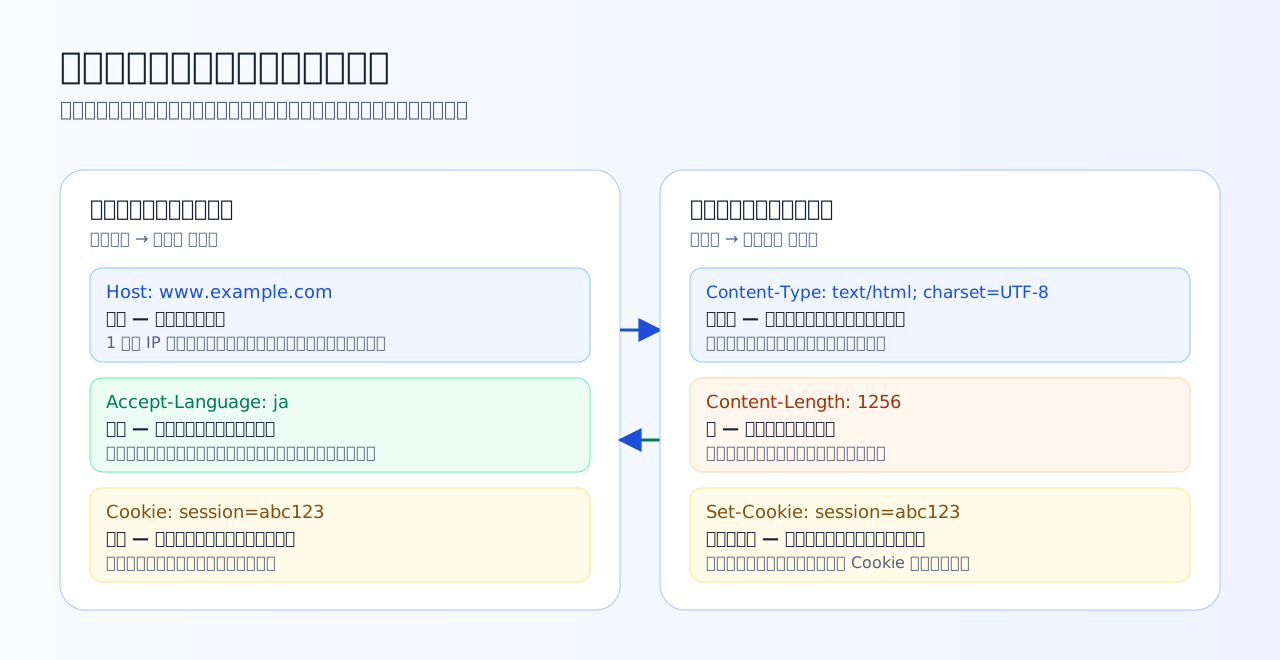
Headers are labels attached to the text. Addressee (Host), contents declaration (Content-Type / Content-Length), preferences (the Accept family), name tag (Cookie / Set-Cookie) — bundle them by role and even hundreds of headers stop being scary.
Host — one address, several nameplates
The mandatory request header Host: example.com is the letter's addressee. You might think "we are connected to the IP address, so isn't the destination obvious?" — but in practice it is completely normal for one server (one IP address) to host several sites, such as www.example.com and shop.example.com, side by side.
The TCP connection only guides you to the building's front door. Which room (site) the letter is for is conveyed by the addressee — the Host header. The server reads it and switches what it serves. This is name-based virtual hosting, and a request lacking Host is an error in HTTP/1.1 because a letter without an addressee cannot be delivered.
Content-Type and Content-Length — what the contents are, and how much
The response's Content-Type: text/html; charset=UTF-8 is a label saying "the contents are HTML, in the UTF-8 character encoding". From the first half, text/html (the MIME type), the browser decides "is this HTML to render, an image to display, or a file to download"; from the second half, charset, it decides which character encoding turns the bytes back into characters.
This is the doorway to mojibake. If the file is actually saved as UTF-8 but declares charset=Shift_JIS, the browser dutifully reads the bytes by the wrong rules and the text garbles. The nasty part is that it renders garbled without any error; the remedy is a single point — "make the label and the contents agree". Note that Content-Type is not response-only — when POSTing JSON, you attach Content-Type: application/json on the request side to state the format of the contents.
Content-Length: 1256 is the size marking: "the body is 1256 bytes". In HTTP/1.1, where one TCP connection is reused for many letters back and forth, the receiver needs to know how far this body extends, and this number marks that boundary.
Practice 4-1 — Notes on the addressee and the contents
Host, Content-Type, and Content-Length — reading 'addressed where, containing what, and how much'.
Q1. One server (one IP address) hosts the two sites www.example.com and shop.example.com. Which header gives the server the clue to tell which site a request is addressed to?
A TCP connection is made to an IP address, so the connection alone cannot say which site is meant. So the request's Host header writes the addressee — 'this is for www.example.com' — and the server switches which site to serve based on it (name-based virtual hosting). It is a building with several nameplates at one address, where letters are delivered to rooms by the name on the envelope. This is why Host is a mandatory header in HTTP/1.1.
Q2. A response returning Japanese HTML saved as UTF-8 carried the header Content-Type: text/html; charset=Shift_JIS. What happens?
As a rule the browser trusts the header's declaration when interpreting the byte stream. If the actual content is UTF-8 but claims to be Shift_JIS, the same bytes are read back as different characters and the text garbles. A mismatch between contents and label — the classic doorway to mojibake — and the fix is to align one or the other: the label (the charset declaration) or the contents (the file's saved encoding). The nasty part is that no error occurs; it just renders garbled.
Q3. Which is the correct meaning of the response header Content-Length: 1256?
Content-Length is the byte count of the body. In HTTP/1.1, where one connection is reused continuously, the receiver must know 'how far does this body extend', and this number marks that boundary. It is neither a line count nor a port number, and expiry is the job of Cache-Control, covered next chapter. It also shows up when comparing against the Size column in DevTools.
The Accept family — state your wishes, let the server choose
Even for the same URL, the desired shape differs by requester. A browser wants HTML, a program wants JSON. A Japanese speaker should get the Japanese page. The Accept family of request headers conveys these "wishes".
The server picks from among the representations it can provide and responds. This is content negotiation. The point is that it is negotiation, not compulsion — a wish may go unmet, and what actually came back is confirmed via the response's Content-Type and friends. One of the tricks behind "the same URL looks different depending on who opens it" lives here.
Cookie and Set-Cookie — building sessions on top of stateless
Time to collect Chapter 1's homework. HTTP is stateless and the server does not remember "where we left off". Then how is login state achieved? — the answer is two headers working together.
Set-Cookie: session=abc123. "From now on, please show this tag"Cookie: session=abc123. The server sees the tag and knows 'it is that person from before'A session, in other words, is a "serial story" created by attaching the same name tag to every single letter of a stateless correspondence. All the server remembers is a lookup table of "who is tag abc123" — HTTP itself stays stateless to the end. Once you can read this picture, everyday phenomena all explain themselves: "clearing Cookies logged me out", "another browser treats me as not logged in".
Practice 4-2 — Stating preferences, wearing a name tag
Content negotiation with the Accept family, and how sessions work via Cookies.
Q4. Which correctly describes 'content negotiation', attaching Accept: application/json or Accept-Language: ja to a request?
The Accept family expresses wishes — 'JSON if possible', 'Japanese if possible' — and the server picks from among the representations it can serve (you can see the outcome in the response's Content-Type and friends). It is negotiation, not compulsion, so a wish may go unmet. Agreeing on encryption is the TLS handshake and speed adjustment is TCP's job — neither is in HTTP headers' territory.
Q5. Which is the correct description of how login works?
HTTP is stateless (Chapter 1), so the server does not 'remember' connections. Instead the server hands over a name tag (a session ID or similar) via Set-Cookie, and because the browser attaches it to the Cookie header of every subsequent request, the server can tell 'it is that person from before'. Putting passwords in URLs is a bad move that leaks into history and logs, and IP addresses are shared and changeable, so they cannot serve as identifiers.
Q6. Which is the correct statement about the Content-Type header?
Content-Type is the note 'the body of this message has this format', so it appears on whichever side carries a body. When sending forms or JSON with POST/PUT, the request-side Content-Type governs how the favor is interpreted, and an API may return 415 or similar based on it. It is not HTML-only (JSON, images, PDF — anything), and for text types charset specifies the character encoding as well.
What to take from this chapter
- Headers are the correspondence's margin notes. The information deciding how to handle the text gathers here
- Host is the addressee — the mandatory header that supports name-based virtual hosting, where several sites share one IP
- Content-Type (+ charset) is the label. A label-contents mismatch is the doorway to mojibake. Content-Length is the body's byte count, marking the message boundary
- The Accept family states wishes (negotiation, not compulsion). The name-tag round trip of Set-Cookie → Cookie builds sessions on top of stateless
The next chapter is the applied class of headers and the heart of the Web's speed — caching. We confirm the conditions and notes for "never shipping the same thing twice" with hand calculations and a simulator.