Observing with openssl and the browser
Learn to read openssl s_client output and the certificate viewer, and translate certificate errors into 'which of the three checks failed.'
Confirm in the wild what you traced on paper
Chapters 1–5 completed the mechanism. This chapter observes it live, with openssl and a browser. Two goals: know where to look in the output, and translate certificate errors into "which of Chapter 4's three checks failed."
Note: keep observation within ordinary access to servers you manage or public sites. Every command below performs one TLS connection and prints the result — the same as a normal visit.
openssl s_client — run the handshake yourself
The fundamental move of TLS investigation: perform a real handshake and print everything received.
openssl s_client -connect example.com:443 -servername example.com < /dev/nullThe output is long, but the places to look are fixed:
s: (subject) and i: (issuer) per level. Check that the leaf's i: connects to the next level's s: — Chapter 4's chain, printed literally0 (ok) means all three checks passed. Otherwise the reason is spelled out: certificate has expired, unable to get local issuer certificate (the chain doesn't connect), and so onTLSv1.3 / TLS_AES_128_GCM_SHA256 — the negotiated version and the AEAD cipher from Chapter 5-servername is Chapter 5's SNI. Omit it and the server may present a different default certificate — a misdiagnosis machine. Match your investigation command to the browser's conditions before reasoning from its output.
To study one certificate closely, pipe into the x509 subcommand:
openssl s_client -connect example.com:443 -servername example.com < /dev/null 2>/dev/null \
  | openssl x509 -noout -subject -issuer -dates -ext subjectAltName
notBefore / notAfter (validity) and the SAN list (names) — material for two of the three checks in one line. The browser's padlock → certificate viewer shows the same data in a GUI. Either way, the items to read are the same.
Practice 6-1 — Reading the output
Read openssl output and certificate contents by mapping them onto Chapter 4's three checks.
Q1. openssl s_client prints verify error: certificate has expired. Which of Chapter 4's three checks failed?
Expired means 'now' falls outside notBefore–notAfter — the validity-period check. The triage pattern is to translate error text into 'which check failed' rather than memorizing wording. Signatures and names are fine, only the period failed — and the fix (renewal) follows immediately.
Q2. The certificate shows notAfter=Aug 11 23:59:59 2026 GMT. Taking today as July 12, 2026, roughly how many days remain until expiry?
From July 12 to July 31 is 19 days, plus 11 days into August: about 30. Days-to-expiry is a standard monitoring item — many teams alert at 30 days out. openssl x509 -noout -dates prints just notBefore / notAfter for a quick check.
Q3. Running openssl s_client -connect example.com:443, you forget -servername example.com (the SNI). What can happen?
As Chapter 5 showed, servers hosting many domains on one IP choose the certificate by SNI. A connection without SNI gets the default certificate — a classic source of misdiagnosed 'name mismatch.' Always confirm your investigation command matches the browser's conditions (SNI included) before drawing conclusions.
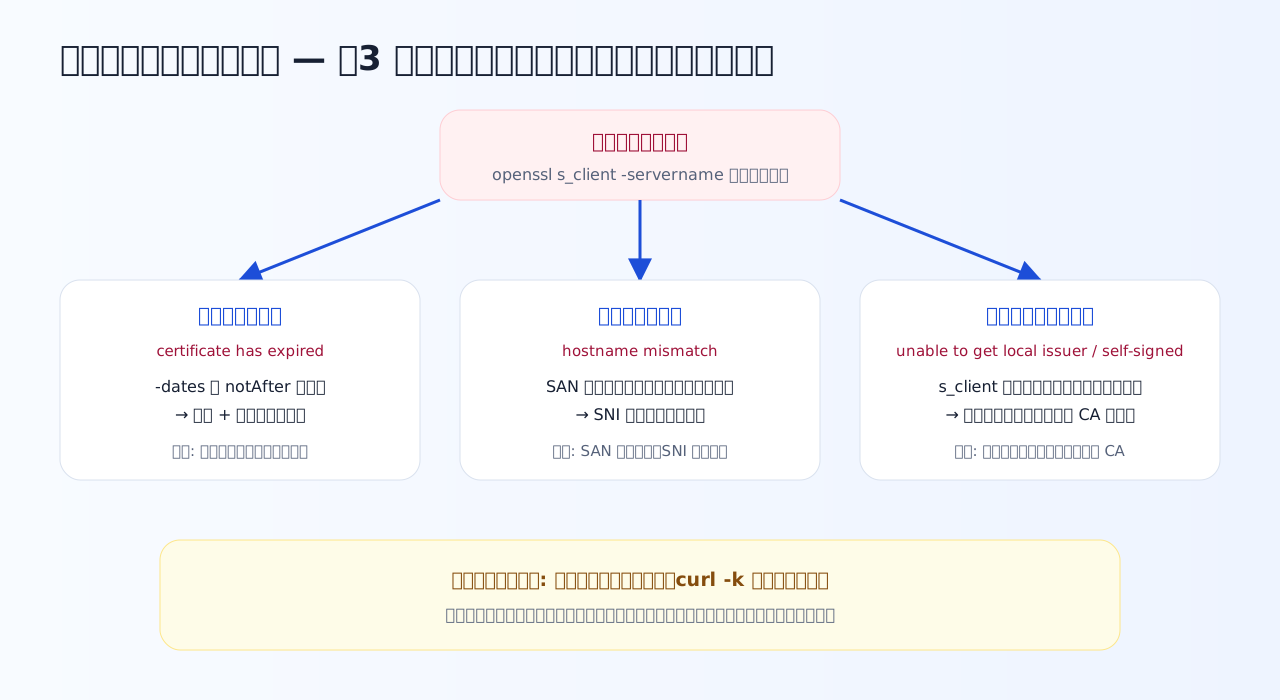
Certificate-error triage starts with translation into "which check failed." Wordings differ; the destination boxes are these three, plus revocation.
The three-error triage table
Most certificate errors in practice land in three families, each mapping one-to-one onto Chapter 4's checks:
| Failed check | Typical wording | Common cause | First move |
|---|---|---|---|
| Validity period | certificate has expired | Renewal forgotten; auto-renewal broken | Check notAfter with -dates; renew; add days-remaining monitoring |
| Name match | hostname mismatch | Accessing a name not in the SAN; missing SNI | Compare the SAN list against the name being accessed and the SNI |
| Signature chain | unable to get local issuer certificate / self-signed certificate | Missing intermediate; self-signed; internal CA absent from the root store | Check the chain the server actually sends with s_client; fix server config if the intermediate is missing |
The missing intermediate deserves special mention: it shows up as the baffling "works in the browser, fails from curl / API clients." Browsers sometimes patch the gap from caches or by fetching the missing certificate. Looking at what the server actually sends via s_client is the direct route.
Before you "turn verification off," stop
Under time pressure, hands reach for curl -k or "ignore certificate errors" settings. In Chapter 1's terms this removes the authenticity check by your own hand. Encryption remains, so it looks safe — but you are now set up for a secret conversation with an impostor: Chapter 4's man-in-the-middle, welcomed in.
Meanwhile, some networks have a legitimate way into the middle: TLS-inspection proxies distribute the company's own CA into each machine's root store and re-issue site certificates under it. Verification ends at the root store (Chapter 4), so no error occurs. When "errors appear only on BYOD machines or the CI server," recall this construction — what is missing is the internal CA in that machine's root store, not verification being on.
One more browser-side guardrail: HSTS (HTTP Strict Transport Security). After receiving the HSTS header once, the browser connects to that site only over HTTPS and offers no "proceed anyway" button on certificate errors. A missing button is not a bug — it is a safety device the site itself requested.
Practice 6-2 — Triage the classic cases
Three situations you will meet repeatedly in practice. Narrow each to one cause.
Q4. A site opens fine in the browser, but curl and your own program fail certificate verification. What do you suspect first?
Servers are responsible for sending the leaf and intermediate together, and forgetting the intermediate is a classic misconfiguration. Browsers may patch the hole from caches or by fetching the missing certificate, producing the 'browser-only works' asymmetry. An expired certificate would fail in the browser too. openssl s_client shows exactly what chain the server sends — the direct route.
Q5. What is wrong with permanently using curl -k (--insecure) to get past verification errors?
-k abandons the "is the peer genuine" question. In Chapter 1's terms, secrecy (encryption) remains but authenticity is gone. As a momentary dev-time expedient, maybe; as a permanent setting or hardcoded flag, you have removed one of TLS's pillars yourself. The real fix is identifying the failing check (chain gap, internal CA) and repairing that.
Q6. A company's internal proxy decrypts TLS traffic for security inspection (TLS inspection). Why do company-issued PCs show no certificate errors?
This is Chapter 4's man-in-the-middle construction made 'trusted' by adding to the root store. Verification terminates at the root store, so certificates re-issued by the added CA pass legitimately. It shows both the weight of adding anything to a root store, and the key to triaging 'errors only on some machines': check what is in that machine's root store.
What to take from this chapter
openssl s_client -connect host:443 -servername hostis the basic move. Read the chain's s:/i:, the Verify return code, Protocol/Cipher- Translate errors into "which of the three checks failed" before acting — mapping, not memorizing
- "Browser-only works" → suspect the missing intermediate. "Company PCs only work" → suspect the internal CA in the root store
- Turning verification off is not a fix. Identify the failing check and repair the cause
Next is the comprehensive review: case problems spanning all six chapters, turning knowledge into something you can use.