Introduction — What does HTTPS protect?
Grasp how the three threats — eavesdropping, tampering, impersonation — map onto confidentiality, integrity, and authenticity, and where the padlock's coverage ends.
"If there's a padlock, it's safe" — can you really say that?
A certificate warning appears and you cannot tell whether it is safe to proceed. You tell a customer "it's HTTPS, so it's safe," and freeze when they ask "safe how, exactly?" — We use HTTPS every day, yet what happens inside is surprisingly hard to explain.
The starting point is to picture what happens without HTTPS — plain HTTP. Between your browser and the server sit many intermediaries: strangers on the same Wi-Fi, routers, your ISP, network equipment along the way. With plaintext HTTP, any point on this path can read the content as-is — and rewrite it.
TLS (Transport Layer Security) answers these three threats each with a different tool. It is not one piece of magic solving everything — that view is the starting point of this course.
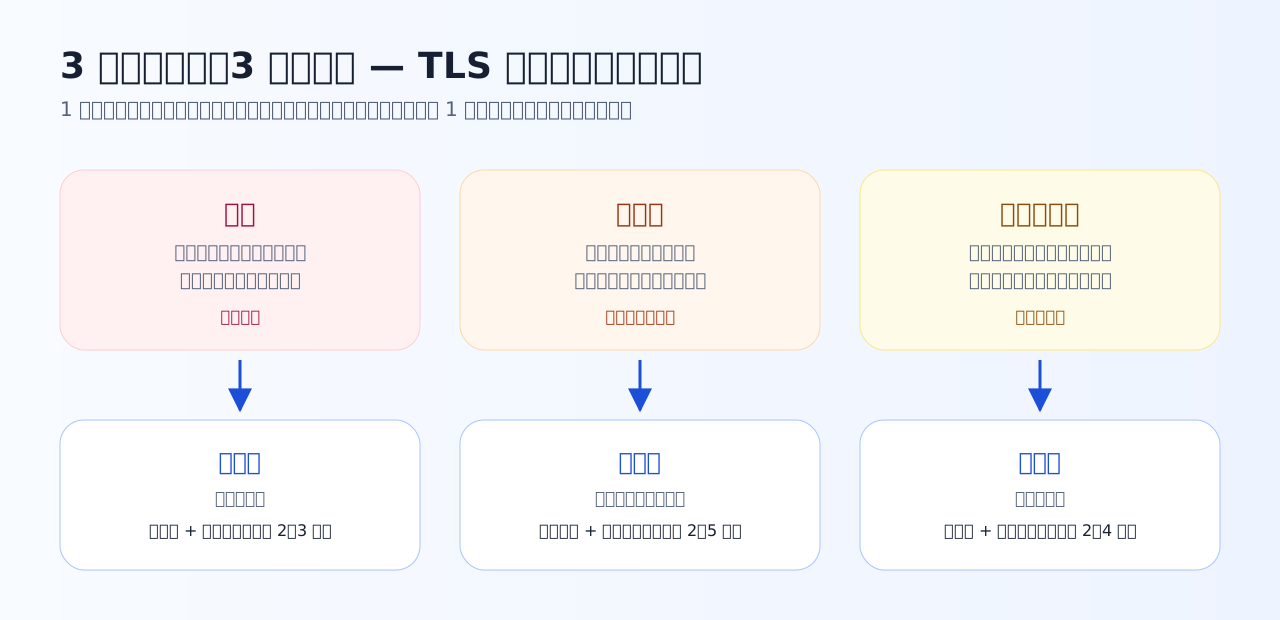
The three threats and the three guarantees map one-to-one. In the coming chapters we open up the tool behind each guarantee — ciphers, hashes, certificates — one at a time. (Diagram labels are in Japanese; the layout follows the table below.)
Three threats, three guarantees
| Threat | Guarantee | Tool that delivers it | Chapter |
|---|---|---|---|
| Eavesdropping | Confidentiality — cannot be read | Key agreement + symmetric encryption | Chapters 2–3 |
| Tampering | Integrity — changes are detected | Hashes + authenticated encryption | Chapters 2 and 5 |
| Impersonation | Authenticity — the peer is genuine | Certificates + digital signatures | Chapters 2 and 4 |
What matters is that these three hold or fail independently. Encrypt without verifying the peer and you end up "having a secret conversation with an impostor" (Chapter 4 shows the attack that exploits exactly this hole). Conversely, a genuine peer without encryption still gets you eavesdropped. The habit this course builds is to check all three questions every time — is the peer genuine, is the content secret, has it been tampered with.
Practice 1-1 — Match threats to guarantees
Check the mapping between the three threats and the three guarantees in concrete situations.
Q1. On a café's public Wi-Fi you typed your password into the login form of a plain-HTTP (not HTTPS) site. Which threat should worry you first?
HTTP flows in plaintext, so anyone on the same Wi-Fi or any device along the path can read the packets as they are. Password strength and browser updates matter too, but they do not answer this scene's main threat: plaintext readable on the path.
Q2. Of the three guarantees, which one corresponds to "what you received was not modified along the way"?
Integrity is the guarantee that content did not change in transit. Confidentiality means it cannot be read; authenticity means the peer is genuine. Keeping these three separate is the foundation of the whole course.
HTTPS is "HTTP over TLS" — think in layers
HTTPS is not a replacement for HTTP. The conversation between browser and server (HTTP) is unchanged; a TLS layer simply slides in underneath it.
Because the layers are separate, TLS is not HTTP-specific — mail (SMTPS) and custom API protocols use it as-is. The flip side: TLS protects data only in transit. What happens to your data after it arrives, and whether the site operator is honest, lie outside its coverage.
The course motto: when you see a padlock or a certificate error, ask — what is missing right now: the peer check, the secrecy, or the tamper detection?
Practice 1-2 — Where the padlock's coverage ends
Draw the line between what the padlock guarantees and what it does not. Explaining this wrong in production settings causes real incidents.
Q3. The address bar shows a padlock. Which statement is correct?
The padlock says only that the channel is encrypted and the peer holds a certificate for that domain. The operator's honesty and what happens inside the server are outside its coverage — a phishing site can obtain a certificate for its own domain and show a padlock too.
Q4. While you communicate over HTTPS, which information can a third party on the path still observe?
TLS encrypts the contents. Which IP address you talk to, the destination host name (the SNI in the ClientHello — covered in Chapter 5), and packet timing and volume remain observable. "HTTPS = nothing is visible" is not the right line either.
Q5. Which description of how HTTPS is structured is correct?
HTTPS is "HTTP over TLS" — HTTP itself is unchanged, and a TLS layer between it and TCP encrypts the entire HTTP message, headers and body alike. Because the layers are separate, TLS also protects protocols other than HTTP, such as mail and APIs.
What to take from this chapter
- The threats are eavesdropping, tampering, impersonation — matched by confidentiality, integrity, authenticity
- The padlock means "an encrypted channel to the owner of that domain" — it does not vouch for the operator
- HTTPS is HTTP over TLS. TLS protects transit only; metadata such as the destination domain stays visible on the path
Next, we open the toolbox behind the three guarantees — symmetric keys, public keys, hashes, and signatures — asking of each: what problem does it solve?