Certificates and PKI — verifying who you talk to
From the man-in-the-middle attack, grasp the structure certificate = public key + name + CA signature, and the verification walk up the chain to the root store.
Not "with someone" — with the owner of that domain
Recall the hole at the end of Chapter 3. DH agrees on a secret with "whoever exchanged public values with you" — it cannot tell you who that is. An attacker spliced into the path can agree on secret s₁ with you and secret s₂ with the real server, then decrypt everything you send with s₁, read it, and forward it re-encrypted with s₂. To you and to the server, the traffic looks perfectly normal. This is the man-in-the-middle (MITM) attack.
What is missing is authenticity — confirmation that "the public value I am about to agree keys with truly belongs to the owner of this domain." The answer is the certificate, and the PKI (public key infrastructure) behind it.
Certificate = public key + name + CA signature
The core of a server certificate (an X.509 certificate) is just three items:
www.example.com; wildcards like *.example.com are possibleBefore signing, the CA verifies that the applicant actually controls the domain. In the most common form, domain validation (DV), the CA has the applicant place a designated token on that domain's web server or DNS — an operation only the domain's controller can perform. The same idea recurs throughout this course: prove identity by doing something only the genuine party can do.
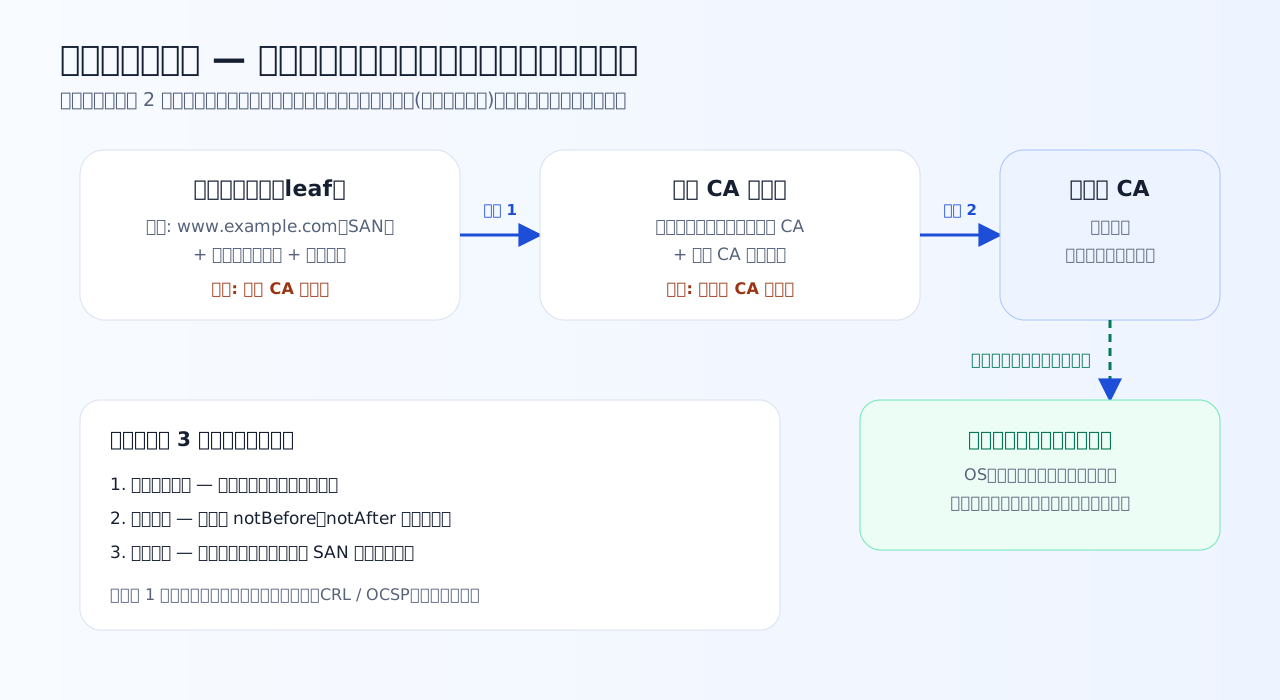
Verification walks the signatures upward from the leaf and settles at "is this in my local root store?" — reducing peer verification to a match against a locally held roster.
Practice 4-1 — Which hole do certificates close?
Confirm the hole left open in Chapter 3's key agreement, and the structure of a certificate.
Q1. Why is Diffie–Hellman key agreement alone insufficient for a secure channel?
DH only guarantees a shared secret with whoever exchanged public values with you. An attacker in the middle can run separate agreements with you and with the real server, then decrypt and re-encrypt everything (man-in-the-middle). Public values traveling in plaintext is not the problem — what is missing is the answer to "is the peer genuine?"
Q2. Which of these is not contained in a server certificate?
A certificate is a public document — "this is the public key for this domain," signed by a CA — and anyone may see it. The private key never goes into the certificate; it stays only in the server's hands. This separation is why, as the next quiz shows, merely copying a certificate does not enable impersonation.
Q3. Verifying the chain server certificate (leaf) → intermediate CA certificate → root CA certificate: how many signature verifications does the browser perform? (The root certificate is confirmed by matching the root store, which does not count as a signature verification)
The leaf's signature is checked with the intermediate CA's public key (1), and the intermediate certificate's signature with the root CA's public key (2). The root certificate is self-signed, so verifying its signature proves nothing — trust is settled by checking it against the local root store.
The chain of trust — walking upward
"Verifying the CA's signature needs the CA's public key. Who vouches for that?" — repeat the question and you see a starting point is required. PKI's answer:
- Verify the server certificate (leaf)'s signature with the intermediate CA's public key
- Verify the intermediate CA certificate's signature with the root CA's public key
- Match the root CA certificate against the root store shipped with the OS/browser — the trust anchor
The root CA's private key is kept in strict isolation; day-to-day signing is done by intermediates. If an intermediate is compromised, it can be revoked without replacing the root — the layering exists for operational safety.
The browser's verification, in summary, is three independent checks. If any one fails, you get an error:
| Check | Question | Typical error when it fails |
|---|---|---|
| Signature chain | Do the signatures reach the root store? | "This certificate is not trusted" (self-signed, unknown CA, missing intermediate) |
| Validity period | Is now within notBefore–notAfter? | "This certificate has expired" |
| Name match | Is the host being accessed listed in the SAN? | "This certificate is not for this site" |
On top of these, revocation checking (CRL / OCSP) exists to reject certificates invalidated before expiry, e.g. after a key leak. Chapter 6 practices triaging these errors on real output.
Certificates are public — so what proves identity?
One frequently missed point: the certificate itself is public information anyone can obtain. Your browser will display it; copying is trivial. So if an attacker copies a genuine certificate onto their server, can they impersonate the site?
No. The certificate binds a name to a public key, and the matching private key exists only on the genuine server. As Chapter 5 shows, the TLS handshake makes the server sign content determined on the spot. Without the private key, that signature cannot be produced. Only the pair — certificate (public) + proof of private-key possession (signature) — establishes "this is the domain's owner."
Operational takeaway: a leaked certificate is not an incident; a leaked private key means immediate revocation. Be able to explain which one needs guarding, from this structure.
Practice 4-2 — The chain through a practitioner's eyes
See how each verification step shows up in real errors and attacks.
Q4. How does the browser come to trust the root CA certificate at the start of the chain?
A chain of trust needs an anchor. Root certificates arrive not over the wire but in the OS/browser root store, present since shipment. PKI's design reduces "verify who I'm talking to" to "match against a roster I already hold locally."
Q5. A certificate's SAN lists only www.example.com, and you connect as api.example.com. The chain's signatures and validity period are fine. What happens?
Verification checks not only "are the signatures valid" and "is it within the validity period" but also "is the name I am connecting to listed in the SAN." A perfectly valid certificate for www.example.com proves nothing about api.example.com. Name matching is one of three independent checks.
Q6. An attacker copies a genuine server certificate (a public document) onto their own server. Why does impersonation still fail?
Certificates are public, so copying is trivial. What stops the attack is that the TLS handshake forces the server to sign content specific to this session, proving it holds the private key matching the certificate's public key (Chapter 5's CertificateVerify). The certificate/private-key separation and "only the key holder can sign" from Chapter 2 lock together here.
What to take from this chapter
- DH's hole is the man-in-the-middle attack; what's missing is authenticity — "is this the domain's owner?"
- A certificate's core is public key + name + CA signature. No private key inside
- Verification = signature chain, validity period, name match — three independent checks, anchored in the local root store
- What finally stops impersonation is proof of private-key possession. Certificate public; private key guarded
The tools are complete. Next, watch key agreement (Chapter 3) and certificates (this chapter) assemble into the single round trip of the TLS 1.3 handshake.