
The Depths of Windows Memory (Part 2) — The Life of a Physical Page: Five Lists and the Truth About the Page File
· Updated: · Go Komura · Windows, Memory Management, Page File, Working Set, Standby, RAMMap, Performance Monitoring
Revision history (1 updates, last updated Sep 3, 2026)
A log of the changes made to this article. Where a pre-update version was archived, it stays readable at a permanent DOI link.
- Restored the `<details>` block this translation was missing entirely, and fixed its code samples so they render as code rather than literal ``` markup. Read the version before this update (DOI: 10.5281/zenodo.22170862)
- First published
Cite this article(DOI (registered archive): 10.5281/zenodo.22170861)
The DOIs below refer to previously archived versions and may not match the current text. Use this page’s URL to reference the current text.
Go Komura (2026). The Depths of Windows Memory (Part 2) — The Life of a Physical Page: Five Lists and the Truth About the Page File. KomuraSoft LLC. https://comcomponent.com/en/blog/windows-memory-internals-page-lifecycle-pagefile/
- DOI (registered archive)
- 10.5281/zenodo.22170861
- DOI (last registered version)
- 10.5281/zenodo.22279014
“The Working Set went down. So is that page no longer in RAM?” Part 2 follows this question from the side of the physical page.
In the previous article, “The Depths of Windows Memory (Part 1) — The Moment a Virtual Address Becomes Physical RAM”, we followed as far as obtaining a physical page on the first access to a committed page. Even after a page leaves the Working Set, it does not necessarily disappear immediately or move to the page file immediately.
An unmodified page can move to Standby with its contents left in place. A modified page first waits for write-back on Modified. At reuse it may pass through Free or Zeroed, and if the same contents are needed again, it can return from Standby with a soft fault.
This article uses the PFN database as its axis and connects the Active, Modified, Standby, Free, and Zeroed states of a single physical page. For how to read the numbers themselves, it assumes the introductory article “What Does Windows’ “Memory Usage” Actually Mean?”.
“The Depths of Windows Memory” — All 3 Parts
This series proceeds in the order obtain a physical page → follow the flow of residency and reclamation → understand sharing and privatization.
| Part | Theme | What this part follows |
|---|---|---|
| Part 1 | Virtual addresses and page faults | When a region allocated with VirtualAlloc obtains physical RAM |
| Part 2 (this article) | The life of a physical page | The state transitions of a page that leaves the Working Set, and the role of the page file |
| Part 3 | Section objects and copy-on-write | How DLLs, file mappings, and shared memory share physical pages |
Part 2 answers just one question.
Does a physical page that leaves the Working Set disappear, go to disk, or remain in RAM?
| Before you start | Details |
|---|---|
| Intended readers | Developers and operations staff who want to understand, from the mechanism up, the relationship between Available and Standby, the behavior after Working Set trimming, page-file settings, and memory compression |
| Environment | Windows 10/11 or a current Windows Server |
| Prerequisites | Basics of Working Set, Commit, and soft/hard faults |
| Difficulty | Intermediate. Uses internal terms such as PFN and page list |
The explanation centers on what you can observe with RAMMap and PerfMon, without a kernel debugger.
In the diagram a solid line marks a relation that always holds and a dashed line marks a conditional one (the conditions are given per relation on the detail page). The full list of relations (18 in total, with evidence and certainty) and the definitions of the main concepts are collected on the knowledge map detail page (in Japanese). Data: JSON-LD / Turtle
1. The Bottom Line First
Where a physical page goes can be summed up in the following three points.
- Removing a page from the Working Set and losing its contents are different things. A clean page remains on Standby, and if the same contents are needed it can return without reading the disk. A modified page is reused only after its contents can be held somewhere such as the page file or the corresponding file.
- Standby is a cache and, at the same time, Available. It keeps its previous contents, but it can be reused if needed for another purpose. Available includes Standby, Free, and Zeroed.1
- The page file supports not only write-out but also Commit and dumps. Write-out is not a batch job that starts only after RAM is completely exhausted; it proceeds in the background according to the Modified list and memory pressure. Disabling it does not fix a leak, and it can reduce the Commit Limit, the options for reusing RAM, and the ability to capture a dump.234
In one sentence: before Windows discards a page, it checks the possibility that it will be needed again and whether there is a place from which the original contents can be restored.
| What you want to know | Sections to read |
|---|---|
| Where a page goes after leaving the Working Set | Sections 2 to 6 |
| The difference between Standby, Free, Zeroed, and compression | Sections 7 to 8 |
| Deciding whether a page file is needed and how large | Sections 9 to 10 |
| Confirming it with RAMMap or Testlimit | Sections 11 to 12 |
2. The PFN Database — the Ledger on the Physical-RAM Side
The PTE we saw in Part 1 represented the translation from a virtual page to a physical page. Looking at this from the physical-page side, the ledger that tracks “what is this RAM page being used for right now” is the PFN database. PFN stands for Page Frame Number: physical RAM numbered in page units.
A PFN entry conceptually tracks the following information.
- The current state of the physical page
- Reference count and share count
- The corresponding PTE
- Whether it is modified
- Which page list it belongs to
- Information related to NUMA node and priority
Choose the tool view to match the granularity you want to see. In WinDbg and RAMMap you can confirm the following.567
| What you want to confirm | View or command |
|---|---|
| Information on a specific PFN | !pfn in WinDbg |
| Physical-memory usage and totals per page list | !memusage in WinDbg |
| Purpose and page list | Use Counts in RAMMap |
| Standby by priority | Priority Summary in RAMMap |
| Per-page usage | Physical Pages in RAMMap |
With RAMMap you can observe this without using a kernel debugger.
3. Connecting the Five States on One Picture
Here the flow of a physical page is simplified to five states. First read them by “can it be used now”, “does it still hold contents”, and “does it need preparation before reuse”.
| State | How this part treats it |
|---|---|
| Active / Valid | Referenced through a valid PTE from a Working Set or similar |
| Modified | Modified and waiting for write-back |
| Standby | A reuse candidate that keeps its previous contents |
| Free | Allocatable, but an old bit pattern may remain |
| Zeroed | Zeroed and ready to hand out as a new user-mode page |
This is not a diagram that enumerates every state. Current Windows also has Standby by priority, Transition, Bad, and others. Also, Active is less a single “Active list” than the state of being referenced through a valid PTE. With that distinction kept in mind, use it as a picture for following an app’s memory behavior.
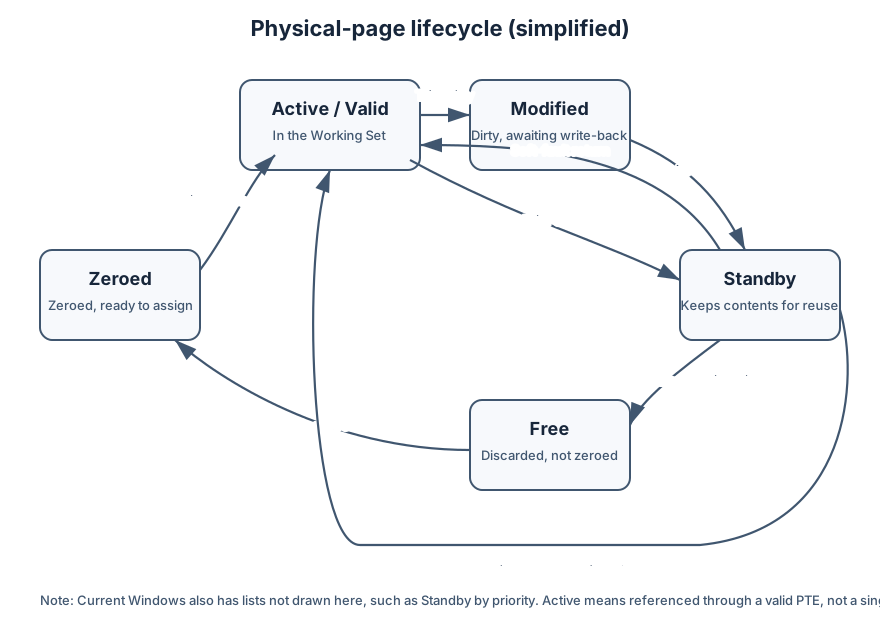
Figure 1: A page referenced in the Working Set moves to Standby if clean and to Modified if dirty. If the same contents are needed it returns; for another use it is either reused directly or goes through Free/Zeroed in preparation for an allocation that requires zeros.
Mermaid source for Figure 1
flowchart LR
    zeroed["Zeroed\nAlready zeroed"] -->|First touch| active["Active / Valid\nReferenced in the Working Set"]
    active -->|Trim clean| standby["Standby\nReuse candidate that keeps its contents"]
    active -->|Trim dirty| modified["Modified\nAwaiting write-back"]
    modified -->|Write-back done| standby
    standby -->|Return via soft fault| active
    standby -->|Drop old identity| free["Free\nNot zeroed"]
    standby -->|Reuse directly for another purpose| active
    free -->|For allocations that need zeros| zeroed
Two points are worth taking from the figure.
Leaving the Working Set does not necessarily mean losing the contents. If the same contents are needed again, the page that remains can be returned to.
Reuse for another purpose does not necessarily pass through Free/Zeroed in order. If the page will be handed to user mode as a new demand-zero private page, the old contents must be erased. If, on the other hand, the whole page will be overwritten, as when it is the destination of a file read, the Standby identity can be dropped and the page reused directly.
4. Active / Valid — a Physical Page You Can Reference Now
An Active/Valid page is referenced from a process’s Working Set or from system space through a valid PTE. The CPU can reach it with ordinary address translation, so the access itself does not need a page fault.
There is no guarantee, however, that the page will remain Active. To maintain available memory, the memory manager looks at Working Set size, how recently the page has been used, and similar factors, and trims candidate pages. Microsoft’s Working Set documentation also explains that the memory manager removes pages from the Working Set in order to create available memory.8
4.1. A Trim Is Not a Free
What Working Set trimming mainly changes is the resident state of being immediately referenceable through a valid PTE. Distinguish the following four as separate events.
- Removing from the Working Set
- Releasing Commit
- Releasing a virtual address range
- Losing the original data
Running EmptyWorkingSet or a tool’s “Trim Working Set” is not a substitute for VirtualFree or a heap free. If you touch the same page again, it comes back via a soft fault from Standby or a hard fault from a backing store. So “I made the Working Set smaller” does not mean “I fixed the leak”.
5. A Clean Page Goes to Standby
Even after a page is removed from the Working Set, if its contents still match the original file or it already has a safe backing store, it can be placed on Standby. Representative examples include the following.
- Unmodified EXE/DLL code
- An unmodified memory-mapped file
- A private page that has already been written back
- Data remaining in the file cache
Return to the same contents, or turn over to another purpose
A Standby page keeps its correspondence to the previous contents. When the same process or another process needs those contents, provided the page has not yet been reused, a soft fault that reconnects the PTE is enough to restore it.
On the other hand, if another allocation needs a physical page, the old Standby identity can be discarded and the page reused. If the reuse destination is a user-mode private page that requires zero initialization, a Zeroed page is prepared; if the whole page will be overwritten with file contents or the like, it can be reassigned directly without zeroing.
This two-sidedness is exactly why Standby is both a cache and Available.
5.1. Why Available Includes Standby
MEMORYSTATUSEX.ullAvailPhys represents physical memory that can be reused immediately without writing to disk, and it is the sum of Standby, Free, and Zeroed.1
flowchart LR
    accTitle: The three page lists that make up Available
    accDescr: Available physical memory is the sum of Standby, Free, and Zeroed, and does not include Active pages referenced from a Working Set
    standby["Standby (reuse candidate that keeps its contents)"] --> avail["Available (available physical memory)"]
    free["Free (unused, not zeroed)"] --> avail
    zeroed["Zeroed (unused and zeroed)"] --> avail
    active["Active (referenced in the Working Set)"] -.->|Not included| avail
Figure 2: Available is the sum of Standby, Free, and Zeroed. Standby, which still holds its contents, is also counted as “available”.
So it is not a contradiction when Task Manager shows “Free is low, yet Cached/Standby is high and Available is sufficient”.
Windows does not leave free RAM idle; it leaves recently used files and code on Standby. It serves the same contents as a cache, and reuses the pages if another purpose needs them.
Do not conclude “Free is low, so we are immediately short of memory”; look at Available, Commit, hard faults, and processing delay together.
6. A Dirty Page Waits on Modified
When an app writes to a page, those contents no longer match the original backing store. Overwriting that dirty page for another purpose as it is would lose the data. So a modified page removed from the Working Set waits for write-back on Modified.
The write-back destination depends on the kind of page.
| Kind of page | Typical write-back destination |
|---|---|
| Private committed page | Page file |
| Writable mapped file | The corresponding data file |
| Dirty data in the file cache | The corresponding data file |
| Clean EXE/DLL page | No write-back needed. Can be re-read from the original image |
Microsoft’s page-file documentation also explains that .dll, .exe, and ordinary files that already exist on disk do not need to be written again to the page file, and that modified data with no original disk copy is what becomes a candidate for the page file.3
6.1. The Modified Page Writer
The Modified Page Writer is a system worker that scans the page-file-backed dirty pages the memory manager tracks and writes them out to the page file.4 On the mapped-file side there are paths such as the Mapped Page Writer, which cooperate with the file system and the cache manager to write back to the corresponding file.
Write-out is not a “do nothing until RAM is at 0 bytes” scheme. According to the Modified list, Available, the state of the page file, and similar factors, it prepares pages that can be reused in the future in the background.
Once write-back finishes and there are no other valid references, the page can proceed to Standby with its contents intact.
flowchart TB
    accTitle: Write-back paths for a modified page
    accDescr: A modified page that leaves the Working Set waits on the Modified list, a private page is written to the page file by the Modified Page Writer if a page file is configured, a mapped-file page is written back to the corresponding data file by the Mapped Page Writer or similar, and after completion the page proceeds to Standby with its contents intact
    dirty["Modified page that left the Working Set"] --> modified["Wait for write-back on the Modified list"]
    modified -->|"Private page (when a page file is configured)"| mpw["Modified Page Writer writes it to the page file"]
    modified -->|Mapped-file page| mapped["Mapped Page Writer or similar writes it back to the corresponding file"]
    mpw --> standby["After write-back, to Standby with contents intact"]
    mapped --> standby
Figure 3: The write-back destination is determined by the kind of page, and both paths proceed in the background. On a system with the page file disabled, the private-page side has no write-back destination, so modified private pages remain in RAM.
6.2. Separating Page Output from Page-File-Specific I/O
Read the counters by separating the number of I/Os from the number of pages.
| Counter | What it counts |
|---|---|
Memory\\Page Writes/sec |
The number of paging write I/Os issued to free physical memory |
Memory\\Pages Output/sec |
The number of pages written to disk by those writes |
Memory\\Page Reads/sec |
The number of disk read I/Os issued to resolve hard faults |
Memory\\Pages Input/sec |
The number of pages that entered RAM from those reads |
The other distinction is that paging I/O and page-file-specific I/O are not the same thing.
Page Writes/sec and Pages Output/sec can also rise on the path that writes back dirty pages of mapped files and the like. The input side likewise does not distinguish the page file, DLLs, EXEs, and memory-mapped files.3
To identify I/O specific to pagefile.sys, do not estimate from these four counters alone; record File I/O and Disk I/O with ETW/WPA. Match FileObject to FileName and confirm the target file.9
One more point: writing to the page file ahead of time does not mean reading back from disk right away. If the page is not accessed, the written-back page can be removed from RAM and its physical memory given to pages that are used more often.
7. The Difference Between Standby, Free, and Zeroed
7.1. Standby
A state that still holds the correspondence to the previous contents.
- If the same contents are needed, it can return via a soft fault
- If another purpose needs it, the old identity can be discarded and the page reused
- There are Standby lists by priority
7.2. Free
The valid correspondence to the previous contents has been lost, and the page is allocatable. However, an old bit pattern may still remain in the page. Handing it to user mode as it is risks leaking information from the previous process.
7.3. Zeroed
The contents are zero, and the page can safely be handed out as a new user-mode page. The demand-zero fault in Part 1 was a representative case of obtaining an available Zeroed page and binding it to a PTE. Preparation from Free to Zeroed is done according to demand and system state.
So even though “Free” and “Zeroed” both look unused, they differ in their security-related readiness.
8. The Memory Compression Store — Creating One More Destination Inside RAM
From Windows 10 onward, when there is memory pressure, the memory manager can in some cases compress infrequently used pages in RAM instead of writing them to disk immediately. That collection of compressed pages is the compression store.
8.1. Where to See the Amount Compressed
In the early Windows 10 implementation the compression store was accounted inside the System process’s Working Set, but on current Windows it appears in the process list of the debugging tools as a dedicated Memory Compression process. So when you investigate the current amount compressed, do not follow only the System process’s Working Set. The purpose itself, keeping more apps in physical memory and reducing disk I/O, has not changed.1011
8.2. Compression Has a Cost Too, and the Order Is Not Fixed
Keep the following points in mind, though.
- Compressed pages still use RAM
- Compression and decompression have a CPU cost
- Compression does not erase the Commit promise
- There is not a fixed order of “always compress, then the page file”
- The policy changes with the kind of page, pressure, and access history
Task Manager’s “In use (Compressed)” does not mean that compression completely freed physical memory. The compression store is not a feature that makes the page file unnecessary; it adds one option that uses CPU to reduce I/O between RAM and storage.
9. The Real Role of the Page File
The page file has at least three roles.
flowchart LR
    accTitle: Three roles of the page file
    accDescr: The page file widens the Commit Limit, becomes the backing store for infrequently accessed modified private pages, and becomes the receptacle for a system crash dump
    pagefile["Page file"] --> limit["Widens the Commit Limit (headroom on the ceiling side)"]
    pagefile --> backing["Backing store for modified private pages"]
    pagefile --> dump["Receptacle for a system crash dump"]
Figure 4: The page file’s role is not only “slow RAM”. Even when usage is 0 it still supports the ceiling and dumps.
9.1. Widening the Commit Limit
The system’s Commit Limit is determined roughly by RAM plus the total of all page files. Without a page file, the Commit Limit drops to a level a little smaller than installed RAM. When Commit Total reaches the ceiling, new Commit fails, which can lead to abnormal app termination or system trouble.2
This is a different matter from “how many GB are currently written to pagefile.sys”. The page file is also headroom on the ceiling side that supports the promise called Commit.
9.2. Backing Modified Private Pages
If infrequently accessed modified private pages are backed by the page file, those physical pages can be removed from RAM and given to frequently used code and data.2 Disabling the page file reduces the options for removing such pages from RAM. You cannot simply say “it is fast because paging out does not happen”.
9.3. Supporting System Crash Dumps
To produce Memory.dmp at a system crash, you need a page file or a dedicated dump file that can support the dump method you chose.3 Complete memory dump, kernel memory dump, and automatic memory dump differ in the amount required.
In an environment where you investigate crashes, deleting the page file only to save space can mean that no evidence remains when you need it most. For collection methods, see also “An Introduction to Collecting Windows Crash Dumps”.
10. The Right Size Is Not Uniform
You should not decide page-file size from a fixed formula such as “1.5 times RAM” alone. Microsoft explains that the appropriate size differs per system on the following two points and cannot be generalized.3
- Peak System Commit Charge
- The system crash dump you need
In practice, think in the following order.
10.1. Start from System-Managed as the Baseline
The Windows default is system-managed. It grows and shrinks according to installed RAM, Commit demand, crash-dump requirements, and the like. Unless you have a special constraint or a measurement result, starting here is the safe choice.
10.2. Measure Peak Commit Under a Representative Load
Collect the following counters in PerfMon over a long period.
Memory\\Committed BytesMemory\\Commit LimitMemory\\% Committed Bytes In UseMemory\\Modified Page List BytesPaging File(*)\\% UsageMemory\\Available MBytesMemory\\Page Reads/secMemory\\Page Writes/sec
Include the actual peaks in the collection period: month-end processing, backups, builds, several users at once, and so on.
A high page-file usage percentage alone does not prove a storage-performance problem. Sticking to the ceiling, however, is a warning of insufficient capacity. Look together at whether Commit is approaching the ceiling, whether a large amount of Modified is waiting, and whether the disk is saturated.3
10.3. Decide the Dump Requirement First
Decide whether you need a complete memory dump, whether a kernel memory dump is enough, or whether you will use a dedicated dump file. If you change to a fixed size, it must satisfy not only peak Commit but also the dump requirement.
11. See It for Yourself
11.1. Looking at Page Lists in RAMMap
Start RAMMap as administrator and open Use Counts first.7 The items to look at are the following.
- Active
- Standby
- Modified
- Modified no write
- Free
- Zeroed
Priority Summary lets you confirm that Standby is split by priority. Processes shows each process’s Working Set; File Summary and File Details let you follow file data that is in RAM.
Read the same file twice and look at the pages that remain
- Read a fairly large local file once.
- End the read and Refresh RAMMap. That file’s pages may remain in File Summary or on the Standby side.
- Read the same file again. Pages that have not yet been reused can return with no disk I/O, or with little I/O.
Results vary with memory pressure, antivirus, and file size. Look at the direction of the state transition rather than a single set of numbers.
Do not use Empty as a performance-improvement operation on production machines
Note that RAMMap’s Empty menu changes system state artificially. Do not clear Standby as a performance-improvement operation on a production machine; use it only in an isolated test environment.
11.2. Separating Commit and Touch with Testlimit
Testlimit is a Sysinternals tool that simulates resource shortages of memory, handles, processes, threads, and the like. First run the following with the binary you have on hand and confirm the version and usage that are displayed.
.\\testlimit64.exe -?
Confirm the version and syntax before you try it
The following targets Testlimit v5.24. In the official v5.24 syntax, -m [MB] allocates the specified amount of memory, -d [MB] allocates and Touches, -e [seconds] is the allocation interval, and -c [count] is the allocation count. Specify -c last. If what you see locally differs, prefer that usage.12
Next, try it small on a disposable VM.
# -m 64: allocate 64 MiB, -e 1: 1-second interval, -c 8: stop after 8 times
.\\testlimit64.exe -m 64 -e 1 -c 8

# The same count and interval, with -d so that each region is Touched
.\\testlimit64.exe -d 64 -e 1 -c 8
While it runs, record the following at the same time.
- Task Manager’s “Committed X/Y”
- RAMMap’s Active, Modified, and Standby
Memory\\Committed BytesMemory\\Commit LimitMemory\\Available MBytesMemory\\Modified Page List Bytes
Reproduce exhaustion only on a VM with a snapshot
If you actually reproduce Commit exhaustion, do not do it on the host PC; increase the count step by step on a VM with a snapshot. A run that automatically allocates up to the ceiling can freeze the screen, terminate processes abnormally, and lose logs. The purpose is not to destabilize the OS; it is to observe that as you approach the Commit Limit, new Commit fails.
12. Four Misreadings to Avoid in Practice
12.1. “Standby is high, so it is a memory leak”
Standby is a reusable cache and is included in Available. Judge a leak by whether the process-private Commit baseline and the allocation breakdown keep growing even after the load ends.
12.2. “Cutting the Working Set will fix the leak”
A trim only changes residency; it does not release Commit or a virtual allocation. On re-access the page faults back in.
12.3. “Page-file usage is 0, so it is unnecessary”
The page file supports not only the current write amount but also the Commit Limit and crash dumps. Deciding to delete it from everyday usage alone loses peak headroom and evidence at failure time.
12.4. “Memory compression first, then always the page file”
Compression is not a fixed serial pipeline. Windows chooses dynamically according to the kind of page, compression efficiency, CPU load, memory pressure, and whether a backing store exists.
13. Summary
- The PFN database is the ledger that tracks a physical page’s ownership, references, modification, and page-list state.
- A clean page that leaves the Working Set remains on Standby and can return via a soft fault if the same contents are needed.8
- A dirty page waits on Modified and is written back to the page file if it is private, or to the corresponding file if it is mapped, and so on.4
- Available is the sum of Standby, Free, and Zeroed; a large Standby by itself is not a memory shortage.1
- Memory compression compresses pages in RAM to reduce I/O, but it does not erase the roles of Commit and the page file.10
- The page file supports the Commit Limit, modified private pages, and system crash dumps.23
- The appropriate size is determined by peak Commit and dump requirements; it cannot be decided by a uniform multiplier.3
- Working Set trimming and clearing Standby are not memory-leak fixes.
Continued in Part 3, “Section Objects and Copy-on-Write: What DLLs and File Mappings Really Are”.
We follow why file pages and DLLs that remain on Standby are visible from multiple processes as the same physical page.
Related Articles
- The Depths of Windows Memory (Part 1) — The Moment a Virtual Address Becomes Physical RAM
- What Does Windows’ “Memory Usage” Actually Mean?
- The Depths of Windows I/O (Part 4) — Cache Manager and WriteFile
- An Introduction to Collecting Windows Crash Dumps
- Process Explorer / Handle / VMMap in Practice
Related Consulting Areas
KomuraSoft LLC handles investigations of Windows application memory pressure, Commit exhaustion, paging, Working Set growth, and crash-dump collection design.
- Windows Application Development
- Bug Investigation and Root-Cause Analysis
- Legacy Asset Migration
- Contact Us
References
-
Microsoft Learn, MEMORYSTATUSEX structure. On
ullAvailPhysbeing physical memory that can be reused immediately without writing to disk, and being the sum of the Standby, Free, and Zeroed lists. ↩ ↩2 ↩3 -
Microsoft Learn, Introduction to page files. On the page file removing infrequently accessed modified pages from RAM, widening the Commit Limit, and supporting system crash dumps. ↩ ↩2 ↩3 ↩4
-
Microsoft Learn, How to determine the appropriate page file size for 64-bit versions of Windows. On the appropriate size depending on peak Commit and crash-dump requirements and not being generalizable, and on the Modified list, page-file usage, related counters, and the system-managed page file. ↩ ↩2 ↩3 ↩4 ↩5 ↩6 ↩7 ↩8
-
Microsoft Learn, Data corruption on IO write. On the Modified Page Writer being a memory-manager system worker that scans page-file-backed dirty pages and writes them out. ↩ ↩2 ↩3
-
Microsoft Learn, !pfn (WinDbg). On being able to display the state, references, PTE address, and more of a specified PFN entry. ↩
-
Microsoft Learn, !memusage (WinDbg). On being able to total physical-memory usage and page states such as Zeroed, Free, Standby, Modified, and Active. ↩
-
Microsoft Learn, RAMMap - Sysinternals. On RAMMap’s Use Counts, Processes, Priority Summary, Physical Pages, File Summary, and File Details displaying the purpose and page lists of physical memory. ↩ ↩2
-
Microsoft Learn, Working Set. On the memory manager trimming the Working Set to create available memory, and on being able to resolve pages that remain in Transition or in another process’s Working Set with a soft fault. ↩ ↩2
-
Microsoft Learn, FileIo_Name class. On ETW File I/O events having FileObject and FileName, so that FileObject can be matched with Disk I/O events to identify I/O to the target file. ↩
-
Windows Insider Blog, Announcing Windows 10 Insider Preview Build 10525. On the early Windows 10 compression-store implementation placing the in-RAM collection of compressed pages in the System process’s Working Set and reducing writes to disk. ↩ ↩2
-
Microsoft Learn, Find Process ID (PID) in Windows. On the process-list example from the current Debugging Tools for Windows showing a
Memory Compressionprocess with a separate PID under System. ↩ -
Microsoft Learn, Testlimit - Sysinternals. On the official Testlimit v5.24 syntax in which
-mallocates memory,-dallocates and Touches,-eis the allocation interval, and-cis the allocation count, with-cspecified last. ↩
Related Articles
Recent articles sharing the same tags. Deepen your understanding with closely related topics.
What Does Windows' "Memory Usage" Actually Mean? — Reading Working Set, Private Bytes, Commit, and the Page File Correctly
Task Manager Memory, Working Set, Private Bytes, and Commit differ. See how virtual and physical memory relate, the page file's role, and...
The Depths of Windows Memory (Part 1) — The Moment a Virtual Address Becomes Physical RAM: A Page Fault from Start to Finish
Connects VirtualAlloc, VADs, page tables, the TLB, demand-zero faults, and hard faults to explain the moment a virtual address is assigne...
The Depths of Windows Memory (Part 3) — Section Objects and Copy-on-Write: What DLLs and File Mappings Really Are
This article connects section objects, image and data mappings, the shared cache, and copy-on-write to explain how DLLs and shared memory...
How Does a Windows Shortcut Find a File You Moved? — A File's Location and Its Identity Are Two Different Things
Why does a shortcut still open a file you moved? Windows can find the target from tracking identifiers and file characteristics, not just...
Is Safely Removing a USB Drive Still Necessary? — Thinking It Through from Quick Removal and Write Caching
Can you pull a USB drive once the copy finishes? Write caching, Quick removal versus Better performance, how to check the setting, and wh...
Related Topics
These topic pages place the article in a broader service and decision context.
Windows Technical Topics
Topic hub for KomuraSoft LLC's Windows development, investigation, and legacy-asset articles.
Where This Topic Connects
This article connects naturally to the following service pages.
Windows App Development
We support Windows desktop applications that involve resident processing, device integration, operational logging, and maintainable structure.
Frequently Asked Questions
Common questions about the topic of this article.
- Is a page written to the page file as soon as it leaves the Working Set?
- No. An unmodified page moves to Standby with its contents intact and becomes a cache that can be reused immediately. A modified page moves to Modified, and after it is written back as needed to the page file or the corresponding file, it proceeds to a reusable state such as Standby.
- Does Task Manager's Available include Standby memory?
- It does. The available physical memory Windows reports is the sum of Standby, Free, and Zeroed. Standby still holds old contents, but because it can be reused for another purpose immediately if needed, it is counted as available memory.
- Does writing to the page file start only after RAM is completely exhausted?
- No. Windows writes back infrequently accessed modified pages in the background according to the Modified list and the state of available memory. It is not a simple mechanism that waits for absolute exhaustion and then evicts everything at once.
- Does disabling the page file make Windows faster?
- In general you cannot assume it will. Disabling it lowers the Commit Limit, makes it harder to remove infrequently accessed modified pages from RAM, and also affects system crash dumps. Normally you leave it system-managed and decide by measuring peak Commit and dump requirements.
- If you have memory compression, is the page file unnecessary?
- It does not become unnecessary. A compression store compresses pages in RAM to reduce I/O, but compressed pages still use physical memory and do not replace the Commit guarantee. The choice between compression and paging out is a dynamic policy of the memory manager.