
Never Use a QR Code's Decoded Value As-Is — Error Correction Succeeding Does Not Guarantee the Value
· Updated: · Go Komura · QR Code, Barcode, Error Correction, Input Validation, Data Quality, Business Systems, C#, Design, Field Operations
Revision history (1 updates, last updated Jul 30, 2026)
A log of the changes made to this article. Where a pre-update version was archived, it stays readable at a permanent DOI link.
- Fixed a display problem where lines containing a vertical bar were rendered as a table, leaving the reference links unclickable. The text itself is unchanged.
- First published
Cite this article(DOI (registered archive): 10.5281/zenodo.22170781)
The DOIs below refer to previously archived versions and may not match the current text. Use this page’s URL to reference the current text.
Go Komura (2026). Never Use a QR Code's Decoded Value As-Is — Error Correction Succeeding Does Not Guarantee the Value. KomuraSoft LLC. https://comcomponent.com/en/blog/qr-decoded-value-validation/
- DOI (registered archive)
- 10.5281/zenodo.22170781
- DOI (last registered version)
- 10.5281/zenodo.22170782
The inspection terminal in the warehouse goes “beep.” Taking that as the signal that the QR code was read, the inventory system allocates the slip and confirms the shipment. What has to be kept apart here is “the decoder returned a value” and “it is safe to act on that value.”
QR codes have error correction that recovers data from dirt and damage. From level L to H, it can recover roughly 7% to 30% of the codewords.1 That does not, however, let you conclude that “the value that came back is necessarily correct.”
Using real QR samples and measurements from two different decoders, this article works through what actually happens, how far error correction’s job extends, and what the application has to validate. The QR codes shown here can be tried with a reader you have to hand. Specimens included to demonstrate that a symbol cannot be read are called out where they appear.
We have also prepared a QR code decoding comparison tool that switches between jsQR and OpenCV.js in the browser. It shows the decoding results for the samples and the differences that character encoding makes. Keep the difference between the Python build of OpenCV and the browser build, described later, separate, though.
1. The Bottom Line First
Treat the decoded value as “unvalidated external input,” exactly like keyboard input. The baseline is three stages: format check, then check digit, then business validation. Error correction is no substitute for that validation.
| What you check | What “it passed” alone does not tell you | What the receiving side does |
|---|---|---|
| Whether the QR code could be decoded | Whether it matches the original value. Whether it is a Structured Append fragment or mojibake | Check the format — length, character classes, prefix — as an exact full match |
| Whether it is consistent as a code scheme | Whether several characters changed, or whether it is a different legitimate number | After the check digit, cross-check against master data and the business context |
| Whether a usable slip exists | Whether it is the slip for the box, run, or task you should be processing right now | Compare it against the work target you identified by some other means |
| Whether it is awaiting shipment right now | Whether another terminal is running the same operation at the same time | Prevent double processing with an atomic state transition at execution time, or with an idempotency key |
How to read the measurements needs separating up front as well. With random module flips and random codeword corruption, across 9,700 trials there were zero wrong values. With damage constructed on purpose, on the other hand, changing just 7 of the 26 codewords made 004873 read as 104873, and two decoders returned the same error. “A pattern that misreads exists” and “how often it happens in the field” are two different questions.
Structured Append, character encoding, and grabbing the wrong QR code from within the frame all happen outside error correction. Whether the result is a warning, an exception, or an empty string is implementation-dependent too, so do not treat “no error was raised” on its own as success.
Where to Start, by What You Want to Know
| What you want to know | Where to read |
|---|---|
| Whether a genuinely different value really comes back | The real samples in section 2 |
| Why error correction cannot prevent it | The mechanism in section 3, and the measurements and limits in section 4 |
| What it turns into as a business failure | The four failure patterns in section 5 |
| How to fix the application | The validation design, C# example, and remaining countermeasures in section 6 |
| How to decide label design and field procedures | Operations in section 7 and the reproduction steps in section 8 |
In the diagram a solid line marks a relation that always holds and a dashed line marks a conditional one (the conditions are given per relation on the detail page). The full list of relations (16 in total, with evidence and certainty) and the definitions of the main concepts are collected on the knowledge map detail page (in Japanese). Data: JSON-LD / Turtle
2. Samples — Two QR Codes That Look Almost Identical
2.1. It Looks Like a Success, but the Slip Number Is Different
Both of the two codes below decoded without error in the testing for this article. B, the lower one, is a sample whose damage was constructed on purpose so that it would be read as a different value. It says nothing about how often ordinary dirt produces this. Start by confirming the outcome: a value came back, and it is wrong.
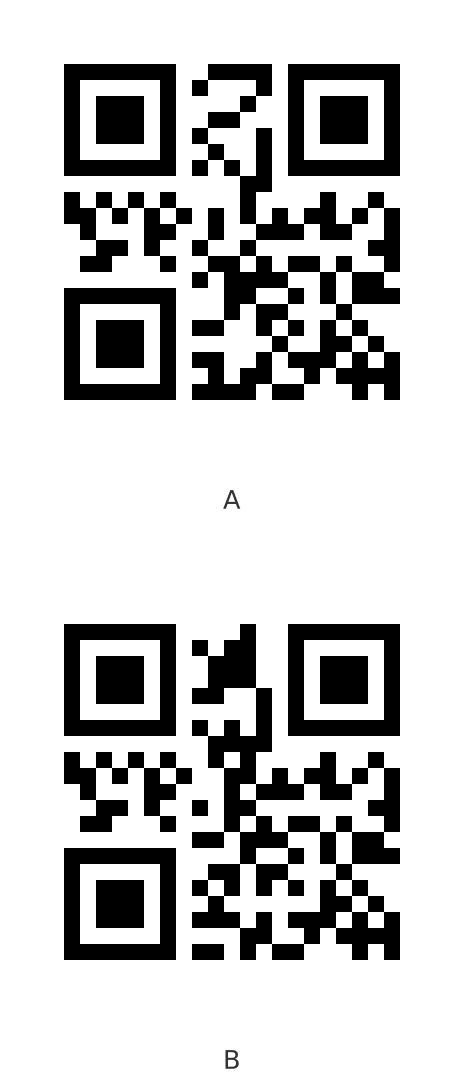
One word before you try: the stock iOS camera may not respond. If it does not read, try a QR reader app (the reason is in the note below).
- A (top) →
NO:20260725-004873 - B (bottom) →
NO:20260725-104873
These are real codes, so you can try them directly with a reader you have to hand. The slip number follows the scheme “8-digit order date + 5-digit sequence number + 1 check digit,” so what changed is the sequence part — 00487 became 10487, pointing at a different slip 10,000 entries away.
The stock iOS camera may not respond. The stock camera is built to give priority to content it can “open,” such as a URL, so a QR code carrying nothing but a string, like the ones in this article, may produce nothing at all. A QR reader app will read it. The same image, yet the behavior changes with the implementation on the reading side — the very subject of this article is something you end up experiencing in the first sample.
2.2. Only 31 Modules Changed, and Still No Notification
B differs from A in only 31 modules, all within a single vertical band in columns 10 through 14 from the left. That is 15% of the 208 modules in the codeword area.
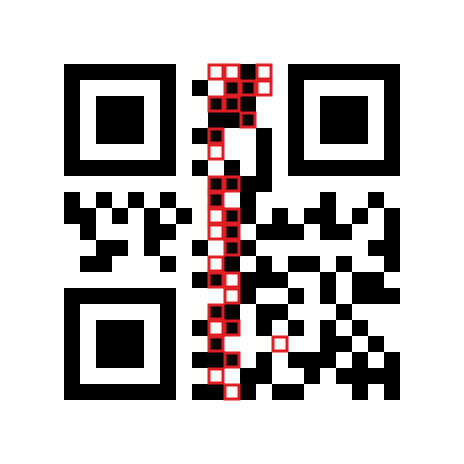
And the crucial part is that the decoder returns no error for either of them. There is not even a “a correction was applied” notification. From the application’s point of view, both are equally successful reads.
To understand this result you have to look not only at the area of the damage but at which pattern, as codewords, it moved closer to. Section 3 covers the mechanism, section 4.2 how the sample was built, and section 4.3 how far it sits from real-world dirt.
3. Why It Happens — Inside Error Correction
3.1. The Unit of Correction, and the Misdecode Margin the Standard Left
QR code error correction is a Reed-Solomon code, and it works per codeword, in units of 8 bits. Here is the breakdown for the version 1, error correction level M symbol (21×21 modules) used here.2
| Total codewords | Data codewords | Error correction codewords | Correction capability in the standard |
|---|---|---|---|
| 26 | 16 | 10 | 4 codewords |
The last column is what catches the eye. With 10 error correction codewords, a Reed-Solomon code can correct up to 5. Yet the correction capability the standard specifies is 4. The one codeword of difference is deliberately set aside as misdecode protection codewords p (for version 1-M, p = 2). A footnote to Table 13 of the standard also states explicitly that the correction capability is set at less than half the number of error correction codewords in order to reduce the probability of misdecodes.2
In other words, the standard itself is designed on the premise that error correction can produce a wrong value. The same clause also says this.
Because QR Code is a matrix symbology, a defect that changes a module from dark to light (or the reverse) results in the corresponding symbol character being misdecoded as an apparently valid but different codeword.2
3.2. It Does Not Know the “Original Value” — It Searches for a Correctable Candidate
The reason lies in the principle of correction itself. What Reed-Solomon decoding does is search for a codeword within a fixed distance — the correction capability — of the received pattern. If one is found it returns that as the answer; if none is found it ends in “unreadable.” It does not go hunting for the nearest codeword no matter how badly the symbol is damaged.
That property splits the outcomes in two. Random damage scatters far from every codeword, so it usually falls on the side of “nothing found, therefore unreadable.” The dangerous case is when the damage happens to land in the neighborhood of a different codeword. The decoder then decides that codeword is the correct answer and returns it. The returned codeword is perfectly consistent in its own right, so there is no way to tell that it is wrong.
4. How Far Correction Goes, and Where the Danger Starts
Here, random damage and damage constructed to move toward a different value are measured separately. The amount of damage alone tells you nothing about whether the returned value is correct. With the same correction mechanism, where the damage landed split the outcomes into “unreadable” and “returns a different value.”
Before reading the numbers, here are the experimental conditions for this section. They are the premises for reproducing the work yourself.
| Item | Details |
|---|---|
| Target symbol | Version 1-M / 21×21 (26 codewords = 16 data + 10 error correction) |
| Generation | segno 1.6.6 / Python 3.11 |
| Decoder 1 | OpenCV 5.0.0 cv2.QRCodeDetector (Python 3.11) |
| Decoder 2 | jsQR 1.4.0 (Node.js 22) |
| How damage was applied (section 4.1) | Flip modules chosen at random from the 208 in the codeword area / corrupt whole codewords at random / apply uniform blur, noise, and contrast reduction across the entire symbol |
| How damage was applied (section 4.2) | Exhaustive trial of every combination of codewords moved toward the target value B |
| Number of trials | 3,900 module flips (300 per level), 1,800 codeword corruptions (200 per level) plus 4,000 follow-up trials beyond the correction capability, 1,000 image-quality degradations (200 per condition). Section 4.2 is the exhaustive 792 and 495 combinations |
| Classification | The decoder’s return value is classified as “read correctly” if it matches the expected value, “unreadable” if no value is obtained, and “wrong value” if a non-empty different value is returned |
The environment for the article as a whole, including the samples in section 5, is collected under “Test Environment” at the end of the article.
4.1. Random Dirt Falls on the Side of “Unreadable”
Flipping Modules at Random
For a version 1-M symbol, some number of the 208 modules in the codeword area were flipped at random and the results classified (300 trials per level, 3,900 in total).
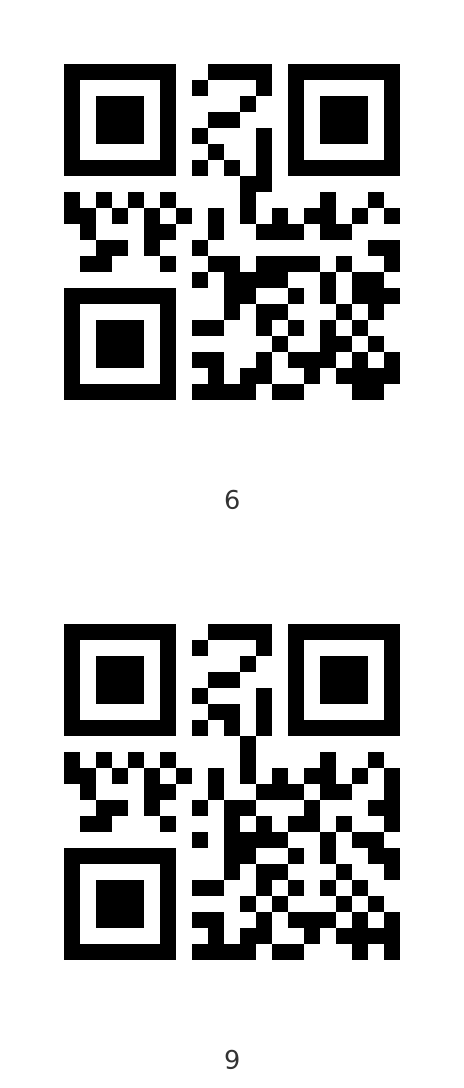
The top has 6 flipped, the bottom 9. The top reads correctly; the bottom does not read at all. A difference of 3 modules is almost invisible to the human eye. The boundary lies somewhere that does not show up in appearance.
| Modules flipped | Read correctly | Unreadable | Wrong value |
|---|---|---|---|
| 0 to 5 | 1,799 | 1 | 0 |
| 6 | 131 | 169 | 0 |
| 7 | 32 | 268 | 0 |
| 8 | 11 | 289 | 0 |
| 9 to 12 | 0 | 1,200 | 0 |
Readability collapses between 5 modules and 6, and 9 or more wipes it out entirely. And not a single wrong value appeared. Damage that cannot be fully corrected falls on the side of “unreadable” — that is the straightforward good news. The numbers for jsQR were nearly the same (all 1,800 trials at 0 to 5 correct, and from 6 upward within one trial of OpenCV).
Corrupting Whole Codewords, and Comparing the Standard’s Capability with What Implementations Do
Looking at the same thing per codeword makes the boundary sharper (200 trials per level, 1,800 in total).
| Codewords corrupted | Read correctly | Unreadable | Wrong value |
|---|---|---|---|
| 0 to 5 | 1,194 | 6 | 0 |
| 6 to 8 | 0 | 600 | 0 |
Correction goes all the way to 5 codewords. As the previous section showed, the correction capability in the standard is 4, and the rest was an allowance for detecting without correcting. jsQR read all 1,200 trials at 0 to 5 correctly, so both implementations spend that entire allowance on correction. The margin the standard set aside as misdecode protection cannot be counted on at the implementation level.
Corruption clearly beyond the correction capability (6 codewords and 8 codewords) was also retried 2,000 times each, and again there were zero wrong values; every trial ended in “unreadable.”
Applying Uniform Image-Quality Degradation to the Whole Symbol
Degradation that originates in the camera shows the same tendency. Here are the results of applying uniform blur, noise, and contrast reduction across the whole symbol (200 trials each, 1,000 in total).
| Blur σ | Noise σ | Contrast | Read correctly | Unreadable | Wrong value |
|---|---|---|---|---|---|
| 0 | 0 | 1.00 | 200 | 0 | 0 |
| 1.5 | 10 | 0.90 | 183 | 17 | 0 |
| 3.0 | 20 | 0.70 | 1 | 199 | 0 |
| 4.5 | 30 | 0.50 | 0 | 200 | 0 |
| 6.0 | 40 | 0.35 | 0 | 200 | 0 |
The result is either “reads correctly” or “unreadable,” with nothing in between. As degradation increases the success rate falls, but everything lost turns into a read failure.
This holds for uniform degradation, though. Real camera shake has a direction, and shooting at an angle or uneven lighting breaks only part of the image. As the next section shows, the danger comes from damage being concentrated, so do not generalize this into “image quality problems never cause a misread.”
4.2. When the Damage Lands Badly, You Reliably Get a Different Value
Sample B in section 2 was constructed on purpose to produce exactly that kind of concentrated damage.
Lining up the 26 codewords of NO:20260725-004873 (A) and NO:20260725-104873 (B), 12 of them differ: 2 data codewords, plus the 10 error correction codewords dragged along by them.
Moving 7 of those 12 to B’s values puts the resulting pattern 7 codewords away from A and 5 codewords away from B. If the correction capability is 5, the decoder reads this as “B with 5 dirty codewords” and corrects it to B.
| Condition | Combinations tried | Number misread as B |
|---|---|---|
| 7 codewords moved toward B (distance 5 from B) | 792 | 792 (100%) |
| 8 codewords moved toward B (distance 4 from B) | 495 | 495 (100%) |
Every combination tried here was misread as B, without exception. The lower row is distance 4 from B, that is, inside the correction capability the standard specifies as seen from B. Even an implementation that respects the misdecode protection codewords p gives the same result once the damage grows by one more codeword. p only lowers the probability; it does not prevent this.
B as shown in section 2 is the combination among these whose damage gathers into a single vertical band (31 modules). Minimized, it could be brought down to 23 modules. Two unrelated implementations, OpenCV 5.0.0 and jsQR 1.4.0, both return NO:20260725-104873.
4.3. How to Read This Gap
To be honest about it, damage like this is unlikely to arise at random. With haphazard dirt, 9,700 trials produced zero misreads. This is not a case of “it could happen tomorrow.”
Even so, there are three reasons it cannot be ignored.
- Real-world damage is not random. A crease runs in a straight line, abrasion during transport concentrates on the same edge, and a clogged print head produces a vertical streak. The band-shaped damage used here is one example of that kind of positionally biased damage. That said, B includes changes in both directions — 17 modules from white to black and 14 from black to white — so it cannot be reproduced by a defect that only removes ink. Both directions occur together in cases such as the shadow of a crease shifting the binarization threshold, dirt and faded printing overlapping, or another sticker being partly applied on top.
- The number of scans is orders of magnitude larger. A probability that is negligible for a single scan is a different matter at a site that reads tens of thousands of codes a day. And because a misread raises no error, it leaves no record and ends up handled as an unexplained stocktaking discrepancy.
- If it can be constructed deliberately, someone else can construct it too. The pattern here was built mechanically after choosing the target value. For QR codes where there is a motive to rewrite the value, such as price tags and coupons, this becomes an attack technique.
5. “It Read, but It Is Wrong” — Cases Unrelated to Error Correction
The following four problems occur even when error correction is working correctly: only a fragment was collected, the characters were interpreted differently, a different QR code was picked, or the label itself is the wrong one. These are the ones you hit more often in practice, and the decoder’s output alone cannot detect them.
5.1. Reading Only the First Symbol of a Structured Append Set
QR codes have a mechanism (Structured Append) for splitting long data across several symbols and concatenating them on the reading side. Below is the first of the three symbols that NO:20260725-004873/LOT:AB-77/QTY:120/EXP:20270131 was split into.
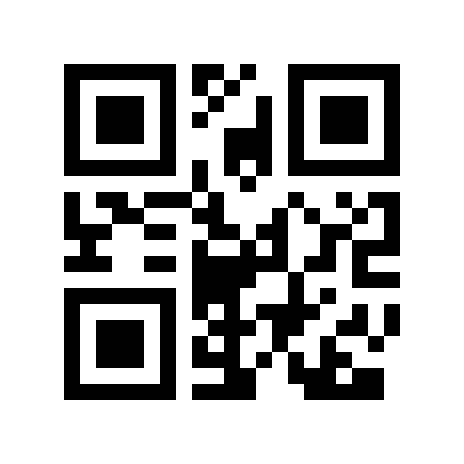
It looks like an ordinary QR code, with no clue that it is one of three. Read on its own, OpenCV returns this.
NO:20260725-00487
No error, no warning. A perfectly plausible slip number, with only the trailing check digit 3 missing. The second and third symbols come out as 3/LOT:AB-77/QTY: and 120/EXP:20270131. Handing the same image to jsQR returned an empty string. What happens when an application that does not expect Structured Append happens to scan the first symbol varies with the decoder.
Here is how it shows up in a business system. On a screen that searches slip numbers by prefix match or LIKE, NO:20260725-00487 with its last digit missing hits the original slip anyway, and because “it read, and the slip came up” nobody notices anything wrong. Unless the length is checked as a fixed value, this fragment flows all the way through as a normal read.
5.2. Character Encoding and ECI
Next is a QR code containing 部品番号 東-004873 in Shift_JIS with no ECI designation.
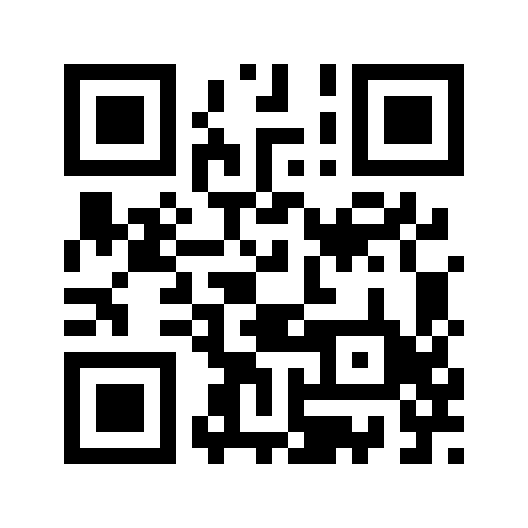
This one is real too. Read it with a reader you have to hand and you will get 部品番号 東-004873, a garbled string, or nothing at all — which tells you which interpretation your reader is using.
Feed this image to the QR code decoding comparison tool and the raw byte sequence jsQR extracted is shown alongside the results of reinterpreting it as UTF-8, Shift_JIS, EUC-JP, and so on. You can see on the spot how the same byte sequence becomes something else entirely depending on the character encoding.
Varying the Generation Conditions and Comparing the Decoders’ Results
Here are the results of generating the same content with varying character encodings and ECI designations and feeding them to the two decoders. All four of these symbols are included among the tool’s samples. The values in the table were measured with Python’s cv2, though, and the third row alone differs from the browser build (discussed in detail immediately after the table). What the tool lets you confirm is the browser build’s behavior, so reproducing the third row’s “dies with an exception” requires Python’s cv2.
| Generation condition | OpenCV 5.0.0 | jsQR 1.4.0 |
|---|---|---|
| Shift_JIS / no ECI | Returns a garbled string as a success | Empty string |
| UTF-8 / no ECI | 部品番号 東-004873 |
部品番号 東-004873 |
| Shift_JIS / with ECI | Emits a warning and fails to decode | Empty string |
| UTF-8 / with ECI | 部品番号 東-004873 |
部品番号 東-004873 |
The first row is the worst. OpenCV interpreted the byte sequence as Latin-1 and returned the broken string \x95\x94\x95i... with no error at all. From the application’s point of view that is a normal read, and if it goes straight into the database you have created one garbled record.
Here is how it shows up in a business system. A garbled string is registered in the item name field of a receiving record, and the next day it becomes an inquiry saying “searching for that part number turns up no record.” Re-reading the same label puts the same value in, so the field reports that “the system’s search is broken,” and the back-and-forth continues until someone works out that the cause is the character encoding on the reading side.
When ECI Is Not Specified, and When It Is Specified but the Implementation Cannot Handle It
This is not an OpenCV bug — it is behavior exactly in line with the default interpretation (ISO/IEC 8859-1) defined by the current standard.3 What departs from the standard is putting Shift_JIS in without ECI.
The third row is not to be overlooked either. Despite ECI — the mechanism for explicitly declaring the character encoding — being specified correctly, OpenCV emitted the warning QR: ECI is not supported properly and then died with an exception, unable to interpret the return value as UTF-8. The inversion where the QR code built faithfully to the standard is the one that cannot be read genuinely happens.
Do Not Treat the Python Build and the Browser Build as the Same Result
What is more, this third row produces different results even within the same OpenCV, depending on the language binding. The table above is the result with Python’s cv2, but pass the same image to the browser build (opencv.js 5.0.0) and no exception is raised: it returns as a success the string ���i��� ��-004873, full of replacement characters. That is because when Emscripten converts std::string as UTF-8, it drops invalid bytes to U+FFFD rather than throwing. Same version, same image; the only thing that changed is the calling language. Python, where an exception at least lets you notice, is the better of the two; the browser build says “it read” while handing back a broken value. You can confirm this with the tool’s samples.
5.3. Several QR Codes Within the Frame
Several QR codes printed on one slip, or the label on the next box coming into the field of view — commonplace situations. We tried three QR codes lined up side by side.
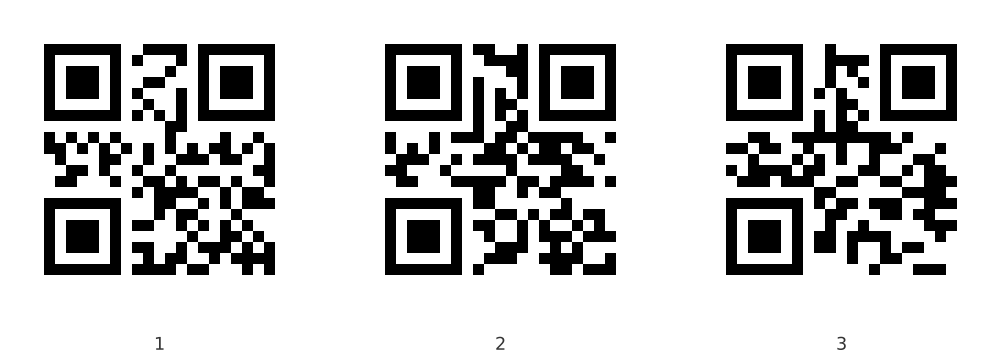
A Single-Read API Does Not Guarantee That It Rejects Multiple Symbols
First, on this image OpenCV’s single-read API returned nothing at all. That is not a guarantee that “it rejects the input when there are several,” however. The single-read API is documented only as detecting and decoding one QR code; nothing says it rejects multiple symbols, and depending on the layout it could well return one of them. Do not use the presence or absence of a return value from the single-read API as a substitute for detecting multiple codes.
Even with a Multi-Read API, the Order of the Results Cannot Be Used for Identification
Using a multi-read API does not mean the return order can be relied on either.
Here are the results of taking the image above (NO: / ITEM: / LOT: from the left) as is and varying only the pixel dimensions. This corresponds to a real scanner where the distance to the target or the camera resolution changes.
| Image width | Return order |
|---|---|
| 1,001 px | NO: / LOT: / ITEM: |
| 1,502 px | Nothing returned |
| 2,002 px | NO: / LOT: / ITEM: |
| 3,003 px | NO: / ITEM: / LOT: |
| 4,004 px | LOT: / NO: / ITEM: |
The same image, yet the order changes purely because the resolution changed. It is neither left-to-right nor largest-first. There is even a resolution at which nothing reads. The order is decided by the internal workings of the detection algorithm, and since it is not specified, this is what you get.
Which means that code taking index 0 on the assumption that “the first one must be the slip number” may happen to work today and grab a different code tomorrow simply because the camera moved closer. It is the kind of defect that is hard to reproduce and hard to trace.
Here is how it shows up in a business system. On the inspection bench, the intended slip and the label on the next box come into the field of view at the same time. An application that takes index 0 allocates the neighboring slip, and the shipping instruction is confirmed against that one. The operator believes the camera was pointed at the correct label, so nobody notices until someone says “the wrong product arrived” after shipment.
The Countermeasure: Select by Content, and Confirm There Is Exactly One Candidate
The receiving side has to select by content, not by order. Pick up everything with the multi-read API, accept only the entries whose prefix and format match, and raise an error if there are zero matches or two or more — that is the safe way to write it.
5.4. The Contents Are Not Necessarily Correct in the First Place
There is a layer that image processing cannot detect even in principle. The source data that was printed is wrong, an old label from before a re-labeling is still on the box, a label from a different supplier has been mixed in, or the label is a copy.
A QR code tells you only what is written there. Whether that is correct, and whether your own company issued it, can only be confirmed by the side that receives it.
Here is how it shows up in a business system. A previous label is still on the side of a reused box, and it is read instead of the new label on the top. As a value the QR code is perfectly correct, so it passes the format check, the check digit, and a master data lookup that only confirms existence, and the package heads for the previous destination. Checking the value alone tells you nothing about whether it is the label on the box in front of you. What is needed is the comparison against the target you should be processing right now, explained in section 6.
6. How to Handle the Value You Received
The countermeasure comes down to one thing: stack your own validation outside error correction.
| Stage | What is validated | What it catches |
|---|---|---|
| 1. Format check | Exact match on length, character classes, separators, and prefix | Reading a different code, a Structured Append fragment, mojibake |
| 2. Self-validation | Check digit | Reliably detects a single-character change. Misses some multi-character changes |
| 3. Business validation | A master data lookup, and whether it matches the target you should be processing right now | An old label, another company’s label, picking up the wrong slip |
The sample slip number is NO: plus an 8-digit order date, a 5-digit sequence number, and a 1-digit check digit, and the trailing digit uses the same modulus 10 weight 3 scheme as GS1. The misread NO:20260725-104873 from section 2 stops here: the correct check digit for 2026072510487 is 0, which does not match the 3 on the label.
What These Three Stages Cannot Protect
Before moving on to the implementation, look at the limits of each stage. The check digit, the existence and status check, and the execution of the operation each play a different role.
A Multi-Character Change Cannot Be Stopped by the Check Digit Alone
The check digit misses multi-character changes. What modulus 10 weight 3 reliably catches is a single-character error. In fact, 2026072500487 and 2026072517487 both produce a check digit of 3, so NO:20260725-174873 sails straight through stage 2. A miscorrection does not necessarily change only one character, so stage 3 cannot be skipped.
Correct Existence and Status Still Does Not Make It the Current Work Target
Do not let the master data lookup end at confirming existence. The repo.Find() call and the status check in the C# example below only confirm that a usable slip exists somewhere. If the operator reads the label on the next box, that label also satisfies the format, the check digit, and the awaiting-shipment status, so it passes straight through. The decoded value has to be compared against the target you are supposed to be processing right now — does it match the next entry on the picking list, is it tied to a container ID that has already been scanned, is the destination the same as the run currently being worked. What you compare it against differs from one business process to another, so this is the one place that does not reduce to generic code.
Double Processing Is Prevented on the Execution Side, After Validation
Validation cannot prevent double processing. If two terminals read the same label at nearly the same time, both confirm the awaiting-shipment status and then update it, so both pass. Preventing that is the execution side’s job: make a conditional state transition such as UPDATE ... WHERE status = 'WaitingForShipment' a single atomic operation, or absorb the re-execution with an idempotency key. Validation is a decision at the entry point; it is no substitute for concurrency control.
6.1. Decide the Character Encoding and the Format First
Decide the character encoding assumption before you write any code. The implementation below assumes the slip number consists only of ASCII digits, and computes the check digit as “character minus '0'.” If full-width digits, or the garbled byte sequence seen in section 5.2, reach that calculation, the result is meaningless. That is why the format-check regular expression is written with [0-9] rather than \d, in an order that keeps any non-ASCII digit from ever reaching the check digit calculation. First decide the assumption, then guarantee it with the format check, and calculate after that. Once that order breaks down, every later check is spinning its wheels.
6.2. Implementing Entry-Point Validation in C#
Below is an example of the format check, the check digit, and the slip existence and status check for a single decoded value. ISlipRepository, SlipStatus, and the slip type come from the business-side implementation. This example on its own does not complete the match against the work target or the prevention of double processing. Handling the case where the decoder throws an exception is also dealt with separately on the calling side.
using System.Linq;
using System.Text.RegularExpressions;

public sealed record ScanOutcome(bool Accepted, string? SlipNo, string Reason);

public static class SlipScanValidator
{
    // NO: + 8-digit order date + '-' + 5-digit sequence number + 1 check digit
    // The terminator is \z, not $. In .NET, $ also matches immediately before a
    // trailing newline, so it would let "NO:20260725-004873\n" through.
    // Digits are [0-9], not \d. In .NET, \d matches Unicode digits in general,
    // including full-width digits, but the check digit calculation below assumes ASCII
    private static readonly Regex Format =
        new(@"\ANO:(?<date>[0-9]{8})-(?<seq>[0-9]{5})(?<cd>[0-9])\z", RegexOptions.Compiled);

    public static ScanOutcome Validate(string? raw, ISlipRepository repo)
    {
        // 1. Do not turn "could not read" into "an empty success."
        //    Decoders differ in whether they report failure as null, an empty string, or an exception
        if (string.IsNullOrEmpty(raw))
            return new(false, null, "Could not read the code. Please scan again");

        // 2. Format check. Not a prefix match: an exact match that includes the length.
        //    The Structured Append fragment "NO:20260725-00487" is rejected here
        var m = Format.Match(raw);
        if (!m.Success)
            return new(false, null, $"Not the format of a slip QR code ({Describe(raw)})");

        // 3. Self-validation. If a miscorrection garbled a digit, it is caught here
        var body = m.Groups["date"].Value + m.Groups["seq"].Value;
        if (Modulus10Weight3(body) != m.Groups["cd"].Value[0] - '0')
            return new(false, null, "The check digit does not match. Check the label for dirt");

        // 4. Business validation. Does it exist, and is it in a state you may process now
        var slip = repo.Find(raw);
        if (slip is null)
            return new(false, null, "No matching slip exists");
        if (slip.Status != SlipStatus.WaitingForShipment)
            return new(false, null, $"This slip is '{slip.Status}'. It is not a shipment target");

        return new(true, raw, "OK");
    }

    // The same modulus 10 weight 3 as GS1. Weights of 3,1,3,1... applied from the rightmost digit
    private static int Modulus10Weight3(string body)
    {
        var sum = 0;
        for (var i = 0; i < body.Length; i++)
        {
            var weight = (body.Length - i) % 2 == 1 ? 3 : 1;
            sum += (body[i] - '0') * weight;
        }
        return (10 - sum % 10) % 10;
    }

    // The decoded value is external input. Keep only printable ASCII before showing it
    // on screen or writing it to a log.
    // char.IsControl drops only Unicode Control (Cc) and lets Format (Cf) characters
    // such as U+202E (right-to-left override) through. Write an allowlist, not a denylist
    private static string Describe(string raw)
    {
        var kept = raw.Where(c => c >= ' ' && c <= '~').Take(40).ToArray();
        if (kept.Length == 0) return "(string cannot be displayed)";
        var safe = new string(kept);
        return kept.Length < raw.Length ? safe + "... (some characters removed)" : safe;
    }
}
The design of check digits themselves is covered in Code Design for Business Systems — Deciding Product and Customer Codes, and Check Digits, which sets out the formulas and how to choose between them. What matters in the context of this article is that the check works not only against human typos but against machine misreads.
Failures and Attacks Are Different Problems
The validation up to this point is a countermeasure against things going wrong: misreads caused by dirt, missing a Structured Append symbol, mojibake, an old label slipping in. Design it to include the comparison against the work target and the prevention of double processing on the execution side. Countermeasures against an adversary who deliberately rewrites the value are a separate requirement.
For uses where there is a motive to rewrite the value — price tags, coupons, admission tickets, payments — none of this is a defense. An attacker can satisfy the format, recompute the check digit, and freely produce a QR code pointing at a different number that really exists. A master data lookup only checks existence, so it passes straight through.
Anti-Forgery Requires a Way to Verify the Issuer
If holding the QR code implies value or authorization, the value itself has to carry authenticity. Either make it an unguessable token issued by the server — a random number of sufficient length — so that one number cannot be guessed from another, or attach a keyed MAC or a digital signature to the payload and have the receiving side verify it with the key. In both cases, manage the used state on the server to prevent a duplicate from being used twice.
Swapping a Genuine QR Code Is Prevented by Binding It to the Target
Authenticity alone does not stop a swap, though. Peel a legitimate QR code off a cheap product and stick it on an expensive one, and both the token and the signature are still genuine. Where the medium is reused, as with a price tag that can be moved, the used-state check does not help either. What works here is the same idea as stage 3: confirm by some route other than the value itself whether that QR code belongs to the object in front of you — take the product’s identity by another means and compare, cross-check against the transaction context such as the register receipt or the time window of admission, or bind it physically with a tamper-evident label that tears when removed.
Neither the check digit nor the master data lookup guarantees anything about authenticity. And authenticity itself does not guarantee that the value belongs to the object in front of you. The key point is not to try to cover misread protection, forgery protection, and swap protection with one and the same mechanism.
7. What to Decide on the Operations Side
The operational decisions are easier to organize when split into label design, what to do when a read fails, and the confirmation step before committing.
7.1. Use Label Design to Sort Out the Causes of Unreadability and the Means of Checking
- Always print a human-readable string beneath the QR code. This is the same idea as the Human Readable Interpretation (HRI) defined by GS1.4 When a misread is suspected, it leaves a way for a person to compare. In real operations it is not unusual for this to be the only way a misread is ever found. Field operations for barcodes in general are covered in GS1 Barcode Standards: The Basics and Operational Pitfalls.
- Do not use Structured Append. If the data does not fit, raise the version, or put only an identifier in the QR code and pull the rest from master data. The latter also lets you keep the label small and correct the contents without reissuing the label.
- Solve character encoding by not putting any in. Keep business-use QR codes within ASCII. Byte mode declares no character encoding unless ECI is specified, and the default interpretation has changed between editions of the standard.3 Simply writing UTF-8 buys no interoperability, and a scanner that applies a different interpretation produces mojibake. If non-ASCII really has to go in, declaring UTF-8 with an ECI designation is the correct answer per the standard, but as section 5.2 shows, implementations whose ECI handling is doubtful genuinely exist, so there is no escaping a check on a real machine of the models you expect to use.
7.2. Define the Procedure for a Failed Read, and Keep Records You Can Investigate
- Decide the procedure for when a code will not read. The maximum number of rescans, the fallback to manual entry, and who approves it. If this is vague, the field moves toward “keep changing the angle and trying until it reads,” which pushes the probability of a misread up.
- Log the values you reject. If they cluster on a particular label or terminal, a failing printer or scanner can be found early. Do not write the raw string straight into a line-oriented log, though. A value containing newlines or control characters can forge log lines or break the display. Truncate and escape the original and store it in a structured log field or a database column, and emit only a sanitized representation on the lines a person reads — build that separation in from the start. Keep the captured image too, where possible.
7.3. The Harder an Operation Is to Undo, the Heavier the Confirmation Before Committing
- Insert a confirmation before an irreversible operation. For operations that are hard to undo — confirming a shipment, drawing down inventory, clearing a payment against a receivable — show a person the item name and the amount looked up from the decoded value. A misread may look like a plausible value, but in the business context it often looks out of place.
How far to take validation is decided by the damage a mistake causes.
| Use case | Format check | Check digit | Master data lookup | Human confirmation |
|---|---|---|---|---|
| Internal locations and shelf numbers | Required | Optional | Recommended | Not needed |
| Receiving, shipping, and stocktaking | Required | Recommended | Required | Not needed |
| Shipment confirmation and inventory drawdown | Required | Required | Required | Recommended |
| Invoicing and payment clearing | Required | Required | Required | Required |
| Preventing mix-ups of pharmaceuticals and hazardous materials | Required | Required | Required | Required |
8. Summary
QR code error correction is a mechanism for recovering the original codewords from a printed pattern. It does that job properly. In the measurements too, against random dirt and uniform image-quality degradation, it read correctly within the range it could correct and cleanly gave up the read beyond it.
That is a different matter, however, from the string the application received being correct for the business. Depending on where the damage lands, correction can do its work and produce a different valid value. Structured Append, character encoding, and another code within the frame are problems outside error correction entirely, and not even a matter of probability.
The standard itself writing “misdecoded as an apparently valid but different codeword,” and going to the trouble of reserving codewords for misdecode protection, expresses this structure plainly. Even after all that, the probability can only be lowered — that is as far as the standard reaches. The only thing that can close the remaining gap is the application that receives the value.
A value that was decoded successfully is unvalidated input from outside. Treat it exactly like a string typed in on a keyboard — that, I believe, is the right way to work with QR codes.
Three Steps to Try This with Your Own QR Codes
Check your own labels too, with the correct value and the implementation used for reading both fixed. The steps below are a way to examine decoding behavior; they do not mean that damaging a code will necessarily cause a misread. The misread sample in section 4.2 was constructed on purpose.
- Generate. Take one value in the format you actually operate with and turn it into a QR code with a generator you have to hand (the samples in this article were generated with segno 1.6.6). First confirm that it reads while undamaged.
- Damage it. In an image editor, draw a single vertical band standing in for a crease or a clogged print head. What matters is concentration rather than amount, so instead of scattering faint noise across the whole symbol, pack the damage into a narrow area.
- Compare two decoders. Feed it to the QR code decoding comparison tool and compare the results from jsQR and OpenCV.js. Behavior such as only one of them returning a value, or both returning the same value that differs from the original, can be confirmed on the spot.
Check not only whether the two results agree with each other, but whether they agree with the value you expected when you generated the code. As in section 2, both can return the same wrong value. If the results split between the two decoders, that condition is one your own validation design must take care of. Trying the question “are the scanners at our site all right?” once at your desk is worth the effort.
Test Environment
Sections 2 through 4, which look at error correction behavior, use version 1-M (21×21 modules) throughout. The samples in section 5 change version with the amount of data, so they are listed per subsection.
| Item | Details |
|---|---|
| Decoder 1 | OpenCV 5.0.0 cv2.QRCodeDetector |
| Decoder 2 | jsQR 1.4.0 (Node.js 22) |
| Generation | segno 1.6.6 / Python 3.11 |
| Symbols in sections 2 to 4 | Version 1-M / 21×21 (26 codewords = 16 data + 10 error correction) |
| Section 5.1 (Structured Append) | All three symbols version 1-M / 21×21 |
| Section 5.2 (character encoding and ECI) | Shift_JIS is version 2-Q and UTF-8 is version 2-M (both 25×25), because 18 to 23 bytes of Japanese text do not fit in the 16 data codewords of version 1-M |
| Section 5.3 (multiple codes) | NO: and ITEM: are version 1-M; LOT:AB-77 is version 1-H because its data is short and segno raises the error correction level (all 21×21) |
-
DENSO WAVE Incorporated, Error correction feature | QRcode.com ↩
-
ISO/IEC 18004 Information technology — Automatic identification and data capture techniques — QR code bar code symbology specification. The error correction capacity formula
e + 2t ≦ d - p, the value of the misdecode protection codewordsp, and the statement about being “misdecoded as an apparently valid but different codeword” are in 8.5.1 Error correction capacity; version 1-M’s(26,16,4)and the footnote that the correction capability is set at less than half the number of error correction codewords in order to reduce the probability of misdecodes are in Table 13 (quotations are based on the 2000 edition). The current edition is ISO/IEC 18004:2024. ↩ ↩2 ↩3 -
The default interpretation in byte mode when no ECI is designated has changed between editions of the standard. ISO/IEC 18004:2000 clause 8.3.1 specified “The default interpretation for QR Code is ECI 000020 representing the JIS8 and Shift JIS character sets,” but from the 2006 edition (QR Code 2005) onward the default is ECI 000003, that is, ISO/IEC 8859-1. Which also means that relying on an undeclared default leaves the interpretation liable to change purely because the edition of the standard changed. ↩ ↩2
Related Articles
Recent articles sharing the same tags. Deepen your understanding with closely related topics.
Code Design for Business Systems — Deciding Product and Customer Codes, and Check Digits
A practical guide to deciding the code scheme for a business system, including product and customer codes. Covers a decision table for me...
Practical Multithreading Best Practices: .NET Edition — What to Decide Before You Add More Threads
Keep .NET/C# threads from crashing or hanging. Ride on Task, cut shared mutable state, lock with discipline, stop with CancellationToken,...
What Is the .NET Generic Host? - The Foundation for DI, Configuration, and Logging
What the Generic Host does, seen through its relationship to DI, configuration, logging, IHostedService, and BackgroundService - and wher...
What Is .NET Native AOT? - How It Differs from JIT and Trimming
What Native AOT is, sorted out against JIT, ReadyToRun, self-contained, single-file, trimming, and source generators, plus the cases it f...
Choosing Between .NET's Three Timers - PeriodicTimer/Timer/DispatcherTimer
Which .NET timer should you use? PeriodicTimer for async loops, Timer for ThreadPool callbacks, DispatcherTimer for WPF UI, plus a decisi...
Related Topics
These are topic pages close to this theme. Starting from the article, you can go on to related services and other articles.
Windows Technical Topics
Entry point collecting technical topics on Windows development, bug investigation, and use of existing assets.
Services Connected to This Topic
This article leads to the following service pages. Start from the entry point closest to your situation.
Windows App Development
We support Windows software development for business applications, device integration, communication tools, and more.
Technical Consulting & Design Review
Technical consulting to sort out modification policy, design review, and how to handle existing assets.
Frequently Asked Questions
Questions commonly asked at the time of consultation about the topic of this article.
- If I set the error correction level to H, does that prevent misreads?
- No. Raising the level increases the amount of dirt that can be corrected, but it does not eliminate the phenomenon of "correction kicks in and produces a different value." Reed-Solomon decoding works by searching the received pattern for a codeword inside the correction capability, so if the damage lands in the neighborhood of a different codeword, it returns that one as the answer (damage that lands far away simply ends in "unreadable"). ISO/IEC 18004 states explicitly that this is "misdecoded as an apparently valid but different codeword," and reserves a separate allowance of codewords for misdecode protection, but that too is a measure that lowers the probability, not a guarantee. The only place a misread can be caught is the application that receives the value.
- Realistically, how often do QR misreads happen?
- With random damage, essentially never. In the measurements for this article, across 3,900 trials that flipped modules at random and 5,800 trials that corrupted codewords at random, there were zero cases where a wrong value was returned. Damage beyond what can be corrected falls on the side of "unreadable." Real-world damage is not random, however: creases, abrasion, and clogged print heads all have a positional bias. Furthermore, missing a Structured Append symbol or picking up the wrong code among several is not even a question of probability; given the right conditions it happens every single time.
- QR codes have error correction, so do I still need a check digit?
- Yes. They protect different layers. Error correction deals with consistency inside the symbol, and it only guarantees recovery up to the limits of its correction capability. Beyond that, damage can be "recovered" into a different valid codeword. A check digit, by contrast, checks whether the string the application received is well-formed as a code scheme. It reliably catches a single-character change, but misses some cases where multiple characters change. A modulus 10 check value has only ten possibilities, and this article gives an example where a two-digit change still matches the check digit. So treat the check digit as the layer that stops the majority of misreads, and leave the final judgment to master data lookups and business-level cross-checking. One advantage is that the same check also protects manual entry, transcription, and imports arriving by other routes.
- My phone's camera app read it, so surely the value is correct?
- "It read" means only that the decoder returned a non-empty string; it says nothing about whether the contents are correct. How failure is signaled also differs by implementation — an exception, an empty string, or null are all possible — so using "no exception was thrown" as a success criterion is dangerous too. In the measurements for this article there were several cases where OpenCV and jsQR returned different results for the same image. For a QR code containing Japanese text in Shift_JIS, one returned a garbled string as a success while the other returned an empty string. Results also diverged on the first symbol of a Structured Append set. Whether it read tells you nothing about whether the value is right.
- Should we avoid Structured Append (split QR) in business use?
- Unless there is a specific reason, avoiding it is the safer choice. Structured Append is a mechanism where data is split across several symbols and the reader collects and concatenates them, but the behavior when a decoder that does not support it is given only the first symbol is implementation-dependent. In the measurements for this article, OpenCV returned a truncated slip number with no error, while jsQR returned an empty string. Since implementations exist that will pass a fragment through as a plausible-looking value, if you are not expecting Structured Append you need validation that rejects incomplete results. If the data does not fit, it is safer to raise the QR version, or shorten the code and lean on master data lookups instead.
Author Profile
Profile page for the article author.
Go Komura
Representative of KomuraSoft LLC
Focused on Windows software development, technical consulting, and bug investigation, with particular strength in projects where existing assets remain and in investigating failures whose cause is hard to see.