
Revision history (first version, published Nov 17, 2026)
- First published
Even when all your tests pass, those tests will not necessarily notice mistakes in the code. A test that does not check boundary values still passes when >= is rewritten as >.
AdaMutant is a tool for checking exactly this. It automatically makes small changes to Ada and SPARK source code and checks whether your tests or GNATprove proofs can detect those changes. KomuraSoft publishes it under the Apache License 2.0.1
This article introduces what AdaMutant does, together with the results of actually running its bundled samples. The environment was Ubuntu 24.04, GNAT 14.2.0 and 4 cores, and the AdaMutant version was 0.1.0. The description of the Alire crate says it runs on Linux, macOS and Windows, but for this article I tried it only on Linux.2
What mutation testing is
Mutation testing automatically creates slightly changed versions of the production code (mutants), runs the tests, and looks at whether they fail. If a test fails, the tests noticed that change. If they all pass, they did not. I wrote about the idea in detail in Testing Your Tests with Mutation Testing.
.NET has a tool called Stryker.NET. AdaMutant brings the same idea to Ada and SPARK.
flowchart TB
        accTitle: The flow of mutation testing
        accDescr: Shows the flow of putting a mutant into the original code, building it and running the tests, where a failing test means the change was detected and all tests passing means it was not detected.
        A["Make a small change to the original code"] --> B["Build and run the tests"]
        B -->|"A test fails"| C["Killed: the change was detected"]
        B -->|"All pass"| D["Survived: the change was not detected"]
Figure 1: A mutant that makes a test fail is counted as detected.
In the diagram a solid line marks a relation that always holds and a dashed line marks a conditional one (the conditions are given per relation on the detail page). The full list of relations (4 in total, with evidence and certainty) and the definitions of the main concepts are collected on the knowledge map detail page (in Japanese). Data: JSON-LD / Turtle
AdaMutant’s features
The README lists the following features.1
- It has a built-in lexer for Ada up to Ada 2022, so it needs no extra dependencies such as libadalang
- In addition to test failures, it can detect mutants through failed GNATprove proofs
- It builds mutants together in one build and switches which mutant is active when the tests run
- It creates several copies of the project (sandboxes) to run in parallel, and stops tests that do not finish in time
- You can specify a git revision and check only the mutants on the lines you changed
- It outputs the results as a console table, as a standalone HTML file and as JSON
It creates 10 kinds of mutants: arithmetic operators (such as swapping + and -), comparison operators (such as turning < into <=), logical operators, unary operators, Boolean values, membership tests (in and not in), conditions (turning a condition into True or False), statement removal, numeric literals and string literals.
flowchart TB
        accTitle: The two ways AdaMutant detects mutants
        accDescr: Shows that AdaMutant first runs the tests on a mutant, a failing test means it is detected, a mutant whose tests pass is then proved, a failing proof means it is detected, and if both pass it survives.
        A["Mutant"] --> B["Run the tests"]
        B -->|"Fail"| C["Killed"]
        B -->|"Pass"| D["Prove with GNATprove"]
        D -->|"Fail"| C
        D -->|"Pass"| E["Survived"]
Figure 2: When both tests and proofs are configured, only mutants whose tests pass are proved.
Getting and building it
You need a GNAT that supports Ada 2022 and GPRbuild. If you want to detect mutants with proofs, you also need GNATprove.
If you use Alire, fetch the crate from the index and build it. The crate is named mutant, and the executable it produces is named adamutant.2
alr get mutant
cd mutant_0.1.0_*
alr build
On my machine, these steps worked from fetching through building. The build took 43 seconds.
You can also clone the repository and build it with make.
git clone https://github.com/gomurin0428/AdaMutant
cd AdaMutant
make build
Either way, you get bin/adamutant. The rest of this article assumes this executable is on your path.
flowchart TB
        accTitle: Two ways to get AdaMutant
        accDescr: Shows that you can fetch the crate with Alire and build it, or clone the repository and build it with make, and that either way produces the adamutant executable.
        A["Fetch with Alire: alr get mutant"] --> C["alr build"]
        B["Clone the repository: git clone"] --> D["make build"]
        C --> E["Executable bin/adamutant"]
        D --> E
Figure 3: Both methods produce the same executable.
Running the sample
The repository’s examples/calculator is a sample whose tests deliberately do not check boundary values. Its configuration file adamutant.toml is as follows.
mutate = ["src/**/*.adb", "src/**/*.ads"]
build = "gprbuild -p -q -P calculator_tests.gpr"
test = '"bin/test_calculator"'
concurrency = 2
sandbox_exclude = [".git", "obj", "bin"]

[thresholds]
high = 80
low = 60
break = 50
mutate is the files to change, build is the build command, and test is the test command. If the test command returns a nonzero exit code, that mutant counts as detected.
Here is the end of the output from running adamutant run in this folder.
File               | Score % | Killed | Timeout | Survived | No cov | Compile | Ignored
---------------------------------------------------------------------------------------
All files          |   77.50 |     29 |       2 |        9 |      0 |       0 |       0
src/calculator.adb |   75.00 |     25 |       2 |        9 |      0 |       0 |       0
src/calculator.ads |  100.00 |      4 |       0 |        0 |      0 |       0 |       0

Mutation score: 77.50% (31 detected, 9 undetected, 0 compile errors, 0 ignored) in 12 s
Of the 40 mutants, 29 were detected because a test failed, 2 timed out, and 9 survived. It took 12 seconds.
flowchart TB
        accTitle: Results for the 40 mutants of the calculator sample
        accDescr: Shows that of the 40 mutants, 29 were detected because a test failed, 2 timed out and were treated as detected, and 9 survived.
        A["40 mutants"] --> B["Detected: 31"]
        A --> C["Undetected: 9 (Survived)"]
        B --> D["29: a test failed (Killed)"]
        B --> E["2: ran out of time (Timeout)"]
Figure 4: 31 mutants were detected, and 9 were not.
The 2 that timed out are mutants that change I := I + 1; inside a loop. One removes this statement and the other turns I + 1 into I + 0; both make the loop never end. AdaMutant sets a limit from how long the tests took before the change, stops the test there, and counts the mutant as detected.
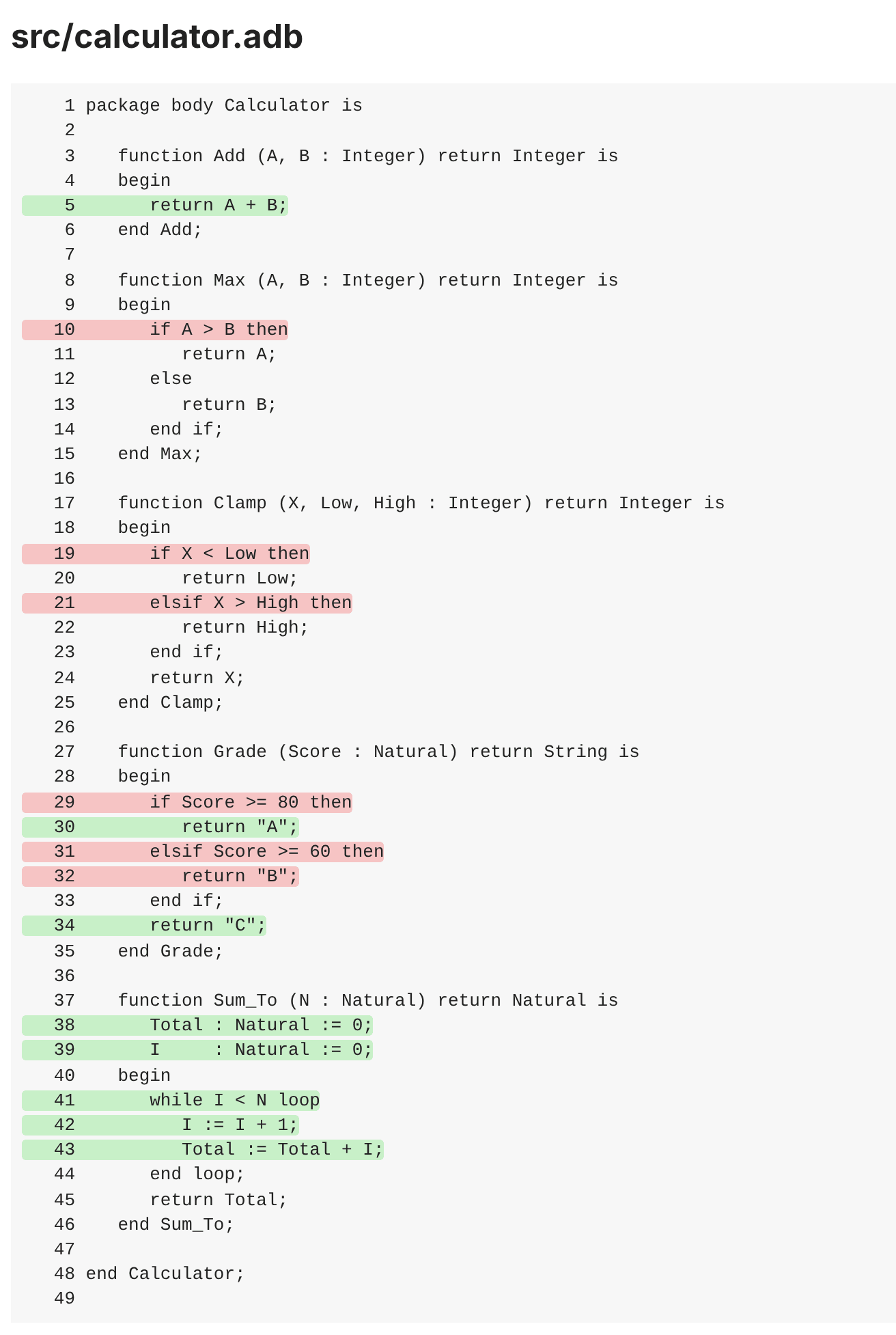
The reports are written to .adamutant/reports. In the HTML report (mutation-report.html), the source lines are colored. The image below is part of the report for this sample. Green lines have detected mutants and no undetected ones. Red lines are lines with surviving mutants. Clicking a line opens the list of mutants on that line.
Reading the surviving mutants
Of the 9 survivors, 6 are in Grade, a function that returns a grade for a score.
function Grade (Score : Natural) return String is
begin
   if Score >= 80 then
      return "A";
   elsif Score >= 60 then
      return "B";
   end if;
   return "C";
end Grade;
The tests check only two things: that Grade (95) is "A" and that Grade (10) is "C". They check neither the boundaries at 80 and 60 nor the case that gives "B". So the tests pass whether >= is changed to > or 80 is changed to 81.
I added four tests that check the boundaries.
Check (Grade (80) = "A", "Grade A boundary");
Check (Grade (79) = "B", "Grade B upper");
Check (Grade (60) = "B", "Grade B boundary");
Check (Grade (59) = "C", "Grade C upper");
Running it again, the score rose to 92.50% and 3 mutants survived. These remaining 3 are of a different nature.
The first is a mutant that changes if A > B then in Max to if A >= B then.
function Max (A, B : Integer) return Integer is
begin
   if A > B then
      return A;
   else
      return B;
   end if;
end Max;
When A and B are equal, the original code returns B and the mutant returns A. The value is the same. No test you write can tell these two apart. A mutant like this, which behaves the same as the original code, is called an equivalent mutant.
The other 2 are comparisons in Clamp.
function Clamp (X, Low, High : Integer) return Integer is
begin
   if X < Low then
      return Low;
   elsif X > High then
      return High;
   end if;
   return X;
end Clamp;
The one that changes X > High to X >= High is equivalent for the same reason as in Max. When X equals High, both return the same value.
The one that changes X < Low to X <= Low looks the same at first glance, but it is not equivalent. The result changes for calls where Low is greater than High. For Clamp (5, 5, 3), 5 < 5 is false in the original code, so it moves on to the next condition, and since 5 > 3 is true it returns 3. The mutant returns 5, because 5 <= 5 is true.
flowchart TB
        accTitle: How the original code and the mutant differ when Clamp gets a lower bound greater than its upper bound
        accDescr: Shows that when Clamp is given 5 with a lower bound of 5 and an upper bound of 3, the first condition is false in the original code and the next one is true, so it returns the upper bound 3, while in the mutant with the changed comparison the first condition is true and it returns the lower bound 5.
        A["Call Clamp (5, 5, 3)"] --> B["Original code: the first condition is false"]
        A --> C["Mutant: the first condition is true"]
        B --> D["The next condition is true, so it returns the upper bound 3"]
        C --> E["Returns the lower bound 5"]
Figure 5: For calls where the lower bound is greater than the upper bound, the original code and the mutant give different results.
What this mutant points to is less a missing test than a place where the specification has not been decided. Clamp has no precondition that Low is less than or equal to High. Neither the code nor the tests tell you whether calls with the lower and upper bounds reversed are allowed, or, if they are, what they should return.
Here, I treated the current behavior (returning the upper bound) as the specification and added one test.
Check (Clamp (5, 5, 3) = 3, "Clamp inverted range");
The score became 95.00%, and the only survivors were the 2 equivalent mutants. If you decide not to allow reversed calls, another option is to add a precondition and exclude this mutant as equivalent.
Equivalent mutants can be excluded with a comment.
--  adamutant:disable-next-line EqualityOperator: equivalent mutant
if A > B then
The fourth row of the table below is the result of running it with this comment on the two places. The comment excludes all comparison operator mutants on that line. There are 2 on each line, so 4 were excluded. 2 of them had been detected before they were excluded.
| Run | Score | Detected | Survived | Excluded |
|---|---|---|---|---|
| Sample as is | 77.50% | 31 | 9 | 0 |
| Added four boundary tests | 92.50% | 37 | 3 | 0 |
| Added a test for reversed lower and upper bounds | 95.00% | 38 | 2 | 0 |
| Excluded equivalent mutants with comments | 100.00% | 36 | 0 | 4 |
flowchart TB
        accTitle: Sorting the surviving mutants
        accDescr: Shows reading a surviving mutant and checking whether there is an input where it behaves differently from the original code; if there is, decide the specification and add a test that checks the difference, and if not, exclude it with a comment as an equivalent mutant.
        A["Read the surviving mutant"] --> B["Is there an input where it behaves differently from the original code?"]
        B -->|"Yes"| C["Decide the specification and add a test that checks the difference"]
        B -->|"No"| D["Exclude it with a comment as an equivalent mutant"]
Figure 6: Survivors split into those that point to missing tests or an incomplete specification, and equivalent mutants.
A person decides which it is. Even while writing this article, I first mistook the Clamp one for an equivalent mutant. What each surviving mutant points to is more useful than the score.
Detecting mutants with proofs
In SPARK code, GNATprove proofs can detect mutants instead of tests. examples/spark_counter is a sample with no tests that uses only proofs.
function Saturating_Add (A, B : Count) return Count
with Post =>
  (if A + B <= Max then Saturating_Add'Result = A + B
   else Saturating_Add'Result = Max);
In the configuration, write prove instead of test. If you write both test and prove, only the mutants whose tests pass are proved. The following is an excerpt from the configuration file.
mutate = ["src/**/*.adb"]
build = "gprbuild -p -q -c -P counters.gpr"
prove = "gnatprove -P counters.gpr --level=1 --report=fail --checks-as-errors=on -j1"
When run, proofs detected 7 of the 8 mutants, and 1 survived. The score was 87.50%, and it took 25 seconds.
The body is as follows.
function Saturating_Add (A, B : Count) return Count is
begin
   if A + B > Max then
      return Max;
   else
      return A + B;
   end if;
end Saturating_Add;
Changing return A + B to return A - B makes the postcondition unprovable. Because GNATprove fails, this mutant counts as detected. Since the postcondition determines the result value, most changes to the body show up as proof failures. Of the 7 detected mutants, 5 failed to prove the postcondition, and the other 2 failed only on the check that the value fits within the range of its type.
The one that survived changes if A + B > Max then to if A + B >= Max then. When A + B equals Max, the original code returns A + B and the mutant returns Max. The value is the same, so this is an equivalent mutant.
By default, it does not create mutants that change the contracts themselves (Pre and Post). It creates them if you set mutate_contracts = true in the configuration.
flowchart TB
        accTitle: The flow of detecting mutants with proofs
        accDescr: Shows putting a mutant into the body and running GNATprove, where a failing proof means it is detected and a passing proof means it survives.
        A["Put a mutant into the body"] --> B["Run GNATprove"]
        B -->|"The proof fails"| C["Killed: the proof detected the change"]
        B -->|"The proof passes"| D["Survived"]
Figure 7: If the contract determines the result value, changes to the body show up as proof failures.
Building mutants together
Mutation testing takes time. If you rebuild for each mutant, you need as many builds as there are mutants.
AdaMutant puts the mutants that can be combined into one source and builds them in one build. The README calls this approach mutant schemata.1 The following is part of the source created while running the sample.
function Add (A, B : Integer) return Integer is
begin

case ADAMUTANT_ACTIVE_1 is
when 1 =>
return A - B;
when others =>
return A + B;
end case;

end Add;
ADAMUTANT_ACTIVE_1 is a function that returns the value of the environment variable ADAMUTANT_MUTANT_ID. By changing this environment variable when running the tests, you can switch the active mutant without rebuilding. When the value is 0, no mutant is active. Mutants of conditions become case expressions.
if (case ADAMUTANT_ACTIVE_1 is
when 2 => (
True
),
when 3 => (
False
),
when 4 => (
A >= B
),
when 5 => (
A <= B
),
when others => (
A > B
)) then
In the calculator sample, 36 of the 40 mutants were combined into a single build: 32 mutants of simple statements and conditions, and 4 mutants of the expression function Is_Even. The remaining 4 were built one at a time: 2 that change the initial value of a declaration and 2 that remove a statement. Including the build before any change, there were 6 builds in total.
There are reasons why some mutants are not combined. According to the README, mutants inside declarations may need static expressions, so they cannot be switched at run time. Statement removals are not combined because, when combined, optimization can make a mutant behave the same as the original program, and something that should have been detected could be missed.1
flowchart TB
        accTitle: Mutants built together and mutants built one at a time
        accDescr: Shows that mutants of simple statements and conditions are combined into one source, built once and switched with an environment variable during testing, while mutants inside declarations and statement removals are built one at a time.
        A["Check where the mutant is"] --> B["Simple statements, conditions, expression functions"]
        A --> C["Inside declarations, statement removal, and so on"]
        B --> D["Combine into one source and build once"]
        D --> E["Switch mutants with an environment variable and test"]
        C --> F["Build and test one at a time"]
Figure 8: Mutants that can be combined need only one build.
Checking only the lines changed in a pull request
Checking every mutant every time in a large project is heavy work. With --since, it checks only the mutants on the lines changed since the merge base of the specified revision and HEAD.
As a test, I turned the sample into a git repository and, on a branch, rewrote the 60 in Grade as 70.
adamutant run --since main
File               | Score % | Killed | Timeout | Survived | No cov | Compile | Ignored
---------------------------------------------------------------------------------------
All files          |   40.00 |      2 |       0 |        3 |      0 |       0 |      31
src/calculator.adb |   40.00 |      2 |       0 |        3 |      0 |       0 |      31

Mutation score: 40.00% (2 detected, 3 undetected, 0 compile errors, 31 ignored) in 1 s
error: the mutation score is below the break threshold 50%
Only the 5 mutants on the one changed line were run, and the other 31 in the same file were excluded. The unchanged calculator.ads was not read, and its 4 mutants do not even appear in the list. It took 1 second.
The score was 40%, below the configured break threshold (50%), so the exit code was 2. The exit codes are 0 for success, 1 for an error and 2 for below the threshold. If you run it in CI, you can stop pull requests that lack tests for the lines they change. The README says that GitHub Actions needs the history, so you should specify fetch-depth: 0 for actions/checkout.
flowchart TB
        accTitle: The flow of checking only the changed lines
        accDescr: Shows finding the changed lines from the diff since the merge base of the specified revision and HEAD, running only the mutants on those lines, excluding the rest, and ending with exit code 2 if the score is below the threshold.
        A["Take the diff from the merge base"] --> B["Run only the mutants on the changed lines"]
        B --> C["Compute the score from the changed lines only"]
        C -->|"At or above the threshold"| D["Exit code 0"]
        C -->|"Below the threshold"| E["Exit code 2"]
Figure 9: The score is computed from the mutants on the changed lines only, and the threshold can stop CI.
Statuses and the score
A mutant has one of seven statuses.1
| Status | Meaning | Treatment in the score |
|---|---|---|
| Killed | A test or proof failed | Detected |
| Timeout | The tests did not finish in time | Detected |
| Survived | Both the tests and the proof passed | Undetected |
| NoCoverage | The build does not compile that file | Undetected |
| CompileError | The mutant could not be built | Excluded |
| RuntimeError | The command could not be started, and so on | Excluded |
| Ignored | Excluded by a comment or similar | Excluded |
The score is the number detected divided by the total of detected and undetected.
flowchart TB
        accTitle: Computing the score in the run that excluded equivalent mutants
        accDescr: Shows that in the run where equivalent mutants were excluded with comments, the 34 Killed and 2 Timeout mutants make 36 detected and 0 are undetected, so 36 divided by 36 gives 100 percent, and the 4 excluded mutants are not part of the calculation.
        A["34 Killed and 2 Timeout"] --> D["Detected: 36"]
        B["Survived and NoCoverage: 0"] --> E["Undetected: 0"]
        D --> F["36 / (36 + 0) = 100.00%"]
        E --> F
        C["Ignored: 4"] --> G["Not included in the calculation"]
Figure 10: The 4 excluded mutants are in neither the denominator nor the numerator.
Things to know before using it
Of the limitations and assumptions written in the README, these are the ones worth knowing before you adopt it.1
- To build mutants together, the test program’s main must be written in Ada and the build must leave GNAT’s ALI files. When these conditions are not met, every mutant is built one at a time.
- In projects that treat warnings as errors, which mutants cause compile errors can differ between building them together and building them one at a time. This is because the combined source turns off style checks, and warnings that come from looking at the whole file are not produced either.
- A mutant that changes how many times a loop runs can allocate a large amount of memory.
test_memory_limit_mbsets a memory limit for each test process. - On Windows, a path containing
/in the test command must be enclosed in quotes.
The version is 0.1.0. What this article checked is the two bundled samples on Linux and how --since behaves.
Summary
- AdaMutant is a tool that makes small changes to Ada and SPARK source code and checks whether tests or GNATprove proofs can detect them.
- In the bundled sample, 9 of the 40 mutants survived. Adding four boundary tests brought the survivors down to 3. Of those, 2 were equivalent mutants, and 1 pointed to a place where the specification had not been decided.
- Even in SPARK code with no tests, proofs alone detected 7 of 8 mutants.
- Mutants that can be combined need only one build, and are switched with an environment variable during testing.
- With
--since, you can check only the mutants on the changed lines and stop CI with a threshold.
Related articles
- Testing Your Tests with Mutation Testing ── Finding Tests That Check Nothing with Stryker.NET
- Can You Trust Tests Written by AI? ── How to Spot Tests That Pass Without Checking Anything
- Introduction to Formal Verification with SPARK — From Ada Contracts to Mathematical Proof
- Proving AI-Written Code with SPARK ── Humans Write the Contracts, GNATprove Checks Them
References
-
KomuraSoft, AdaMutant (README.ja.md) (in Japanese). Sections referred to: the list of features at the top, “Usage”, “Mutants”, “Statuses and score”, “How it works” and “Building mutants together”. This article was checked against the content at commit
22c0fcb(November 15, 2026). ↩ ↩2 ↩3 ↩4 ↩5 ↩6 -
Alire, mutant. Parts referred to: the crate name (mutant), the version (0.1.0), the license (Apache-2.0), the dependency (gnat >=14), and “AdaMutant runs on Linux, macOS and Windows.” in the description. Checked on November 17, 2026. ↩ ↩2
Related Articles
Recent articles sharing the same tags. Deepen your understanding with closely related topics.
Starting an Ada Project with Alire — Creating a Project, Adding Dependencies, Build Profiles, and GNATprove
Using Alire, the Ada package manager, to create a project, fetch GNAT automatically, add crates, switch build profiles, and prove code wi...
Proving Image Processing Free of Out-of-Bounds Access with SPARK — Binarization, Smoothing, Labeling and a Speed Comparison with C
Proving with SPARK's GNATprove that image-processing code never reads or writes outside the image, using binarization, 3×3 smoothing and ...
Proving AI-Written Code with SPARK ── Humans Write the Contracts, GNATprove Checks Them
We add preconditions and postconditions to Ada functions written by AI and prove them with GNATprove, using real output: how to read fail...
Introduction to Formal Verification with SPARK — From Ada Contracts to Mathematical Proof
A practical introduction to formal verification using the SPARK subset of Ada. Covers how to step up from contracts (Pre/Post) to proofs,...
The Appeal of the Ada Language — Expressing Design Through Types and Powering Software That Runs for Decades
An introduction to the appeal of the Ada language: strong typing, range constraints, separation of specification and implementation via p...
Related Topics
These are topic pages close to this theme. Starting from the article, you can go on to related services and other articles.
Windows Technical Topics
Entry point collecting technical topics on Windows development, bug investigation, and use of existing assets.
Services Connected to This Topic
This article leads to the following service pages. Start from the entry point closest to your situation.
Technical Consulting & Design Review
Working out which changes the tests and proofs in your Ada or SPARK code can detect, where they are thin, and which tests or contracts to add can be handled as technical consulting and design review.
Bug Investigation & Root Cause Analysis
When a bug appears even though the tests pass, finding out what those tests were not checking can be handled as bug investigation and root cause analysis.
Frequently Asked Questions
Questions commonly asked at the time of consultation about the topic of this article.
- What does AdaMutant do?
- It automatically makes small changes (mutants) to Ada and SPARK source code and checks whether your tests or GNATprove proofs can detect those changes. It reports the share it detected as the mutation score. KomuraSoft publishes it under the Apache License 2.0.
- Can it be used on SPARK code that has no tests, only proofs?
- Yes. If you write a GNATprove command in the prove setting, a mutant whose proof fails is counted as detected. In the bundled sample, proofs alone detected 7 of 8 mutants with no tests, and the one that remained was an equivalent mutant that behaves the same as the original code.
- Should I aim for a mutation score of 100%?
- Rather than treating it as a target number, we recommend reading the surviving mutants one by one. The survivors include some that point to missing tests or an incomplete specification, and some that cannot be detected because they behave the same as the original code (equivalent mutants). A person has to decide which is which.
Author Profile
Profile page for the article author.
Go Komura
Representative of KomuraSoft LLC
Focused on Windows software development, technical consulting, and bug investigation, with particular strength in projects where existing assets remain and in investigating failures whose cause is hard to see.