Flow control — TCP's sliding window
With every ACK the receiver advertises 'how many more bytes I can accept,' and the sender keeps its unacknowledged bytes within that allowance. The sliding of this window sets the throughput ceiling.
A fast sender drowns a slow receiver
Even with retransmission in place, the promises are not yet complete. What if the sending server is powerful and the receiver is an underpowered mobile device? Arriving data first sits in the receiver's receive buffer, waiting for the application to read it with recv(). If the application cannot keep up with the sending pace, the buffer overflows, and data that made it all the way there gets discarded and must be retransmitted. That defeats the whole purpose.
So TCP adds the first half of promise 3: flow control. The mechanism rides on Chapter 3's ACKs. Every time the receiver returns an ACK, it also declares its free capacity — the window (rwnd): 'beyond the position I have confirmed, I can accept this much more.' The sender advances only so far that the bytes sent but not yet ACKed (in-flight) never exceed this allowance.
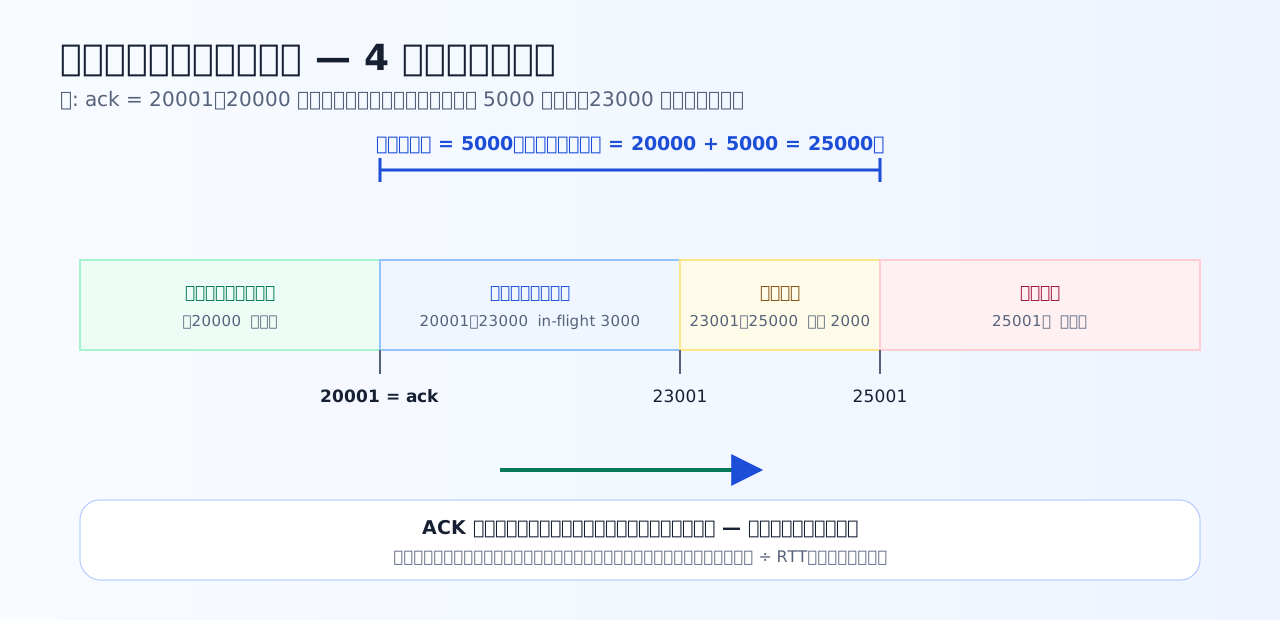
From the confirmed edge (ack = 20001), one window of 5000 bytes is the 'allowed to send' range. As ACKs advance, the whole window slides right — hence the name sliding window.
Painting the byte sequence in four colors
From the sender's viewpoint, the byte sequence can always be painted into four ranges. Take the example of ack = 20001, window 5000, and everything up to byte 23000 already sent.
Sometimes the advertised window is 0 (a zero window). The receiving application is not reading its buffer, so the sender stops transmitting and waits, occasionally checking in with a small query called a window probe. If a capture shows a run of zero windows, the suspect is not the network but a processing stall in the receiving application.
Practice 4-1 — Hand-calculating the window edges
Learn to draw the line of 'how far may I send' precisely, in byte numbers.
Q1. What does the window value (rwnd) that the receiver advertises on its ACKs represent?
rwnd is the free capacity of the receive buffer. The receiver is holding 'data that arrived but the application has not yet read,' and it declares the remaining capacity on every ACK. The sender transmits so that its unacknowledged (in-flight) byte count never exceeds this allowance. Bandwidth and path congestion do not appear in rwnd — those concerns belong to Chapter 5's congestion control.
Q2. The sender received an ACK with ack = 20001 (confirmed up to 20000) and an advertised window of 5000 bytes. It has already sent up to byte 23000. How many additional bytes may it send now?
The right edge of what may be sent is 'confirmed edge + window' = 20000 + 5000 = 25000. Having sent up to 23000, the in-flight range is 20001–23000, i.e. 3000 bytes. The remaining allowance is 25000 − 23000 = 2000 bytes. Each time an ACK advances (the left edge moves right), the right edge slides forward too — that motion is where the name sliding window comes from.
Q3. The receiver advertised a window of 0 (zero window). What is the sender's correct behavior?
A zero window is the declaration 'my receive buffer is full — I cannot accept a single byte until the application reads data out,' so the correct move is to wait. But waiting silently risks waiting forever if the 'window has opened' notice gets lost, so the sender checks in periodically with window probes. For troubleshooting, the crucial point is that the prime suspect for zero windows is not the network but the receiving application reading too slowly (Chapter 7).
The window size caps the speed — window ÷ RTT
Flow control has an important side effect. The sender keeps its outstanding data within the window, so at most one windowful can be sent per RTT. In other words, no matter how fat the bandwidth,
throughput ceiling = window ÷ RTT
cannot be exceeded. With a 100 KB window and an RTT of 100 milliseconds, 100,000 bytes ÷ 0.1 s = 1 MB/s is the ceiling. To use a line to the full, you need a window of at least bandwidth × RTT (the bandwidth-delay product, BDP). Much of "fast from the nearby server, slow only from the overseas one" is explained by this formula.
What the simulator does (text version): moving the three sliders — RTT, window, and bandwidth — updates the numbers for the amount sendable per RTT (= the window), the throughput ceiling given by window ÷ RTT, bandwidth × RTT (BDP), and the effective throughput (the smaller of the window-limited and bandwidth-limited values). A horizontal bar also shows how full the pipe of the path is with in-flight segments (fill ratio and an estimate of segments in flight), and a sentence states whether the current ceiling is set by the window or by the bandwidth.
Three experiments to try in the simulator
- Multiply only the RTT by 10 — window and bandwidth unchanged. Watch the ceiling fall to one-tenth and the pipe go nearly empty.
- Set the window equal to the BDP — the fill ratio hits exactly 100%. Find the boundary where the limiter flips from 'window' to 'bandwidth.' It should match the answer to the third question of Practice 4-2.
- Make the window larger than the BDP — the ceiling stops growing. Confirm that widening the window cannot push more through than the pipe itself.
Practice 4-2 — Window and RTT determine throughput
Verify the simulator's formula with your own hands. Let 1 MB = 1,000,000 bytes.
Q4. What is the throughput ceiling, in MB/s, of a connection with a 100 KB (100,000-byte) window and an RTT of 100 milliseconds? (1 MB = 1,000,000 bytes)
The sender can have at most one window's worth (100,000 bytes) outstanding until ACKs return, and ACKs return one RTT (0.1 s) later. So at most one windowful per RTT: 100,000 bytes ÷ 0.1 s = 1,000,000 bytes/s = 1 MB/s. Throughput ceiling = window ÷ RTT — the single most practically useful formula in this course.
Q5. On a fast 1 Gbps line, transfers can still be slow — but only to distant destinations (large RTT). Which is the correct reason?
The cycle is: send one windowful, wait one round trip for ACKs, repeat — so the ceiling is window ÷ RTT. A window that is plenty at RTT 5 ms gives one-thirtieth the ceiling at RTT 150 ms. However fat the pipe, no water flows through a small window. The fix is a larger window (modern OSes auto-tune it via window scaling) — the protocol does not switch to something else.
Q6. To keep a path with 10 MB/s of bandwidth and an RTT of 100 milliseconds completely full, what is the minimum window in MB? (Compute bandwidth × RTT. 1 MB = 1,000,000 bytes)
The in-flight amount needed to fill the path is bandwidth × RTT (the bandwidth-delay product, BDP): 10,000,000 bytes/s × 0.1 s = 1,000,000 bytes = 1 MB. With a window at or above the BDP, bandwidth becomes the ceiling; below it, window ÷ RTT is the ceiling. Verify in the simulator that the boundary between 'window-limited' and 'bandwidth-limited' sits exactly at this value.
Key takeaways from this chapter
- Flow control adapts to the receiver's circumstances. rwnd is the declared free space of the receive buffer
- The right edge of what may be sent = confirmed edge + window. Keep in-flight bytes within the window
- Throughput ceiling = window ÷ RTT. To use the line fully, window ≥ bandwidth × RTT (BDP)
- The prime suspect for zero windows is the receiving application's read stall. Look at the app before blaming the network
But adapting to the peer alone is still not enough. The next chapter is the second half of promise 3 — congestion control, which adapts to the network's circumstances along the way. Another window, cwnd, enters the stage.