
What an HCP Chart Is - How to Use MakingHCPChartSkill to Turn HCP-DSL into Deterministic SVG
What an HCP Chart Is - How to Use MakingHCPChartSkill to Turn HCP-DSL into Deterministic SVG
Contents
- What an HCP chart is
- What this repository solves
- The quickest way to understand the repository layout
- A 10-minute hands-on example (GCD sample)
- How to read the two sample outputs
- What the skill does internally (HCP chart)
- Summary
If you want an HCP chart to work as a diagram that can be read as a specification, hand-drawn diagrams alone eventually become hard to maintain.
MakingHCPChartSkill is a skill repository that interprets HCP-DSL text according to the specification and returns deterministic SVG output.
This article starts from the basic idea of HCP charts and goes all the way to actually running the tool.
1. What an HCP chart is
An HCP chart is a way to describe processing hierarchically.
In this repository, the following writing rules are treated as required:
- the left side expresses what is being achieved (the purpose)
- the deeper indentation on the right expresses how it is achieved (means and detail)
- the top level (level 0) contains the purpose label
By writing the text along those rules, it becomes easier to read the relationship between design intent and implementation detail.
2. What this repository solves
Managing diagrams by hand tends to create common problems:
- the diagram drifts away from the specification text
- branching and hierarchy rules become ambiguous
- reviewing diffs becomes harder than it should be
MakingHCPChartSkill solves this by accepting HCP-DSL as a JSON request and letting hcp_render_svg.py validate and render it.
Because the same input always produces the same output, the diagrams are easier to use in CI and review.
3. The quickest way to understand the repository layout
Target repository: https://github.com/gomurin0428/MakingHCPChartSkill
hcp-chart-svg-v2/SKILL.md
explains how to use the skill and its constraints, such as not specifyingrenderAllModulesandmoduleat the same timehcp-chart-svg-v2/scripts/hcp_render_svg.py
the main renderer that validates JSON input, interprets HCP-DSL, and returns SVG responseshcp-chart-svg-v2/references/
specification references, sample request / response files, and sample SVGshcp-chart-svg-v2/scripts/hcp_xml_to_svg.py
deprecated; usehcp_render_svg.pynow
4. A 10-minute hands-on example (GCD sample)
4.1. Clone the repository
git clone https://github.com/gomurin0428/MakingHCPChartSkill.git
cd .\MakingHCPChartSkill
4.2. Place the skill into local Codex
Copy-Item -Recurse -Force .\hcp-chart-svg-v2 "$HOME\.codex\skills\hcp-chart-svg-v2"
4.3. Generate an SVG response from the sample input
python .\hcp-chart-svg-v2\scripts\hcp_render_svg.py `
  --input .\hcp-chart-svg-v2\references\example-gcd-request.json `
  --output .\hcp-chart-svg-v2\references\example-gcd-response.json `
  --pretty
4.4. Extract the SVG from the response JSON
$r = Get-Content -Raw .\hcp-chart-svg-v2\references\example-gcd-response.json | ConvertFrom-Json
$r.svg | Set-Content -NoNewline -Encoding utf8 .\hcp-chart-svg-v2\references\example-gcd.svg
4.5. Notes on input constraints
- when
renderAllModules=true, you cannot also specifymodule - if
diagnosticscontains anerror,svgorsvgswill be empty
5. How to read the two sample outputs
5.1. Euclidean algorithm (GCD)
- Input example:
example-gcd-request.json - Output example:
example-gcd-response.json
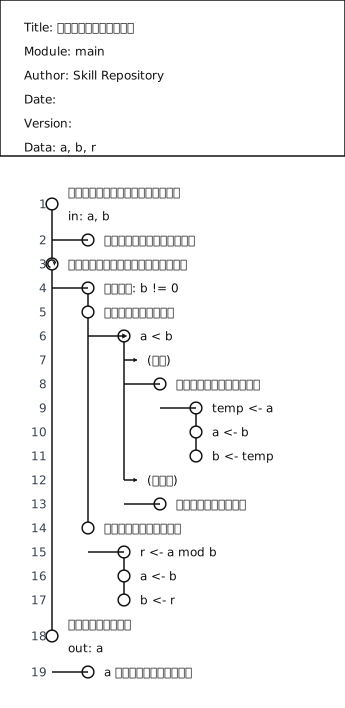
The structure separates “accept input,” “repeat,” and “return the result” into different hierarchy layers, so it is easy to follow both the purpose and the means of the processing.
5.2. Order approval flow
- Input example:
example-order-approval-request.json - Output example:
example-order-approval-response.json
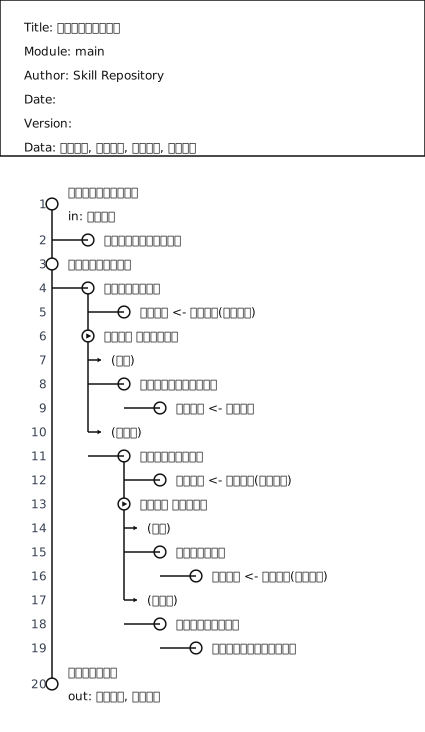
Even for business flows, fork and true/false let you describe the intent of branching explicitly.
6. What the skill does internally (HCP chart)
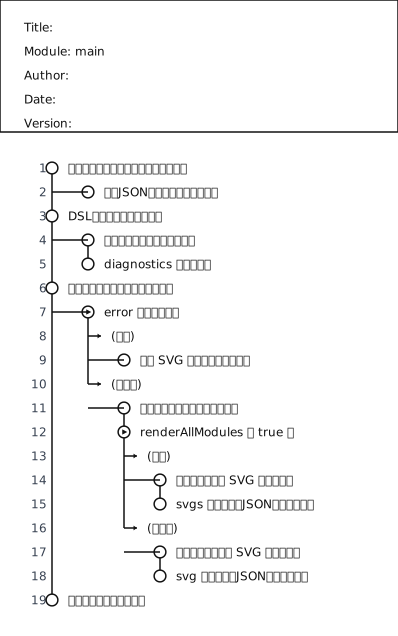
If you express the processing flow inside execute_request in HCP-DSL, it looks like this:
\module main
Receive the request and confirm the prerequisites
    Validate required fields in the input JSON
Parse the DSL and build structure
    Interpret modules and hierarchy
    Collect diagnostics
Choose the response path according to the diagnostic result
    \fork does an error exist
        \true yes
            Return an empty SVG payload
        \false no
            Decide which module or modules to render
            \fork is renderAllModules true
                \true yes
                    Generate SVG for all modules
                    Build a response JSON that contains svgs
                \false no
                    Generate SVG for a single module
                    Build a response JSON that contains svg
Return the result to the caller
Here is the diagram produced by actually rendering that DSL:
7. Summary
The strength of HCP charts is not only that they look easy to read as diagrams.
It is that they can be managed in a form that works as a specification.
With MakingHCPChartSkill, you can validate HCP-DSL and generate SVG output in one consistent flow.
If you want to try it next, a good first step is to take one of your everyday processing specifications, write it in HCP-DSL, and refine it while watching diagnostics.
References
Author GitHub
The author of this article, Go Komura, is on GitHub as gomurin0428 .
You can also find COM_BLAS and COM_BigDecimal there.